Think of an expert video editor who can watch an hour-long webinar and instantly pull out every single moment with viral potential. That’s essentially what an AI video clip generator does. It’s a tool built to automate the once-painful task of finding, editing, and formatting short, engaging clips from your long-form content.
What Is an AI Video Clip Generator and Why Does It Matter?
An AI video clip generator is like having a tireless content assistant on your team—one that never misses a key quote, a powerful statement, or a perfectly-timed question. Instead of manually scrubbing through hours of footage, you just upload a long video, like a podcast, webinar, or sales call, and let the AI find the best parts for you.
For marketers and creators, this technology solves one of the biggest challenges in content today: scaling video production efficiently. It breaks the bottleneck of manual editing, which has always been slow, expensive, and a real headache to scale up.
The Shift From Manual to Automated Clipping
The old way of making social media clips was a grind. A human editor had to watch the entire video, pinpoint potential highlights, cut them just right, add captions, and reformat everything for different platforms. This process could easily burn hours for just one piece of long-form content.
An AI video clip generator shrinks this entire workflow down to minutes. By automating the most tedious parts of the job, it lets your team multiply its content output without needing a bigger budget or more hours in the day.
Think of it this way: in the time it takes a human editor to produce one or two clips, an AI can generate a dozen, each one ready to go. This makes a high-volume content strategy—something that used to be out of reach for most businesses—not just possible, but easy.
To really grasp what these tools do, it helps to break down their core functions. A modern AI clip generator isn't just one simple feature; it's a combination of several smart technologies working together.
Key Capabilities of Modern AI Video Clip Generators
| Core Feature | What It Does for You | Primary Benefit |
|---|---|---|
| Intelligent Clip Selection | Analyzes transcripts and audio to find the most interesting and relevant segments. | Saves hours of manual review by automatically identifying highlight-worthy moments. |
| Speaker Detection | Identifies who is speaking and when, which is crucial for interviews and panel discussions. | Ensures clips are focused on the right person and makes editing dialogue seamless. |
| AI-Powered Captions | Automatically transcribes the audio and generates synchronized, editable captions. | Boosts accessibility and engagement, as a reported 85% of social video is watched without sound. |
| Filler Word Removal | Detects and removes "ums," "ahs," and other verbal stumbles to create a cleaner sound. | Makes your speakers sound more polished and professional without any manual audio editing. |
| AI Translation & Dubbing | Translates captions and even generates dubbed audio tracks in multiple languages. | Massively expands your content's reach to a global audience with minimal effort. |
Each of these capabilities tackles a specific, time-consuming part of the video editing process, turning a complex workflow into a simple, automated one.
The Growing Demand for AI Video Tools
The market’s explosive growth tells the whole story. Valued at around USD 554.9 million in 2023, the global AI video generator market is projected to hit USD 2,562.9 million by 2032. This surge is driven by businesses looking to slash production costs—by up to 90% in some cases—by using AI for tasks like editing and scripting.
But this isn't just about saving time and money. It's about unlocking the treasure trove of value sitting in your existing content library. Every long video you've ever recorded is a goldmine of potential short-form content, and similar AI advancements are making content creation easier across the board. To get a broader sense of how this works, you can find great insights in articles about using an AI social media content generator. An AI-powered tool gives you the power to finally tap into that potential at scale.
How AI Finds the Best Moments in Your Videos
Think of an AI video clip generator like a seasoned TV producer. It has an almost uncanny knack for spotting the exact moments in a long conversation that will grab an audience and refuse to let go. This isn't random guesswork; it’s a sophisticated process that analyzes your content on multiple levels to pull out the most compelling highlights. The end result? Raw footage is transformed into polished, shareable clips in minutes, not hours.
It all starts the second you upload your video. The AI immediately begins deconstructing the file into its essential parts—the audio track, the visual elements, and the rhythm of human speech. This initial breakdown sets the stage for everything that follows.
Here’s a quick look at how the AI takes a long video and turns it into a series of social-ready clips.
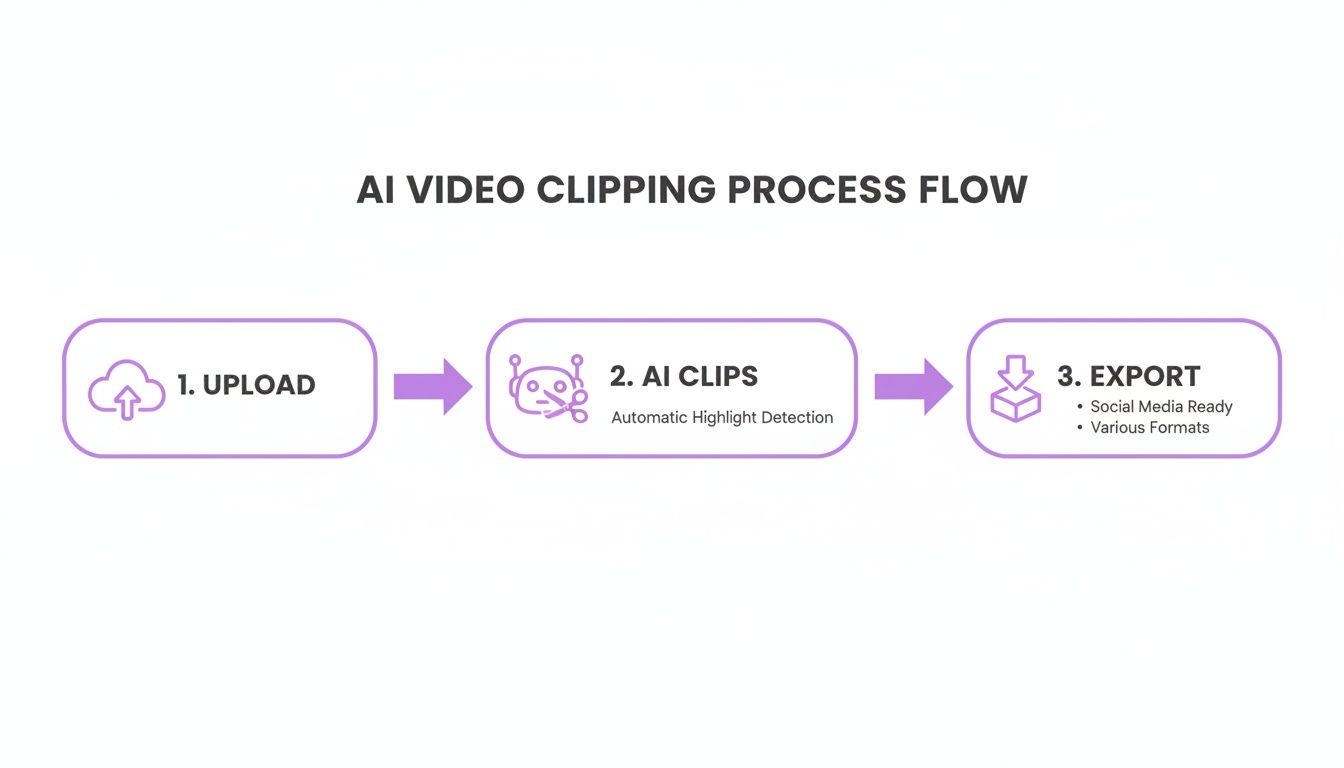
This simple, three-step workflow—upload, let the AI work its magic, and export—is precisely what allows teams to scale their video output so effectively.
Smart Transcription and Speaker Identification
First things first, the AI needs to understand what’s being said. It does this through smart transcription, converting every spoken word into a timestamped script. The best systems can achieve over 95% accuracy, which is critical for grasping the nuances and context of the conversation.
At the same time, the AI figures out who is speaking and when. For a multi-person podcast or a panel discussion, this speaker detection is a game-changer. It makes sure that when a clip is selected later on, the dialogue is attributed to the right person, so you don't end up with confusing, disjointed snippets.
This step is about more than just turning audio into text. It’s about creating a detailed, searchable map of your entire conversation—the very foundation for all the intelligent analysis to come.
AI Highlight Detection: The Core Engine
With a perfect transcript in hand, the AI’s main engine fires up to find the gold. This is where AI highlight detection happens. Using powerful algorithms trained on vast libraries of engaging video content, the AI has learned to recognize the tell-tale signs of a great moment.
It’s actively listening for specific conversational patterns, including:
- Questions and Answers: It pinpoints when a thoughtful question is asked and followed by a clear, powerful answer—a perfect format for a shareable insight.
- Numbered Lists: When a speaker says, "There are three main reasons…" the AI flags it as structured, high-value information ideal for a short clip.
- Strong Statements: It picks up on changes in tone, volume, and pacing that usually signal a key takeaway or a bold pronouncement.
- Keyword Clusters: The AI identifies segments where important industry terms are discussed in-depth, flagging them as highly relevant to your target audience.
This is a world away from just randomly chopping a video into pieces. While both involve sectioning off video, highlight detection is about intelligently finding the value. To dig deeper into these differences, our guide on clipping vs cutting vs splitting explains AI video editing techniques offers a more detailed breakdown.
Final Touches: Automated Polishing
Once the best moments have been identified, the AI doesn't just stop. It moves into the finishing phase to make sure every clip is ready to publish. One of the most valuable steps here is filler word removal.
The average person uses about five filler words—like "um," "ah," and "you know"—every single minute. An AI can automatically sniff these out and remove them, making the speaker sound incredibly confident and articulate without a single manual audio edit.
Finally, the system adds the visual elements that make a clip shine online. It generates automated captions directly from the verified transcript and overlays them onto the video. Many tools also let you apply branded templates, automatically adding your logo, brand colors, and custom fonts. This last step ensures every clip is polished, professional, and perfectly on-brand before you even think about hitting export.
Driving Real Business Growth with AI Video Clips
Let's move past the tech specs for a moment. The real magic of an AI video clip generator isn't just what it does, but the tangible business results it delivers. By taking the heavy lifting out of creating short-form content, these tools directly impact everything from your marketing reach and sales conversions to how your teams communicate internally. We're talking about a clear, measurable return on investment.

Switching from manual editing to automated clipping isn't just a minor efficiency boost. It's a genuine strategic advantage. It gives your teams the power to scale their video efforts in ways that, until recently, would have required a huge budget or a dedicated production crew.
Supercharge Marketing with Content Repurposing
For any marketing team, the relentless need to feed the social media beast is a constant challenge. An AI video clip generator completely flips this script, turning a single piece of long-form content into a pipeline of ready-to-post assets.
A Practical Example: The One-Hour Webinar
Think about that great one-hour webinar your team just hosted. Traditionally, you might email the recording to attendees, and then it sits on a server, collecting digital dust. With an AI tool, that single hour of video becomes a content goldmine.
- Upload the Recording: Just drop the full webinar file into the AI video clip generator.
- Let the AI Work: The system transcribes the entire conversation, pinpoints who is speaking, and automatically flags 15-20 highlight-worthy moments—think powerful quotes, insightful Q&A exchanges, and key data points.
- Get Your Clips: In just a few minutes, you have a library of compelling, shareable clips. They’re already prepped with captions and your company's branding.
- Fill Your Calendar: Those 20 clips are now ready to be scheduled across LinkedIn, X, and Instagram Reels. That’s potentially a full month of high-quality video content, all from one original source.
This workflow dramatically multiplies your content output, building brand visibility and driving leads without any extra recording or tedious manual editing.
Accelerate Sales Cycles with Personalized Outreach
In sales, personalization is what cuts through the noise. Generic emails are easy to ignore, but a targeted video clip makes a prospect stop and pay attention, seriously improving response rates.
A Practical Example: The Sales Demo Follow-Up
Sales pros can use an AI tool to pull hyper-relevant snippets from product demo recordings. This is a game-changer for follow-ups, allowing them to tailor communication based on what a specific person actually cared about.
By sending a short, personalized clip that directly addresses a prospect's pain point mentioned during a demo, a sales rep can boost reply rates by over 50%. This simple, scalable tactic keeps the conversation going and moves deals forward faster.
Instead of a generic "checking in" email, imagine sending a message that says, "Here's that 30-second clip from our demo where we discussed how to solve [specific problem]." It proves you were listening and reinforces your value in a powerful, targeted way.
Enhance Corporate Communications and Training
The benefits don't stop with marketing and sales. For HR and internal comms teams, AI offers a fantastic way to make important company information more engaging and easier to digest.
A Practical Example: Internal Town Hall Recap
Let’s be honest—not everyone has time to watch a full-hour town hall meeting or a multi-hour training session. AI makes it simple to distill these long recordings into their most essential takeaways.
- Executive Updates: A 60-minute all-hands meeting can become a 5-minute highlight reel with the CEO’s key announcements.
- Training Modules: A two-hour deep-dive training can be broken into a series of bite-sized micro-learning videos, each focused on a specific skill.
- Onboarding: You can create a searchable library of short clips from past Q&A sessions, giving new hires a way to quickly find answers to their questions.
This approach makes sure crucial information doesn't get lost and allows employees to learn on their own schedule, which boosts knowledge retention and keeps everyone aligned.
The numbers back this up. AI video generators are already cutting production costs by 70-80% for some businesses and boosting conversion rates by 25%. With 91% of marketers globally saying AI videos improve engagement, it's no wonder that 70% of B2B firms are upping their investment. You can see more on these trends in this detailed market analysis on marketresearchfuture.com.
How to Choose the Right AI Video Clip Generator
With so many AI tools flooding the market, picking the right one can feel like a shot in the dark. But making a choice isn’t just about ticking off feature boxes. It’s about finding a true partner for your content strategy—one that fits your workflow, your goals, and your team. The perfect tool for a solo creator churning out TikToks will look very different from what a large marketing team needs.
So, where do you start? The first step is to get clear on what you actually need. Are you after raw speed to pump out dozens of social clips a day, or do you need deep customization and the ability to plug the tool directly into your existing tech stack? Answering that question is half the battle.
Core Evaluation Criteria
When you start comparing platforms, don't get lost in the marketing hype. Zero in on the three things that actually matter: accuracy, customization, and integration. These are the pillars that determine whether a tool will be a helpful assistant or just another frustrating subscription.
- Accuracy of AI Suggestions: How smart is the AI, really? A mediocre tool will just chop your video into random 60-second chunks. A great one understands context, emotion, and pacing to pinpoint moments that have genuine viral potential. Put this to the test: upload the same long-form video to a few different tools and see which one serves up the most compelling clips.
- Customization and Branding: Your content has to feel like yours. See how much control you have over the look and feel. Can you easily change caption styles, fonts, and colors? A huge time-saver is the ability to create and save brand kits. This ensures every single clip looks polished and consistent without you having to fiddle with settings every time.
- Integration and Workflow: How well does this tool play with others? Look for direct connections to platforms you already use, like YouTube for importing videos or social media schedulers for publishing. For more technical teams, a solid, well-documented API is a must-have. It’s the key to building truly automated content pipelines.
A Practical Example of Choosing a Tool
Let's say you're a marketing manager at a B2B software company. Your main job is to take those hour-long product webinars and turn them into a steady stream of short, insightful clips for LinkedIn to drive leads.
You try out two different kinds of tools. The first is a basic generator. It cuts clips and adds captions, but the AI's suggestions feel a bit random. You find yourself spending way too much time manually tweaking the captions to match your company's strict brand guide.
Then you test an advanced platform. Its AI is much sharper—it pulls out genuinely insightful moments from the webinar. Better yet, it automatically applies your pre-loaded brand template, adding your logo and animated captions with one click. The real game-changer? It has an API. Your developer can now build a script that automatically pulls new webinar recordings from cloud storage, generates clips, and pushes them to your social media scheduler as ready-to-review drafts.
In this scenario, the advanced tool isn't just a nice-to-have; it delivers a massive return on your investment by automating tedious work and freeing up your team.
Comparing Basic vs. Advanced Generators
It's important to remember that not all AI clip generators are built the same. Basic tools are fine for quick, simple tasks. But if you're serious about your content strategy, an advanced solution gives you the power and flexibility to really scale. Our edge is in providing smarter highlight detection and much deeper workflow integrations.
Feature Comparison Across Leading AI Video Tools
This table gives you a quick look at the key differences you'll find and why they should matter to your team.
| Feature | Basic Generator | Advanced Generator (Our Edge) | Why It Matters to You |
|---|---|---|---|
| Highlight Detection | Identifies clips based on simple keywords or pauses in speech. | Uses contextual analysis to find nuanced, high-impact moments. | Gets you to better content faster, with less manual searching. |
| Caption Customization | Offers a few standard font and color options. | Provides a full animation engine with presets and brand kits. | Ensures every clip is perfectly on-brand without extra editing work. |
| Workflow Automation | Requires manual upload, editing, and export for each video. | Offers a robust API for building custom, automated workflows. | Enables content creation at scale, freeing up your team for strategic tasks. |
Ultimately, the goal is to find a tool that doesn’t just do the work, but does it intelligently.
The quality of the AI's core suggestions makes all the difference. One study found that high-quality, relevant short-form video can boost user engagement by up to 85%. An AI that consistently finds these golden nuggets gives you a serious competitive edge.
Making the right choice also means doing a bit of homework on the market. As you look at different options, check out reviews of the best AI video generators to get a feel for how various platforms compare. And once you have your clips, knowing how to fine-tune them is key. For more on that, take a look at our guide to using a video editor for social media to make sure your content is perfectly optimized for every channel.
Weaving AI into Your Content Workflow
Bringing an AI video clip generator on board isn't just about adding another icon to your software list. It's a chance to fundamentally shift how you think about creating and sharing content. The good news is, you don't need to tear down your current process. A simple, step-by-step approach can show immediate value and get your whole team excited for what's next.
A Practical Example: The Pilot Project
Start small. I always recommend a pilot project. Pick one valuable piece of long-form content—a recent webinar or a deep-dive podcast interview works perfectly—and use it as your test case. The goal is simple: generate a full week's worth of social media clips from that one asset. This little experiment lets you prove the concept, measure the immediate return, and build some internal buzz without derailing anyone's day-to-day work.

Running this first test usually reveals a critical truth about AI: the quality of what you get out is directly tied to the quality of what you put in.
Getting Your Source Videos Ready for AI
To get clips that are actually compelling, you need to feed the AI good material. It’s a lot like giving a clear brief to a human editor—the better your source, the better the final cut.
- Prioritize High-Quality Audio: The AI is "listening" to the transcript to find gold. Make sure your recordings have clean, crisp audio with as little background noise as possible. Using dedicated mics instead of the one built into a laptop makes a world of difference.
- Encourage Structured Dialogue: Content with obvious questions, clear answers, and numbered lists is a gift to an AI. When you're running a webinar or interview, try prompting speakers with phrases like, "So, what are the three biggest mistakes people make?" This creates perfectly structured moments the AI can easily flag as valuable clips.
- Use Multi-Track Recordings: If you can, record each speaker on a separate audio track. This is a pro move that lets the AI perfectly isolate who is speaking, which makes for much cleaner edits when you’re removing filler words or creating focused soundbites.
A recent study found that over 60% of consumers are more likely to ditch a video because of bad audio than because of poor video quality. Clean audio isn't just a best practice; it's what keeps people watching.
Scaling Up with API Automation
Once you've got the hang of it and proven the tool's worth, the next frontier is true automation. For any team with technical folks, this is where an Application Programming Interface (API) changes everything. An API lets your different software platforms communicate, creating a content pipeline that runs itself.
This is the leap from just using an AI tool to truly embedding it into your entire content machine. The possibilities here are massive and can be shaped to fit exactly what your team needs.
A Practical Example of an Automated Workflow
Imagine this process running entirely on its own:
- Your team uploads a new podcast episode to your company's cloud drive.
- That simple action triggers an API call, which automatically sends the video file straight to the AI video clip generator.
- The AI gets to work, generating ten shareable clips with branded captions and even assigning a virality score to each one.
- Another API call sends these finished clips directly into the drafts folder of your social media scheduling tool.
- Your social media manager gets a notification: "New clips are reviewed and ready to go."
This kind of integration turns a manual, time-consuming process into an efficient, hands-off system. To dive deeper into how this works, you can learn more about the benefits of using an API for video repurposing. This is how a lot of teams achieve a 10x increase in content output without having to grow their headcount.
The Future of Automated Content Creation
The world of AI-powered video is moving at a dizzying speed, and it’s already pushing far beyond just finding the best moments in your recordings. The tools we have now are impressive, but they’re just a glimpse of what’s coming.
We're on the cusp of the next big leap, one that will all but erase the line between a professional production studio and an automated tool. This isn't just about making video creation easier; it's about making it possible for anyone to produce truly high-quality content.
What’s next? Think beyond editing. We're seeing the astonishing rise of text-to-video, where a simple typed-out idea can conjure up entire video clips out of thin air. Imagine creating custom B-roll, slick animated explainers, or compelling visual stories without ever touching a camera.
Breaking Down Borders and Understanding Emotion
Another huge breakthrough is happening in how we handle language. AI-driven translation and dubbing are getting so good they’re almost undetectable. Soon, you’ll be able to upload a single video and instantly get back versions with natural-sounding voices and perfectly timed captions in dozens of languages. This is a game-changer for businesses wanting to connect with a truly global audience.
But it goes deeper than just words. The next wave of AI will understand emotion.
Sentiment analysis is evolving to a point where tools can detect not just what was said, but the feeling behind it. The AI will be able to pinpoint moments of excitement, humor, or genuine passion, helping you craft clips that pack the biggest emotional punch.
This isn’t some far-off theory; it's driving massive growth right now. In 2024, the Asia-Pacific region alone grabbed over 37% of the AI video generator market. The entire global market is on a rocket ship, projected to climb from USD 0.43 billion to a staggering USD 2.34 billion by 2030, all fueled by the relentless demand for localized, engaging video. You can dig into these market trends on fortunebusinessinsights.com.
Your Next Move in a Video-First World
The message is loud and clear: AI video clip generators aren't just a shiny new toy. They are quickly becoming a core part of any serious content strategy.
Getting on board now is how you stay quick on your feet and ahead of the curve. The future isn’t about AI replacing human creativity—it’s about giving it a massive boost. It’s about producing more, reaching further, and connecting with your audience on a level you never thought possible.
Common Questions About AI Clip Generators
Diving into AI video tools can feel like a new frontier, so it's natural to have a few questions. Let's tackle some of the most common ones that come up when people first start using an AI video clip generator.
How Good Is the AI at Actually Finding the Best Clips?
This really comes down to the brains behind the software. Simpler tools might just flag moments with loud audio or a specific keyword, which is a pretty blunt instrument. The truly smart systems, however, are trained to understand the flow and substance of a conversation. They analyze dialogue for context, tone, and structure.
A Practical Example: when you upload a podcast, a sophisticated AI doesn't just grab random sentences. It's trained on massive amounts of data to recognize what a key takeaway sounds like. It can identify the moment a guest drops a game-changing insight or a host summarizes a critical point, giving you suggestions that are genuinely valuable.
Will AI Make Human Video Editors Obsolete?
Not at all. Think of an AI video clip generator as an incredibly efficient assistant editor, not a replacement for a creative professional. Its real power is in chewing through the most tedious parts of the job.
The AI handles the grunt work—combing through hours of footage, transcribing everything, and making those first-pass selections. This frees up human editors to do what they do best: focus on storytelling, fine-tuning the pacing, and adding that creative polish that only a person can. The AI handles the science so the editor can focus on the art.
What Kind of Videos Are the Best Fit for This?
AI clip generators work their magic on content driven by dialogue. Since the AI is essentially "listening" for the best moments, videos with clear, structured speech will give you the best results by a long shot.
You'll see the best performance with source videos like:
- Podcasts and Interviews: The conversational, question-and-answer format is a perfect match for the AI.
- Webinars and Presentations: These are goldmines for well-defined, informative clips because of their structured nature.
- Customer Testimonials and Panel Discussions: These are full of authentic, impactful soundbites that are ready-made for sharing.
Ultimately, any content with high-quality audio and a clear narrative is going to produce fantastic, shareable clips.
Ready to stop wasting time on manual editing and start scaling your video content? Our platform transforms your long-form videos into dozens of social-ready clips in minutes. Start your free trial today and see how easy it can be.