If you want to create social media content that actually gets results, you can't just throw things at the wall and see what sticks. The best content comes from a solid plan, not guesswork. It all begins with knowing your ideal audience, nailing down your unique brand voice, and setting goals you can actually measure. This prep work is what makes every post count.
Laying the Groundwork for Engaging Content

Before you even think about hitting 'publish,' the smartest brands are already drawing up a detailed blueprint. This initial phase is what separates random content from a focused strategy built to connect with the right people.
Figure Out Who You're Talking To (And What You Want)
The first question you have to answer is simple: Who are you trying to reach? Truly understanding your audience is the absolute foundation of everything. Don't stop at basic demographics. You need to get into their heads—what are their problems, what motivates them, what do they scroll past?
For example, a fitness coach isn't just targeting "busy professionals." They're targeting people whose biggest pain point is finding 30 minutes in a packed schedule for a workout. A practical way to uncover this is to survey your existing clients, asking, "What was the single biggest challenge you faced before we started working together?" This direct feedback is content gold.
Once you know your audience, you need to set some clear, measurable goals. This gives your content a purpose and lets you know if what you're doing is actually working.
- Build a Community: Don't just chase likes. Aim to increase comments per post by 15% this quarter to build a real following.
- Drive Traffic: Keep an eye on click-through rates from your posts to your website or blog. A practical goal is to achieve a 2% CTR on all posts with links.
- Get Leads: Track how many people click the link in your bio to download a freebie or sign up for your newsletter. For instance, aim for 50 new email sign-ups from Instagram each month.
Find Your Authentic Brand Voice
Your brand voice is your personality. It’s how you come across in every caption, video, and reply. Are you funny and casual? Or are you more professional and educational? A consistent voice builds trust and makes your content feel familiar and recognizable in a crowded feed.
A strong brand voice makes your business feel human. It’s the key to turning followers into a real community and starting conversations instead of just broadcasting messages.
It’s also critical to match your content format to the platform. We often hear "video is king," but that's not always true. For instance, recent analysis from Socialinsider found that on Instagram, static image posts pulled in the highest average engagement rate. This shows that a one-size-fits-all video strategy is outdated. The brands that win are the ones that adapt their content to what works best on each platform.
For a deeper dive into creating compelling content, check out this excellent guide on how to improve social media engagement for your brand. Getting this foundation right ensures every single thing you create serves a purpose and connects with your audience.
Fueling Your Content Calendar with Great Ideas
Staring at a blank content calendar can be intimidating. But what if I told you the best ideas aren't found by brainstorming in a vacuum? The real secret is to stop guessing what your audience wants and start listening to what they're already talking about.
Think of yourself as a detective. Spend some time lurking in online forums like Reddit, scrolling through the comments on your competitors' posts, and using social listening tools. What questions keep popping up? What are the common frustrations or pain points you see? Every single one of those is a golden opportunity to create content that genuinely helps someone.
Another trick I've learned is to look at what's already a hit. Check out the top-performing content from others in your niche, and even from those in adjacent industries. The goal isn't to copy them, but to deconstruct why it works. Is it the quick how-to format? The behind-the-scenes glimpse? The myth-busting angle? Find the pattern, and you've found a proven concept to adapt for your own brand.
Crafting Your Narrative Hook
Okay, you've got an idea. Now, how do you make someone stop scrolling and actually watch it? With over 5 billion active social media users out there, you're competing for attention, and you've got about three seconds to win it.
This is where a killer hook comes in. It’s your opening line that grabs someone by the collar by asking a sharp question, making a bold claim, or teasing an unexpected result.
- Ask a Question: "Are you making this common mistake with your retirement savings?"
- Make a Bold Statement: "Most financial advice online is dangerously outdated."
- Tease a Surprising Outcome: "How one small daily habit could fund your entire retirement."
That last one is great, isn't it? It takes a potentially boring topic like 'compound interest' and reframes it as a life-changing story. It’s instantly more compelling.
Your hook is a promise. You're setting an expectation, and the rest of your video's job is to deliver on that promise, keeping them hooked right to the very end.
Building a Compelling Story
Once you’ve got their attention, you need to hold it. The best way to do that is with a simple story structure: a beginning (the problem), a middle (the insight or solution), and an end (the call-to-action). This simple framework turns a random tip into a memorable and impactful piece of content.
Let's say you're a marketing agency. You could frame a video like this:
- The Problem: Kick off with a pain point everyone feels. "Is your ad spend getting higher while your results get worse?"
- The Insight: Drop a valuable, actionable tip that starts to solve that problem. "Here's a 30-second trick inside Ads Manager to exclude low-intent audiences, which can cut your cost-per-click by up to 40%."
- The Call-to-Action: Guide them to the next step. "Comment 'ADS' below if you want our free checklist for optimizing your campaigns."
See how that works? You take the viewer on a quick journey from frustration to empowerment, and then give them a clear way to engage. Figuring out how to plan this all out is a huge part of the process, and this guide on creating a LinkedIn content calendar really breaks down that planning stage well.
Making Short-Form Video That Actually Stops the Scroll
Let's be honest, everyone's making short-form video on TikTok, Reels, and Shorts. Just hitting "record" isn't going to cut it anymore. If you want to stand out, you need content that looks polished and performs brilliantly—and you don't need a Hollywood budget to get there. It all starts with the basics: good lighting and clear audio.
You don't need a fancy studio. Seriously. Just filming on your phone next to a window for that soft, natural light can instantly make your video look ten times better. And for audio? A simple, inexpensive lavalier microphone will give you that crisp, clear sound that makes you sound like a pro, way better than your phone's built-in mic ever could.
This whole process can feel overwhelming, but it boils down to a pretty simple flow: you start with an idea, craft it into a story, and then drive people to take action.
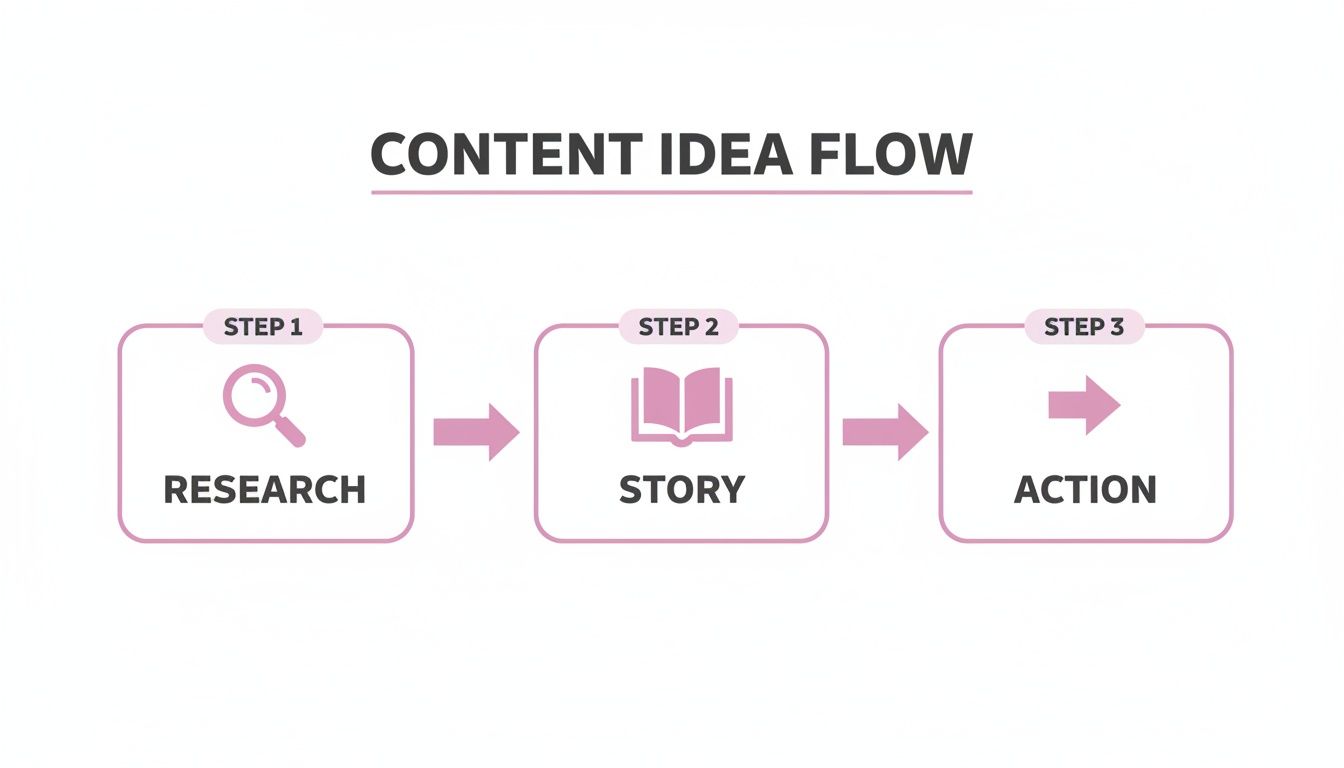
Thinking about your content in these three stages—research, story, and action—is the key to turning a raw idea into a video that gets results.
Editing Is Where the Magic Happens
Once you’ve filmed your clips, the editing suite is where you bring your video to life. Pacing is everything here. You have to keep things moving to hold someone's attention. Think quick cuts, strategic zooms on your face to emphasize a point, and relevant B-roll to break up the monotony. A straight-up talking head for 60 seconds is a guaranteed way to get someone to swipe away.
Text overlays are your secret weapon. I use them constantly to:
- Drive home the main point: Popping a key takeaway on screen right as you say it makes it stick.
- Add a little extra flavor: A bit of extra context or a funny side comment can add so much personality.
- Make it accessible: Research shows that as many as 85% of Facebook videos are watched with the sound off. Captions are non-negotiable.
Pro Tip: Don't sleep on trending audio. Tapping into a popular sound or song is one of the fastest ways to get your video in front of new eyeballs. The algorithms love it, and it gives your content an instant boost in discoverability.
Are Shorter Videos Always Better? Not Anymore.
We've all been told to "keep it short," but the data is starting to tell a different story. One deep-dive analysis found that video engagement on some platforms can actually hit its sweet spot in the 90–120 second range.
And when you consider that 78% of consumers say they prefer short videos for discovering new products, it’s clear we should be focused on delivering real value, not just cutting down the clock. Don't be afraid to test videos in that 60–150 second sweet spot—just make absolutely sure your hook in the first 2–5 seconds is irresistible.
For a deeper look into building a killer production workflow, we've put together a comprehensive guide on effective short-form content creation. Using tools that automatically handle things like animated captions and cutting out "ums" and "ahs" can be a massive time-saver, freeing you up to focus on the creative side of things.
Platform-Specific Video Optimization Checklist
Remember, what crushes it on TikTok might not land the same way on YouTube Shorts. Each platform has its own quirks and what the algorithm favors. Here’s a quick checklist to help you tailor your content for maximum reach on each one.
| Feature | TikTok | Instagram Reels | YouTube Shorts |
|---|---|---|---|
| Ideal Length | 15-60 seconds for trends, up to 3 mins for storytelling | 15-90 seconds, with a sweet spot around 30-60 seconds | Under 60 seconds is a must |
| Audio Strategy | Trending sounds are critical for discoverability | Trending audio is very important, but original audio also performs well | Trending audio helps, but value-driven content is key |
| Visual Style | Raw, authentic, less polished is often preferred | Aesthetically pleasing, polished, high-quality visuals do best | High-energy, fast-paced, educational, or entertaining |
| Text/Captions | On-screen text with native fonts is standard | Creative use of native text styles and stickers is common | Clean, bold captions for clarity and accessibility |
| Call to Action (CTA) | Drive to profile link, comments, or a follow | "Link in bio," DMs, Story shares, or product tags | "Subscribe," check description for links, or watch another video |
This isn't about creating three separate videos. It's about making small, strategic tweaks to one great piece of content so it feels native and performs at its best, no matter where you post it.
Writing Captions That Get People Talking
A killer visual might stop the scroll, but that's only half the battle. Your caption is where the magic really happens—it’s your chance to add context, show some personality, and nudge your audience to take action. A great caption can turn a passive viewer into an active participant, making your post a conversation starter, not just another piece of content flying by.
Think of it this way: your caption is the bridge connecting your content to your community. The data doesn't lie; HubSpot found that Instagram captions up to 1,000 characters long receive more engagement. While the video or image is what grabs their attention, your words are what make them stick around, think, and hit that reply button. The real goal is to write captions that do more than just describe what's happening—they should build a genuine connection.
It's More Than Just Words on a Screen
Let's be clear: not all captions are created equal. The best ones are shaped by the content itself, the platform you're on, and what your audience is looking for in that moment. You've got a few different angles you can take, depending on what you want the post to achieve.
- Short & Witty: These are your go-to for memes or super relatable content. A clever one-liner can be incredibly powerful for getting quick likes and shares.
- Micro-Blogs: When you're sharing something educational or getting a bit more personal, a longer, more detailed caption is perfect. This style encourages people to save your post for later and leave more thoughtful comments.
- Questions & Prompts: This is the most straightforward way to kickstart a conversation. Ending your caption with a simple, direct question is a surefire way to get people talking.
For example, a real estate agent could post a picture of a gorgeous, modern kitchen. A boring caption would be "Just listed!" A much better approach? Ask something like, "What's the one feature your dream kitchen absolutely must have?" That simple switch can open the floodgates to hundreds of comments and gives you incredible insight into what your audience actually wants.
If you're pulling clips from longer videos, you can find amazing caption ideas by getting a transcript of a YouTube video and lifting the most compelling questions or one-liners directly from your own content.
A Hashtag Strategy That Actually Works
Hashtags aren't just something you tack on at the end. They are a critical tool for getting your content discovered by people who are actively looking for what you're talking about. But a huge mistake I see all the time is just slapping on the most popular tags. That’s a great way to get your content completely buried.
A much smarter way to play the game is to blend broad, niche, and branded hashtags.
The right hashtag mix ensures you're not just shouting into the void. You're strategically placing your content in front of a wide audience, a targeted local community, and your loyal brand followers all at once.
Let's say you run a local coffee shop. A solid hashtag strategy would look something like this:
| Tag Type | Example Hashtags | Purpose |
|---|---|---|
| Broad | #coffeelover, #baristalife |
Reaches a large, global audience of coffee enthusiasts. |
| Niche | #[YourCity]Cafes, #[YourNeighborhood]Coffee |
Attracts local customers who are physically able to visit. |
| Branded | #[YourShopName]Specials |
Organizes your content and encourages user-generated posts. |
Using this layered approach, you attract general interest from coffee lovers everywhere, target people in your area who can actually become customers, and build a unique content library for your own brand. This turns your captions and hashtags into a powerful engine for both engagement and real business results.
Working Smarter with Content Repurposing

The secret to a packed content calendar isn’t always about creating more. It's about making your best content work a whole lot harder for you. Creator burnout is a very real thing, but repurposing helps you stay consistent across all your platforms without having to start from a blank page every single time.
This isn’t just about saving time; it's a strategic move. By transforming a single, high-effort piece of content into a dozen smaller social media posts, you give your best ideas the biggest possible audience. It’s hands-down the most efficient way to maximize your reach and squeeze every drop of value from your hard work.
Your Content Goldmine: A Practical Example
Let's say you just wrapped up a fantastic one-hour webinar with a customer who walked through their success story. That single long-form video? It's a goldmine. Instead of letting it just sit on your YouTube channel, you can chop it up into an entire week's worth of content.
Don’t think of it as one webinar. Think of it as a key quote for a text post, three impactful video clips for Reels, a shareable graphic with a key statistic, and a carousel post walking through the customer's top three tips.
Once you make this mindset shift, everything changes. You stop creating one-off posts and start building a content ecosystem, all stemming from one high-value source.
Deconstructing Your Core Asset
So, how do you actually turn that webinar into engaging social media content? Here's a simple system I've used time and again.
- Pull Short Video Clips: Scrub through the recording and find the most compelling 15-60 second segments. You're hunting for those "aha!" moments—a surprising insight, a powerful result, or a super actionable tip. These are your future Reels, Shorts, and TikToks.
- Extract Key Quotes: Listen for those punchy one-liners or concise bits of advice. You can use these for simple, effective text-based posts or get a designer to turn them into eye-catching quote graphics for Instagram and Facebook.
- Create Shareable Graphics: Did your customer mention a mind-blowing stat, like, "We saw a 50% increase in leads"? That number needs its own spotlight. Turn that data point into a bold, simple graphic that’s easy to read, understand, and share.
- Write a Carousel Post: Group a few related tips from the webinar into a helpful step-by-step carousel for LinkedIn or Instagram. Think along the lines of, "3 Steps Our Customer Took to Double Their ROI."
Now, you could do all of this manually, but that’s a massive time sink. This is where AI-powered tools come in. This technology can find the most compelling moments for you, automatically adds animated captions, and cleans up filler words. It can turn a full day of editing into just a few minutes of review.
For a deeper dive, check out our guide on powerful content repurposing strategies.
This whole approach doesn't just fill your calendar—it ensures every single post is packed with proven value from your best material, making your social media presence more impactful and, most importantly, sustainable.
Using Analytics to Refine Your Strategy
Putting great content out there is only half the battle. If you're not digging into the data, you're essentially guessing what your audience wants and hoping for the best. To really level up your strategy, you have to get comfortable with analytics and understand what the numbers are telling you.
It's easy to get a quick ego boost from a high like count, but that's a classic vanity metric. It feels good, but it doesn't really tell you if your content actually connected with people or inspired them to do something. The real insights are hidden a layer deeper, in the data that shows genuine interest and loyalty.
Focus on What Truly Matters
To get a clear picture of what's working, you need to shift your focus to the metrics that reveal how people are behaving. These are the numbers that give you the power to make smart, informed decisions instead of just throwing content at the wall to see what sticks.
Start by zeroing in on these key performance indicators (KPIs):
- Shares and Saves: These are huge. When someone shares your content, they're vouching for it. When they save it, they're saying, "This is so valuable, I need to come back to it." Both are far more meaningful than a simple 'like.'
- Click-Through Rate (CTR): This one's critical if your goal is to drive traffic. It tells you exactly how many people saw your post and were intrigued enough to click the link to your website, blog, or product page.
- Comment Sentiment: Don't just count the comments—read them. Are the comments just emojis, or are people asking detailed questions? Are they tagging their friends? This qualitative feedback is pure gold for understanding what really resonates.
I've seen it time and time again in my own work and across the industry: the most successful accounts track the metrics that signal a real connection. In fact, a recent report found that 79% of marketing strategists prioritize engagement metrics like shares and comments over everything else. The game has shifted from just being seen to building a genuine community.
Your Monthly Content Check-In
I highly recommend setting aside a little time each month to do a simple content audit. No need for a massive spreadsheet—just pull up your analytics and look at your top-performing posts based on the metrics we just talked about.
Ask yourself: what do they have in common? For example, you might look at your top 5 posts from last month and notice that 4 of them were Reels that showed a "behind-the-scenes" process, while your polished graphic posts got the lowest engagement. That's a clear signal from your audience to create more authentic, process-oriented video content.
This is how you stop guessing and start building a data-backed strategy. You learn exactly what your audience craves, which means every piece of content you create from that point on is more likely to hit the mark and deliver a real return on your effort.
Answering Your Content Creation Questions
Even the most seasoned creators hit a wall sometimes. When you're in the thick of creating content, questions are bound to pop up. Here are some of the most common ones I hear, along with some straightforward answers to get you back on track.
How Often Should I Be Posting?
This is the big one, isn't it? The honest answer is that consistency beats frequency, every single time. It's better to post three great videos a week than seven rushed ones.
As a general rule of thumb, aim for 3-5 times per week on platforms like Instagram and Facebook. For faster-paced feeds like TikTok, you might want to try for 1-3 times a day. But the real key? Don't just post to post. Pay close attention to your analytics to see when your audience is actually online and engaging. Let that data, not a random number, guide your schedule.
What are the Best Free Tools for Making Content?
You absolutely do not need a massive budget to create content that looks fantastic. In fact, some of the best tools out there are completely free.
Here are my go-to recommendations:
- Canva: A lifesaver for graphics. It's packed with free templates that make design work a breeze, even if you're not a designer.
- CapCut: This is my top pick for mobile video editing. It's surprisingly powerful and its auto-caption feature is a game-changer.
- Pexels and Unsplash: When you need a high-quality stock photo and don't want to pay a dime, these are your best bets.
How Do I Actually Find Trending Topics and Audio?
The best way to find trends is to be a user first. Spend time scrolling your "For You" and "Reels" feeds. Don't just watch—look for patterns. What sounds keep popping up? What video formats are you seeing over and over?
Both TikTok and Instagram make it easy by showing a little arrow or "trending" icon next to popular audio right inside the editor. For broader topics, tools like Google Trends are great for seeing what people are searching for, and I always recommend keeping an eye on what creators in your specific niche are talking about.
Ready to stop manually chopping up your long videos and start getting a steady stream of social-ready clips? Swiftia is built for this. It uses AI to pinpoint the most compelling moments in your footage, adds slick animated captions, and formats everything perfectly for TikTok, Reels, and Shorts. See how much time you could get back at https://swiftia.io.