Turning your best ideas into bite-sized, scroll-stopping content is the whole game. Creating a great short video clip means finding those gold-nugget moments in your long-form content, editing them for maximum impact with dynamic captions and snappy pacing, and then tailoring them for platforms like TikTok or Reels.
Why Short Video Clips Are a Modern Marketing Essential
Let's be clear: short-form video isn't just a trend. It’s now the default language of social media. The way people consume content has completely shifted, with platforms like TikTok, Instagram Reels, and YouTube Shorts training us all to expect quick, high-impact information. In this fast-paced world, you have just a few seconds to make a connection, which is why nailing your short clips is so critical.
The numbers behind this format are just staggering. YouTube Shorts, for example, now racks up over 70 billion daily views. Meanwhile, a 2023 report found that Reels generate 67% more engagement than standard Instagram videos. This explosion in viewership shows why getting good at creating short video clips can completely change the game for your marketing.
The Psychology of the Scroll
The endless scroll has completely rewired our attention spans. It’s a fact. Viewers make a snap judgment within the first three seconds to decide if a video is worth watching. This behavior rewards content that gets straight to the point, is visually interesting, and strikes an emotional chord from the very first frame.
To win, your clips have to deliver value immediately. Here’s how you do it:
- Nail the hook: Kick things off with a surprising statistic, a bold question, or a visual that makes someone stop dead in their scroll. For example, a clip for a financial advisor could start with the text overlay: "95% of people make this same investing mistake."
- Be direct: Cut the fluff. Get right to the core of your message without a long-winded intro.
- Keep it dynamic: Use quick cuts, animated captions, and interesting B-roll to keep their eyes glued to the screen.
When you get these elements right, you're creating content that works with modern viewing habits, not against them. A great clip doesn't just get seen; it sticks.
Building Community and Expanding Reach
A consistent flow of sharp, valuable clips is one of the best ways to build a real community. Every video you post is another chance to connect, show off your expertise, and reinforce what your brand is all about.
When someone enjoys your clip, they're far more likely to share it, drop a comment, or hit that follow button. This creates a powerful flywheel, pushing your content out to new people organically. Platform algorithms see that consistent engagement, flag your content as valuable, and show it to even more potential followers. To really build out a solid plan, digging into the fundamentals of a video content marketing strategy is the perfect next step.
Your Blueprint for Planning High-Impact Video Clips
Let’s be honest, the magic of a viral video clip doesn't happen in the editing software. It starts way before that, with a rock-solid plan. If you jump straight into cutting clips without a clear purpose, you're just adding to the noise.
Every single video you create needs a job. Is it meant to teach your audience something valuable? Is it a customer story designed to build trust? Or is its sole purpose to get people to click a link and visit a product page? Nail this down first, because it shapes every other decision you'll make.
This kind of strategic thinking is why marketers who repurpose existing content into videos see a 41% increase in engagement. They aren't just randomly chopping up old content; they're pulling out proven ideas and giving them a new life.
Finding Golden Moments in Your Content
You're probably already sitting on a treasure trove of video ideas. Your webinars, podcast interviews, and even lengthy tutorials are packed with what I call "golden moments." These are the powerful quotes, surprising stats, or quick, actionable tips that are practically begging to be turned into short-form videos.
The trick is to start listening for them intentionally. Don't just passively re-watch your content. Grab a notepad (digital or physical) and create a "moment map" as you go.
- Timestamp surprising statistics: The second you share a number that makes people sit up and take notice, write down the timestamp. Example: 24:15 – "Our study showed a 300% ROI on this strategy."
- Isolate powerful quotes: Did you or a guest say something incredibly concise and impactful? Note the time. Example: 41:02 – "Stop selling products and start solving problems."
- Pinpoint actionable advice: Mark any spot where you give a clear, step-by-step tip someone can use right away. Example: 1:05:30 – "The 3-step process for A/B testing headlines."
This simple system turns content repurposing from a guessing game into a repeatable process. You’re not hunting for ideas anymore; you’re harvesting them from content that has already proven its value.
This simple workflow is how you turn those harvested ideas into real, impactful content that gets results.
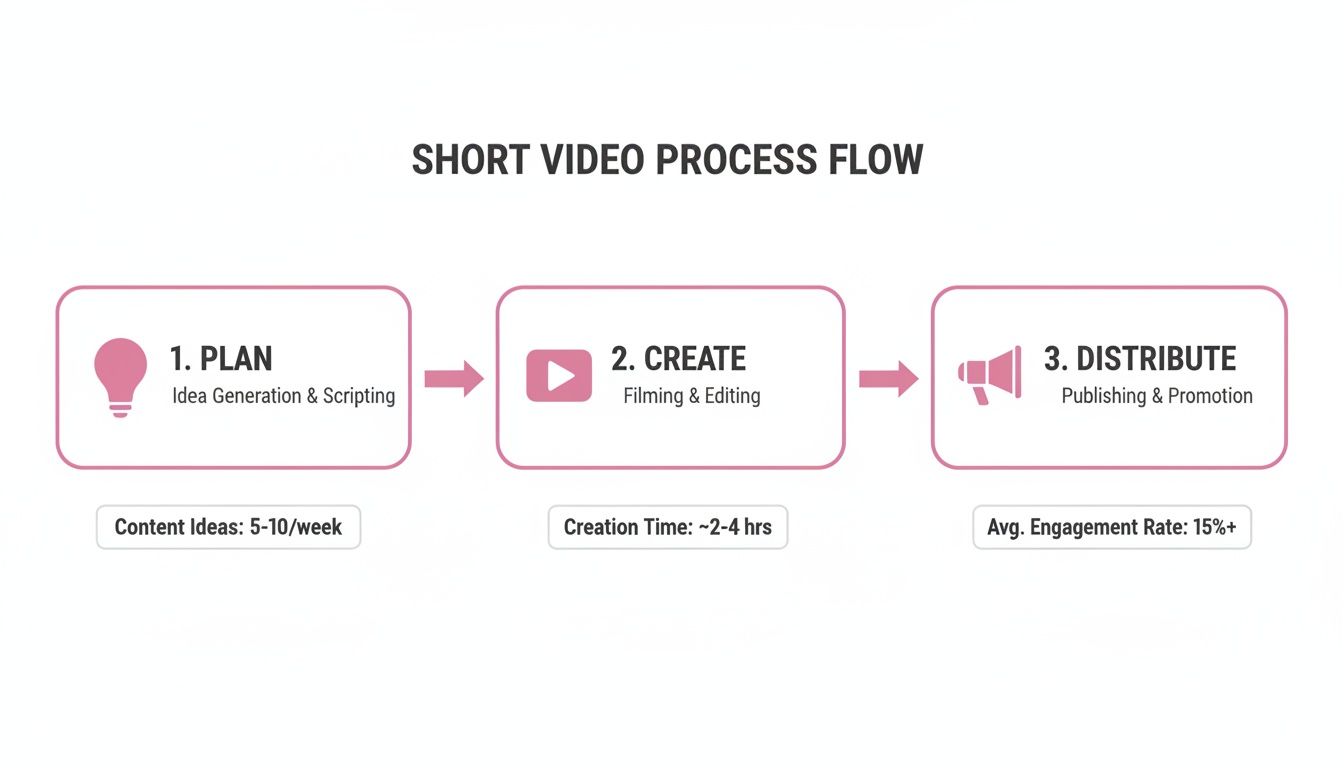
Following this Plan, Create, and Distribute model keeps you focused and ensures every clip you publish is set up for success.
From Moments to a Cohesive Narrative
Once you've got your list of golden moments, the next job is to give them a story structure. Even a 30-second clip needs a clear beginning, middle, and end to keep viewers from swiping away. This is where knowing how to write effective video scripts becomes a critical skill, turning a raw idea into something people actually want to watch.
Here’s how it works in the real world.
Let's say you have a one-hour podcast on productivity. You've identified a fantastic 45-second segment where your guest shares their number one tip for beating procrastination.
- The Hook (The Beginning): Start the video with an immediate, attention-grabbing text overlay. Something like, "This 45-second hack saves me 5 hours a week."
- The Golden Moment (The Middle): Now, drop in the core 45-second audio and video from the podcast. This is the value you promised in the hook.
- The Call-to-Action (The End): Finish with a simple text card or a verbal cue prompting the next step. "Want more productivity tips? Listen to the full episode. Link in bio."
By mapping out your clips like this, you ensure every single video is engineered to connect with your audience and achieve its goal. No more winging it.
Essential Editing Techniques for Scroll-Stopping Clips
Raw footage is just the starting point. The real magic happens in the edit, where you sculpt that footage into a clip that forces people to stop scrolling. This is where we move beyond basic trims and start using the techniques that give your videos that professional, high-energy feel. The right edits can turn a good moment into a great one.
This isn’t just about making your video look pretty. It's about fighting for attention when the next video is just a swipe away. With 30% of short videos being watched to completion, every single editing choice you make directly impacts whether your message lands or gets lost in the feed.
Mastering Pacing with Strategic Cuts
The pacing of your video sets its entire energy. While a slow, deliberate pace might work for some things, short clips almost always need a quick, dynamic rhythm to keep viewers hooked. This is where strategic cuts, especially jump cuts, become your best friend.
A jump cut is a sharp transition between two clips of the same subject, often from a slightly different angle. They're perfect for a few things:
- Chopping out the fluff: You can instantly get rid of awkward silences or moments where the speaker is searching for their next word. This tightens up the video and makes the delivery feel way more confident and direct.
- Adding emphasis: A quick cut right after a powerful statement can act like a visual punch, telling the viewer, "Hey, pay attention to this."
- Keeping the energy up: Rapid-fire cuts maintain momentum and keep people's eyes glued to the screen.
Imagine you're editing a clip where someone says, "The single most important… um… thing to remember is consistency." A simple jump cut gets rid of the "um," creating a much cleaner, more powerful sentence: "The single most important thing to remember is consistency." It’s a tiny change that makes a massive difference in how the message is received.
The Power of Clean Audio and Animated Captions
Here’s a hard truth: viewers will forgive mediocre video quality, but they will not tolerate bad audio. If they can't hear you clearly, they're gone. Your first job is to make sure the sound is clean and free of distractions. This often means the tedious task of hunting down and removing all those "uhs," "ums," and "likes."
Just as critical are captions. In fact, a Verizon Media study found 69% of people view videos without sound in public places. But don't just slap on some static text and call it a day. You need dynamic, animated captions that highlight words as they’re spoken.
These aren't just for accessibility. Animated captions are a visual anchor. They guide the viewer's eyes and have been shown to dramatically increase retention, especially when people are watching without sound.
To really dig into making your captions effective, check out this comprehensive video transcription and subtitles guide. For more tips on editing specifically for YouTube, our guide on YouTube Shorts editing has some great platform-specific advice.
Swiftia’s Advantage in Editing Efficiency
You can do all of this manually in traditional editing software, but let's be honest—it's incredibly time-consuming. Removing filler words and animating captions for a single 60-second clip can easily eat up an hour or more.
This is where a little automation goes a long way. The platform has an algorithm that automatically detects and removes filler words, cleaning up your audio in seconds.
Even better, our Caption Animation Engine generates those dynamic, on-brand captions for you. You can set up your own presets, and it handles the rest. This frees you up to focus on the creative side of editing instead of getting bogged down in repetitive, manual work.
Scaling Your Video Production with Smart Automation

If you've ever tried to maintain a consistent content schedule, you know the biggest bottleneck is usually the manual creation of clips. This is where smart, AI-powered tools stop being a "nice-to-have" and become a real competitive advantage, letting you scale your output without killing your quality.
This isn't about just getting things done a little faster. It's about creating a content engine that was once only possible for big media companies with massive teams.
Let AI Do the Heavy Lifting
Picture this: you've just wrapped up a fantastic one-hour podcast. In the past, you'd have to spend at least another hour scrubbing through the timeline, listening for those perfect, shareable moments. Automation flips that workflow on its head.
AI features like speaker detection can chew through hours of footage in minutes. It intelligently isolates the most compelling snippets—the insightful questions, the punchy one-liners, the core takeaways—and serves them up for your review.
This simple shift moves you from a manual editor to a creative director. You spend less time hunting for gold and more time polishing it, guiding the AI to produce the best possible clips.
This approach is quickly becoming the new standard. The global AI video generator market is expected to explode from $534.4 million in 2024 to $2,562.9 million by 2032. With 63% of marketers already using AI for video creation, it's clear the industry is all-in on automation.
From Automated Edits to Global Reach
Beyond just finding the right moments, automation is a lifesaver for all those tedious editing tasks that drain your creative energy. Think about all the time you've spent perfecting captions or making sure every video has the right brand elements.
With the platform, these tasks are handled for you. It can automatically generate dynamic, animated captions and apply your custom-branded templates to every clip. This doesn't just save time; it ensures a professional, consistent look across all your content without you lifting a finger.
But we didn't stop there. With features like auto-translation, you can take a great clip and open it up to a global audience with just one click.
Here’s how our automation gives you an edge:
- Automated Captioning: Get accurate, animated captions perfectly synced to your audio, instantly.
- Branded Templates: Lock in your brand identity with your logo, colors, and fonts applied to every video.
- Auto-Translation: Repurpose your best clips into over 90 languages to connect with viewers around the world.
Our goal is to get you out of the weeds so you can focus on the bigger picture. To see how this can work for your team, check out our guide on scaling video content editing with AI. Mastering this process is the key to creating high-impact clips efficiently and at a scale that actually grows your brand.
A Smart Distribution Strategy for Maximum Reach
You’ve poured all that effort into creating the perfect video clip, but that’s only half the job. Now comes the real work: getting people to actually see it. A smart distribution plan is what turns a great video into a genuine online presence.
The first big question is always: cross-post one file everywhere, or upload it natively to each platform? While it's tempting to just hit "share" and be done with it, uploading natively is almost always the better play. Social platforms give preferential treatment to content uploaded directly to their system. Plus, you’ll avoid the dreaded watermark from a rival app, which can kill your reach instantly.
Take an extra five minutes to customize each post. A Reel might take off with trending audio, whereas a YouTube Short can get long-term views if you pack its description with good keywords. These little tweaks really matter.
Building a Sustainable Content Calendar
If you want to grow on social media, consistency is your engine. A solid content calendar keeps your audience coming back for more and, just as importantly, signals to the algorithms that you’re a serious creator. This doesn't mean you have to burn yourself out posting five times a day.
It’s all about finding a rhythm that works for you without letting quality slide. For most creators, this boils down to a simple system:
- Batch your work: Set aside a single block of time—maybe a Sunday afternoon—to film and edit all your clips for the upcoming week.
- Schedule ahead: Use a scheduling tool to automatically post your videos when your audience is most active.
- Make time for community: Plan for 15-20 minutes each day just to reply to comments and interact with your followers.
This kind of structure takes the daily "what do I post?" pressure off your shoulders, freeing up your mental energy to focus on making better content.
A great clip isn't just a one-off post; it's a conversation starter. Your distribution strategy should be built around keeping that conversation going consistently.
Moving Beyond Vanity Metrics
Sure, seeing the view count climb is a great feeling, but views alone don't tell you much. To really figure out what makes your audience tick, you have to dig deeper into the metrics that signal real engagement. The best creators I know are obsessed with watch time, audience retention, and shares.
- Watch Time: This is the total time people spend watching your video. High watch time is a massive signal to the algorithm that your content is worth pushing to more people.
- Audience Retention: This graph shows you the exact moment viewers lose interest and scroll away. If you see a huge drop-off in the first 3 seconds, your hook isn't working.
- Shares: A share is the ultimate compliment. When someone sends your video to a friend, they're putting their own reputation on the line to vouch for your content. It’s one of the most powerful indicators of a successful clip.
Use this data to run your own little experiments. Try starting one video with a question and the next with a bold, controversial statement. Test different calls-to-action at the end to see what actually gets people commenting. This is how you move from guessing what works to making data-backed decisions that consistently improve your videos and grow your reach.
Common Questions About Making Short Video Clips
As you start figuring out your own system for creating short-form videos, a few questions always seem to come up. Nailing down the answers early on can help you build a workflow that's not just effective, but actually sustainable. Let's dig into some of the most common ones I hear.
What's the Ideal Length for a Short Video Clip?
The sweet spot for keeping people hooked is almost always between 15 and 60 seconds. This gives you just enough runway to deliver something valuable without testing a viewer's notoriously short attention span. The real trick is matching the length to what you're trying to accomplish.
If you're explaining a concept or telling a quick story, aiming for 30-45 seconds is a great target. It gives you room for a hook, the core message, and a quick call-to-action. On the other hand, if you're jumping on a trend or just going for pure entertainment, you'll want to keep it snappy—under 15 seconds is often the way to go.
The goal is to get your point across and end the video right before a viewer even thinks about scrolling. A completed watch is a huge signal to the platform's algorithm.
How Often Should I Be Posting These Clips?
Consistency is king. Forget trying to post three times a day right out of the gate. For most businesses and creators, putting out 3-5 high-quality clips a week is a fantastic, manageable goal. This rhythm keeps your audience engaged and tells the algorithms that your account is active and worth showing to people.
It’s easy to fall into the trap of thinking more is always better, but you can't sacrifice quality for quantity. First, build a workflow you can actually stick with without burning out. Once that system is humming along, then you can think about ramping things up.
What's the Best Way to Caption My Videos?
The hands-down most effective way is with dynamic, animated captions that highlight words as they’re spoken. This style is incredibly engaging and perfect for the huge chunk of your audience watching with the sound off on their phones. The problem? Creating these manually is a massive time-suck.
This is where smart automation becomes a game-changer.
While plenty of tools can slap a basic text overlay on your video, a tool with a Caption Animation Engine is built specifically for efficiency and branding. It automatically generates those slick, word-by-word captions for you. Better yet, you can create and save your own presets with your brand fonts and colors, making sure every single video looks professional without hours of tedious work.
Think about it this way: You've got five clips to edit. Manually animating captions for all of them could easily eat up your entire afternoon. With a platform like this, you just apply your saved preset, and the captions are done in minutes. That time is now yours to spend on more creative work.
Can I Just Post the Same Video Everywhere?
Absolutely. Repurposing your clips across TikTok, Instagram Reels, and YouTube Shorts is one of the smartest things you can do to maximize your reach. But—and this is a big but—you should always upload the original, clean video file to each platform directly.
Never post a clip that has another platform's watermark on it. The algorithms can spot this and will often penalize the video by limiting its visibility. It's also a good idea to make small tweaks for each platform, like swapping in a trending audio clip on Reels or optimizing the title for search on Shorts, to better fit the vibe of each one.
Ready to stop wasting time on tedious editing and start scaling your video output? With automated tools, you can transform long-form content into dozens of on-brand, ready-to-post clips in minutes, not hours. See how AI-powered features can change your workflow and book a demo at swiftia.io today.