Sure, posting a Reel on Facebook is straightforward. You open the app, tap the "Reel" icon where you’d normally type a status, and upload your video. But just knowing the steps isn't enough. The real magic happens when you understand why this format is such a powerhouse for growth.
Why Facebook Reels Are Essential for Your Growth
If you're on the fence about investing time in short-form video, the data makes the decision for you. Facebook Reels have quickly evolved from a cool new feature into a core driver of visibility and connection. This isn't just a passing trend; it's a fundamental shift in how people consume content online.
Learning how to post Reels is less about the technical clicks and more about plugging into an algorithm built to reward engaging, bite-sized videos. This format essentially gives your brand a direct line to a massive audience that might otherwise never stumble upon your traditional posts.
The Undeniable Power of Reels Data
The numbers behind this explosive growth are pretty staggering. At least 616.8 million people watch Facebook Reels on a regular basis. Daily plays have skyrocketed to over 200 billion across Meta's platforms, and in 2023, Reels pulled in 3.1x more views than other video formats on the platform. This insane reach is exactly why getting good at Reels is a must for anyone serious about growing their online presence. For a deeper dive, Buffer has a great analysis on Facebook's evolving landscape.
To really get the most out of Reels, it helps to have a solid grasp of the broader Facebook platform. Understanding how it all works together helps you create content that not only looks good but also plays nicely with what the algorithm wants to see.
The biggest advantage Reels have is discoverability. Unlike a normal post that mostly gets shown to your followers, Reels are pushed out to a much wider audience based on their interests. This makes them one of the best organic reach tools we have today.
Key Benefits of Using Facebook Reels
The real impact of weaving Reels into your strategy goes way beyond just chasing view counts. Here’s what you actually gain:
- Boosted Organic Reach: The algorithm is designed to show your Reels to new people. This helps you break free from your existing follower bubble and find a whole new audience.
- Increased Audience Engagement: The fast-paced, interactive nature of Reels just naturally encourages more likes, comments, and shares than a static image or a long video. A recent study found Reels generate an average engagement rate of 2.18%, which is over 12 times higher than standard video posts.
- Showcasing Authenticity: The casual, often unscripted style of a good Reel helps humanize your brand. For example, a local bakery could post a behind-the-scenes Reel of their head baker decorating a cake, creating a genuine connection that a polished ad can't replicate.
When you embrace this format, you're not just uploading a video. You're using a tool specifically designed for massive audience expansion and real interaction.
Before you even think about hitting that "post" button, let's talk about the real groundwork: prepping your video file. A little effort here goes a long way, and it’s often the secret sauce that separates a Reel that gets swiped past from one that stops the scroll cold.
Getting your video ready isn't just a technical step; it's a strategic one. It ensures you avoid those frustrating upload errors or, even worse, the dreaded awkward crop that makes your content look amateurish.
Get the Technical Details Right
First things first, you have to play by Facebook's rules. The platform's algorithm gives preferential treatment to content that looks like it belongs there, and for Reels, that means one thing above all else: vertical video. Your goal is to fill the entire mobile screen for a truly immersive feel.
To keep things simple, I've put together a quick cheat sheet with the technical specs you'll want to have handy.
Facebook Reels Technical Specifications Cheat Sheet
Here’s a quick reference guide to ensure your videos are perfectly formatted for Facebook Reels every time.
| Specification | Recommended Setting |
|---|---|
| Aspect Ratio | 9:16 (vertical orientation is a must) |
| Resolution | 1080×1920 pixels (for that crisp, professional look) |
| File Format | MP4 or MOV (the most reliable options) |
| Video Length | Between 3 and 90 seconds |
Getting the 9:16 aspect ratio is absolutely critical. If your original video was shot horizontally, you'll need to reframe it. If you're not sure how, this guide on how to change the aspect ratio of a video will walk you through it.
Hook Them in the First 3 Seconds
You have a sliver of time—literally three seconds—to convince someone to stop scrolling. That's it. Viewer drop-off is brutal in those first few moments, so your opening needs to land a punch.
Think about starting with a surprising visual, a bold statement, or a question that makes people curious. For instance, if you're making a cooking Reel, don't start with chopping an onion. Start with the finished, mouth-watering dish. For a business tip, maybe open with a text overlay that says, "You're probably losing money with this one mistake." It creates instant intrigue and gives people a reason to keep watching.
Your job isn't just to make a video; it's to create a pattern interrupt. That opening shot needs to be strong enough to break someone's mindless scrolling and make them lean in.
Design for Sound-Off Viewing
Here's a stat that might surprise you: as many as 85% of people watch social media videos with the sound off. If your message is buried in a voiceover, you're losing the vast majority of your audience.
This is why you have to design for silent viewing.
Use bold, easy-to-read text overlays and captions to carry your story. You can even animate the text to appear on-screen as you speak, which helps guide the viewer's eye and keeps them locked in. It’s a simple trick that makes sure your message gets across, whether they have their volume up or not. For creators looking to streamline this, exploring some of the top AI video generator tools can be a huge time-saver.
A Practical Guide to Posting Reels on Mobile and Desktop
Alright, your video is edited and ready for the spotlight. So, how do you actually get it live? The process for posting a Reel changes a bit depending on whether you're uploading on the fly from your phone or scheduling out content from your computer.
Neither way is right or wrong; they just serve different purposes. If you're capturing something happening right now, the mobile app is your best friend. But if you're a business or an agency managing a content calendar, the desktop workflow through Meta Business Suite offers much more control. Let's walk through both so you know exactly how to post Reels on Facebook no matter where you are.
Posting from Your Phone
Uploading a Reel straight from your mobile device is the most common way people do it. It’s built for speed and simplicity, putting all the creative tools like trending audio and fun effects right at your fingertips. This makes it perfect for capturing those authentic, in-the-moment clips.
Just open the Facebook app and tap the “Reel” button, which you'll usually find right near the status update box. This will bring up the Reels creator screen. From there, you can either shoot a new video on the spot or pull a pre-edited clip from your camera roll.
Once your video is loaded, you get to add the finishing touches:
- Audio: Tap the music note icon to dive into Facebook’s massive library of trending songs and sounds. Seriously, using a popular audio track can be a game-changer for your Reel's visibility.
- Effects: Play around with the AR filters and effects. It's a simple way to add some personality that aligns with your brand.
- Text and Stickers: Don't forget to add text overlays, polls, or even GIFs. This makes your Reel more engaging and ensures people who watch with the sound off still get the message.
After you’ve tweaked everything to your liking, write a snappy caption, throw in some relevant hashtags, and hit "Share." The whole thing is designed to be quick, getting you from an idea to a live post in just a couple of minutes.
Uploading via Meta Business Suite
For a more structured and professional workflow, you'll want to post from your desktop using Meta Business Suite. This is the go-to method for social media managers and agencies who need to plan, schedule, and collaborate on content ahead of time.
Let's be clear: Reels are no longer just a fun add-on. They are a core part of a solid content strategy. Daily reshares have skyrocketed to 3.5 billion across Facebook and Instagram, with total daily plays hitting an incredible 200 billion in 2023.
With a potential audience of over 616.8 million viewers, it’s easy to see why having a dedicated desktop workflow is crucial for anyone serious about growth. If you want to dig deeper into the numbers, check out the full research on Facebook business statistics.
To get started, log into Meta Business Suite and head over to the "Content" tab. From there, just click "Create Reel" and upload your video file. The desktop interface gives you a lot more screen real estate to write detailed descriptions and fine-tune all your settings.
This simple diagram breaks down the creative flow, from grabbing your audience's attention to finally publishing the content.
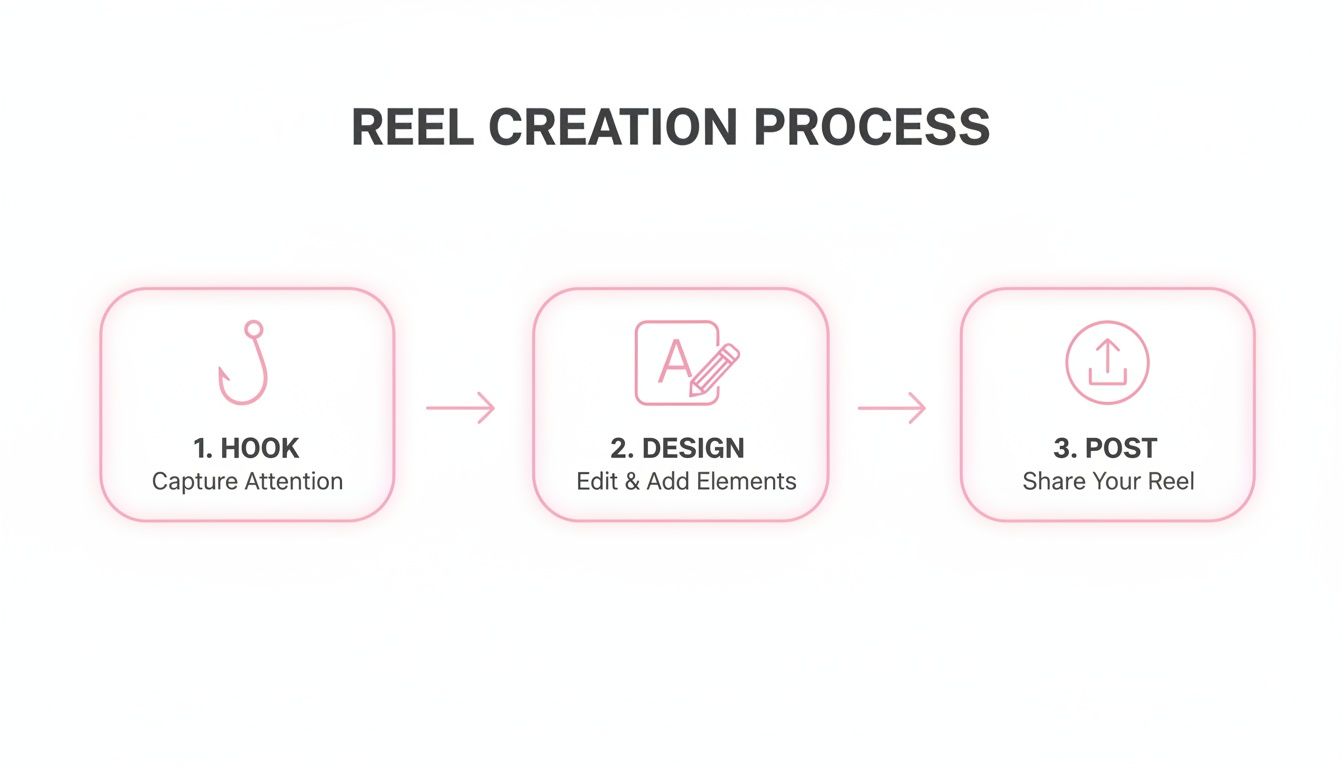
It's a great reminder that a successful Reel isn't just about the upload—it begins with a powerful hook and a well-thought-out design.
But the real magic of the Business Suite is its scheduling feature. You can upload an entire week's worth of Reels in one sitting and set each one to go live at the exact time your audience is most active.
Here's a real-world example: An agency can batch-create ten Reels for a client on a Monday. Using Meta Business Suite, they can then schedule them to post automatically throughout the week during peak engagement windows, like lunch breaks and evenings. This creates a consistent presence without anyone having to manually post every single day.
This approach shifts your content strategy from being reactive to proactive. It frees you up to focus on what really matters: engaging with your community and analyzing your results, instead of just being a button-pusher.
Mastering Crossposting and Scheduling for Efficiency
Ready to move beyond posting Reels one by one? This is where your content strategy goes from a daily grind to a well-oiled machine. Two key practices will get you there: crossposting from Instagram and scheduling your content ahead of time.
Crossposting is a massive time-saver. By linking your Instagram and Facebook accounts, you can create a Reel just once and share it to both platforms simultaneously, effectively doubling your reach with a single tap. You can manage this handy integration right from the Instagram app or through Meta Business Suite.
The Smart Way to Crosspost Reels
Setting up crossposting is pretty simple, but doing it right takes a little more thought. Your goal is to get your content in front of more people without hitting those frustrating snags that can tank your performance.
One of the most common headaches is music licensing. That trending track you used on Instagram might not have the same license for Facebook, which means your Reel could get posted with the sound stripped out. Total buzzkill. To play it safe, always try to use audio from Facebook’s own sound library or, even better, your original audio.
Here's how to get your crossposting set up for success:
- Connect Your Accounts: First things first, head into Meta Business Suite and make sure your Facebook Page and Instagram account are correctly linked up under your business settings.
- Enable Future Reels: When you go to post on Instagram, look for the option to "Recommend on Facebook." Switch this on, and you can even set it to automatically apply to all future Reels. Set it and forget it.
Pro Tip: Even though automatic crossposting is incredibly efficient, it’s a good idea to pop over to Facebook and see how your Reels look after they go live. Sometimes captions or text overlays get a little funky, so a quick spot-check keeps everything looking polished.
Scheduling Your Content for Consistency
On social media, consistency is king. Your audience craves a steady stream of content, and scheduling is the only sustainable way to deliver it without burning yourself out. This is where you can start thinking strategically about when and how to post Reels on Facebook.
The Meta Business Suite calendar is your new best friend. It lets you upload all your Reels for the week—or even the whole month—in one sitting. From there, you can schedule them to publish at the exact times your audience is most active, which you can pinpoint using your Page Insights.
Let's look at a real-world example. A fitness influencer batch-films five short workout tips on a Sunday. They then spend an hour uploading them to Meta Business Suite, scheduling one to go live every weekday at 7:30 AM—right when their audience is looking for morning motivation. This frees up their entire week to focus on what really matters: engaging with comments and building their community.
To build a workflow like this, you need a solid system. Learning how to automate social media posts is a game-changer, giving you back precious time to think about creative strategy instead of just hitting "publish." This approach turns your content calendar from a to-do list into a powerful engine for consistent growth.
Proven Strategies to Get More Eyes on Your Reels

Okay, so you’ve mastered the art of posting a Reel on Facebook. That’s a great first step, but the real challenge—and where the growth happens—is getting people to actually watch, react, and share it. Let's dive into some practical strategies that move the needle from simple views to meaningful engagement.
Let's be clear: Reels are not just another content format on Facebook; they're the format. The data doesn't lie.
Average Engagement Rates on Facebook by Content Type
Take a look at how different content types stack up against each other. It becomes pretty obvious where you should be focusing your energy.
| Content Type | Average Engagement Rate |
|---|---|
| Reels | 2.18% |
| Image Posts | 0.23% |
| Video Posts | 0.17% |
| Link Posts | 0.08% |
Source: Socialinsider Q1 2024
With Reels pulling in an engagement rate of 2.18%, they absolutely dwarf regular video posts, which sit at a mere 0.17%. When you consider that users spend 60% of their Facebook time watching videos, it's a no-brainer to prioritize Reels. You can dig deeper into Facebook Reels performance benchmarks to see how your own content measures up.
Jump on Trending Audio and Visuals
One of the fastest ways to get your Reel seen by more people is to piggyback on what's already popular. The Facebook algorithm loves promoting content that uses trending audio, pushing it out to a far wider audience than your followers alone.
Finding a trending sound is simple. Just scroll through your own Reels feed and see what keeps popping up. Or, when you’re creating a Reel, tap the audio library and look for tracks marked with a "trending" icon. But don't just slap a random song onto your video—the magic happens when you can creatively tie the sound to your content's message.
Key takeaway: Speed is everything here. A trend can blow up and die out in a matter of days. If you see a sound or a format gaining traction, try to jump on it within 24-48 hours to catch the wave before it crashes.
Start a Conversation and Build Your Community
Your caption is prime real estate. Don't waste it with a generic description of what's happening in the video. Instead, use it to spark a conversation. Asking a direct, open-ended question is one of the easiest ways to get the comment section buzzing.
But you can go even further by using Facebook's built-in interactive tools. Here are a couple of my favorites:
- Encourage Remixes: Directly ask your audience to "Remix" your Reel. This lets them create their own video side-by-side with yours. It's an incredible tool for generating user-generated content and collaborating with other creators in your niche.
- Reply to Comments with a Reel: This is an absolute goldmine for engagement that too few people use. When a follower leaves a great question, don't just type out a quick reply. Create a brand new Reel answering their question and tag them in it.
Let me give you a real-world example. Say a fitness coach posts a workout Reel and someone comments, "How do I keep my back from rounding during a squat?" Instead of just writing back, the coach could film a quick 30-second Reel demonstrating the proper form, tagging the original commenter in the caption.
This does two powerful things: it provides massive value to one person, and it shows the entire community that the coach is actively listening and cares. That's how you turn a passive viewer into a loyal fan. For a deeper dive, check out our guide on how to increase social media engagement.
Common Questions About Posting Reels on Facebook
Even the most seasoned creators hit a snag now and then. As you start making Facebook Reels a regular part of your strategy, you’re bound to have some questions pop up. Let’s tackle some of the most common ones I hear so you can keep your content flowing without any friction.
Can I Post a Reel on Facebook Longer Than 90 Seconds?
In a word, no. The hard limit for a Facebook Reel is 90 seconds. If you upload something longer, Facebook won’t just reject it—it’ll post it as a regular video on your feed.
The big problem here is that a standard video post doesn't get the same love from the algorithm as a Reel. You'll miss out on the powerful discovery engine that pushes Reels to new audiences. My advice? Always edit your video to fit snugly within that 90-second window to give it the best possible chance for massive reach.
Why Did the Audio from My Instagram Reel Disappear?
This is a classic—and super frustrating—issue that almost always comes down to music licensing. The song you used on Instagram might be perfectly fine there, but the license doesn't extend to Facebook. When you crosspost, Facebook's system will automatically strip the audio to avoid a copyright headache.
Here’s how to sidestep this problem:
- Stick to audio you find directly in Facebook’s own sound library.
- Use music from a trusted royalty-free service.
- The safest bet? Create your own original audio. It's guaranteed to work everywhere.
How Do I Post a Reel Without the Instagram Watermark?
You definitely want to avoid that "reposted" look. The key is to do your editing outside of the Instagram app.
Finalize your video in a third-party editor, save the clean, watermark-free version to your phone or computer, and then upload that master file to each platform separately. It makes your content feel native to both Facebook and Instagram, which the algorithms love.
A clean, un-watermarked video signals to each platform that your content is high-quality and created with care. It's a small detail, but it can genuinely impact how your Reel is prioritized and shown to new people.
When Is the Best Time to Post Reels on Facebook?
You'll see a lot of generic advice floating around about posting on weekday mornings, but honestly, the "best time" is when your specific audience is online. Don't leave it to guesswork; let the data guide you.
The most reliable way to figure this out is by diving into your Facebook Page Insights. Head over to the "Posts" tab, and you'll see a breakdown of the exact days and times your followers are most active. Test out a few of those peak windows, see what performs best, and you'll have your answer.
Turning one long video into a dozen engaging Reels shouldn't feel like a full-time job. AI tools can automate this whole process, helping you pump out compelling clips 10x faster. Transform your podcasts, webinars, and interviews into a consistent stream of content for Facebook Reels. Discover how Swiftia can streamline your video strategy today.