At its core, posting a YouTube Short is as simple as uploading a vertical video that's under 60 seconds long. You can do it from your phone or your computer, and as long as you pop the #Shorts hashtag in the title or description, YouTube’s algorithm will know exactly what to do with it.
But just knowing the mechanics isn't enough. You need to understand why this format is such a game-changer. For example, a gaming channel could post a 30-second clip of a hilarious in-game fail. Without any other context, that clip has the potential to reach millions of viewers who have never seen the channel's longer "Let's Play" videos, simply because it's engaging and short.
Why Shorts Are Your Secret Weapon for Channel Growth
Let's be clear: YouTube Shorts aren't just a fun little feature to play around with. They've fundamentally changed the game for discovery on the platform. For any creator or brand serious about growing, mastering Shorts is no longer optional—it's a critical piece of your strategy. Think of it as the most powerful audience discovery engine YouTube has ever built.
Unlike your traditional, longer videos, the Shorts algorithm is built for one thing: explosive reach. It doesn't care as much about your subscriber count or how your last ten videos performed. Instead, it prioritizes immediate engagement signals like how long people watch and whether they interact. This levels the playing field, giving a single, well-made Short the potential to reach millions of people who have never heard of you, practically overnight.
The Algorithm Wants to Introduce You to New People
The magic of Shorts is their unique ability to shatter your existing audience bubble. The algorithm is constantly running little experiments, showing your Short to small pockets of new viewers. If it clicks with one group, it immediately gets pushed to a much larger, similar audience. This is how that snowball effect of visibility kicks in.
This rapid-fire testing connects you with viewers who probably would have never stumbled upon your 20-minute deep dives.
- Accelerated Channel Growth: It's not uncommon for channels to gain more subscribers from a handful of viral Shorts than from months of grinding out long-form content.
- Reaching New Demographics: Imagine a financial advisor who usually hosts 60-minute webinars. They can take a complex topic, distill it into a punchy 60-second tip, and suddenly attract a younger audience that would have scrolled right past the longer presentation.
Here's the key takeaway: Shorts are your top-of-funnel discovery tool. They introduce your brand and expertise to a massive, untapped audience that you can then funnel toward your core, long-form content.
Jump on a Rocket Ship of a Trend
The numbers behind the Shorts ecosystem are staggering. Viewership has soared to over 70 billion daily views, a figure that continues to climb. To put that in perspective, this is a massive leap from just 30 billion daily views in 2021—that’s a 133% explosion in viewership. This isn't a slow burn; it's a wildfire.
This constant flow of new videos feeds an audience that is actively looking for quick, entertaining, or valuable content. When you learn how to post YouTube Shorts effectively, you're placing your channel right in the middle of this high-traffic zone. The goal isn't just to rack up views; it's to understand what makes people stop scrolling. Mastering this format teaches you what captivates an audience in seconds—a skill that will make all of your content better.
Before you even think about hitting that upload button, let's talk about the fundamentals. A few minutes spent on a pre-flight check can be the difference between a Short that gets lost in the feed and one that takes off. It’s not about perfection, but about giving your content the best possible shot to grab someone's attention in that split second of scrolling.
The absolute most important thing to get right is the format. YouTube Shorts are a mobile-first world, which means you have to think vertically.
Getting these specs right from the beginning saves you so much frustration down the line. It ensures your video looks clean and professional, not like a blurry, pixelated mess.
Here’s a quick reference table to keep handy.
YouTube Shorts Technical Specifications at a Glance
| Specification | Requirement | Pro Tip |
|---|---|---|
| Aspect Ratio | 9:16 (Vertical) | Film with your phone held upright. If editing, set your project to these dimensions from the start to avoid awkward cropping. |
| Resolution | 1080×1920 pixels | Always export in the highest quality possible. YouTube compresses everything, so a high-quality source file looks much better. |
| Length | Under 60 seconds | While you can go up to a minute, many viral Shorts are in the 15-30 second range. Brevity is key. |
| File Format | .MP4, .MOV | .MP4 is generally the most compatible and widely used format for web video. |
Mastering these four specs is your ticket to entry. Now, let's get into how you'll actually create the content.
In-App Creation vs. External Editing
Alright, you've got your specs sorted. Now for the big workflow decision: do you create your Short right inside the YouTube app, or do you edit it elsewhere and just upload the finished file? There’s no single right answer, as each path has its own strengths.
Creating in the app is perfect for jumping on trends and spontaneous content. It drops you right into YouTube’s massive sound library, which is a goldmine for discoverability. Seriously, hopping on a trending audio clip can give your Short a massive initial boost. The in-app tools are basic but effective for filming quick clips, adding simple text, and slapping on a filter.
I find this method works best when you want to react fast. If you see a sound or challenge taking off, the in-app editor removes all the friction between having the idea and getting it live.
But for content that needs a bit more polish or has to stay on-brand, uploading a pre-edited video is almost always the better move.
The Power of a Polished Upload
Taking the time to edit your video in a dedicated app—whether it's on your phone or a full desktop suite—unlocks a whole new level of creative control. You can dial in your edits with frame-perfect precision, add custom graphics and animations, perform professional color grading, and mix your audio just right. The in-app tools just can't compete with that.
Let’s run through a real-world scenario.
Imagine you're a real estate agent trying to create a 45-second home tour.
- In-App Method: You could walk through the house filming clips, maybe adding some text like "Stunning Kitchen!" It’s quick, it’s easy, and it gets the job done.
- External Editor Method: You could combine beautifully shot clips with slick transitions, add your company logo as a subtle watermark, overlay elegant text that matches your branding, and layer in some professionally licensed background music that sets the perfect mood.
The second version immediately feels more high-end and trustworthy, right? That polished look is essential for businesses and any creator who treats their content as a direct reflection of their brand. With research showing that 71% of consumers are more likely to purchase from a brand after a positive social media experience, that professional touch goes a long way in building viewer confidence.
The Creator's Workflow for Posting Shorts
Alright, let's get down to brass tacks. We've covered the technical stuff, but knowing the specs is different from actually getting your Shorts out there effectively. The real magic happens when you build a solid workflow.
Whether you're posting on the fly from your phone or scheduling a batch of polished videos from your desk, the process differs slightly. But the goal is always the same: get your content in front of eyeballs, fast.
I like to think of it as a quick pre-flight checklist. Before you hit publish, you're running through the essentials to make sure your Short is set up for success.
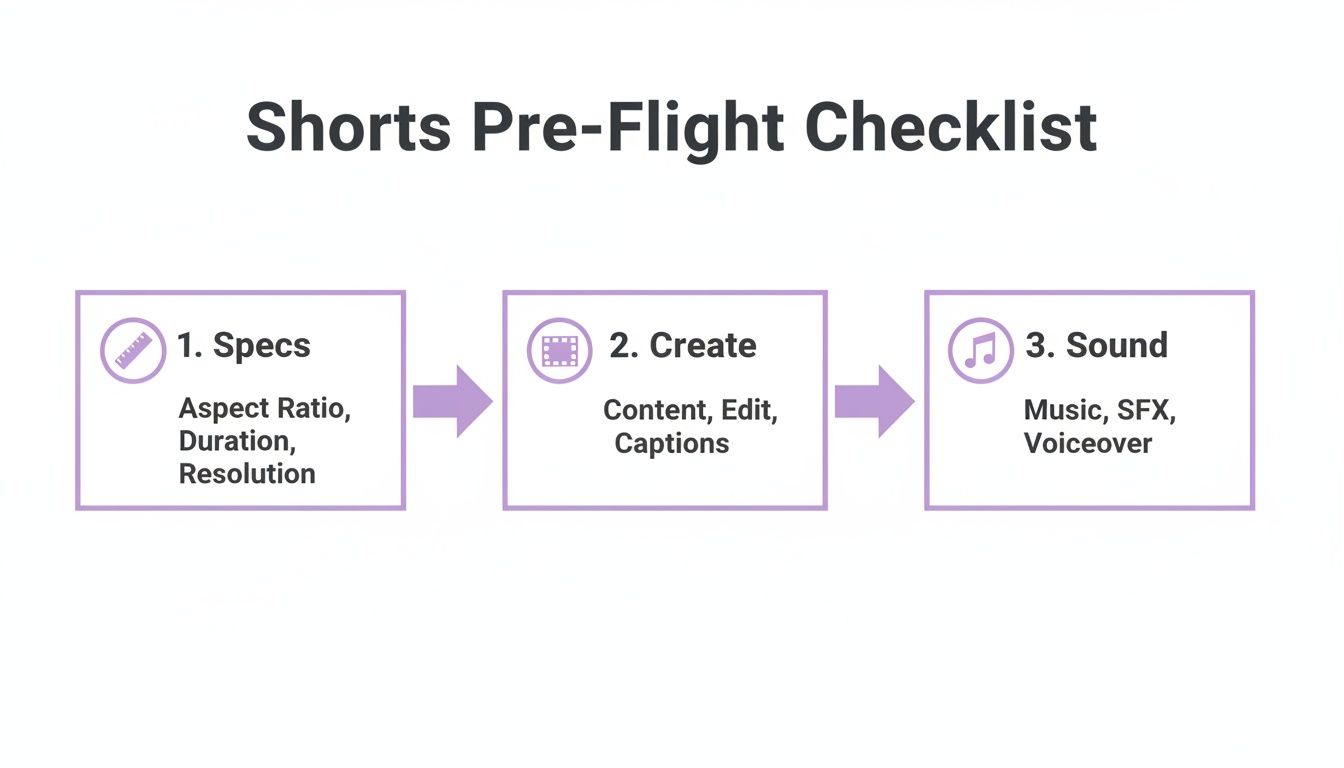
This little mental map—from nailing the specs to picking the right sound—covers the core decisions that can make or break a Short's performance right out of the gate.
Posting Shorts Directly From Your Phone
The mobile workflow is all about speed and spontaneity. It's perfect for capturing something in the moment or jumping on a trend while it's still hot. Don't underestimate the in-app tools; they're surprisingly capable for quick-and-dirty edits.
Let's imagine a food blogger just nailed a 60-second recipe for that viral whipped coffee. They shot everything on their phone and are ready to post it now.
Here’s how they'd do it:
- Fire up the YouTube app. Tap the big “+” icon at the bottom and hit “Create a Short.”
- Grab your clips. Instead of recording live, they'll tap the little gallery icon in the bottom-left to pull in the clips they already filmed. They can trim and reorder them right there to build the story.
- Find a trending sound. This is huge for discoverability. Tap “Add sound” at the top. Knowing that upbeat, lo-fi tracks are killing it right now, they search for one and add it. YouTube syncs it up, and they can tweak the volume to let their original audio (like the sound of the whisk) peek through.
- Add text and effects. Using the “Text” tool, they’ll add simple, bold captions like “2 TBSP Instant Coffee” and “Whip Until Fluffy!” at just the right moments. The timeline editor is key here for making sure the text appears and disappears precisely when needed.
- Finalize and launch. After a quick preview, they hit “Next.” They'll write a punchy title like “The Only Whipped Coffee Recipe You Need #Shorts,” pick an eye-catching thumbnail from the video frames, and set the visibility to “Public.” Then, it's just a matter of hitting “Upload Short.”
The whole thing, from opening the app to seeing it live, can take less than five minutes. That speed is mobile's superpower. It lets you act on inspiration without losing momentum.
Using the Desktop Uploader for Polished Content
Now, for content that's been more carefully produced—maybe edited in Premiere Pro or DaVinci Resolve—the YouTube Studio desktop uploader is your best friend. It gives you way more control over the fine details and is perfect for creators who batch-produce their Shorts.
Let's go back to our food blogger. This time, they edited their whipped coffee video on their computer, adding custom graphics, brand colors, and smoother transitions.
Their desktop workflow is more methodical:
- Head to YouTube Studio. They log in, click the “CREATE” button in the top-right corner, and choose “Upload videos.”
- Select the file. They simply drag and drop their finished .MP4 file. Since it’s already in a 9:16 aspect ratio and under 60 seconds, YouTube instantly recognizes it as a Short.
- Optimize the details. This is where desktop really shines. They can write a much richer description, maybe including a link to the full recipe on their blog. Crucially, they can upload a custom-designed thumbnail featuring a perfect, mouth-watering shot of the coffee instead of relying on a frame from the video.
- Schedule for peak time. Rather than posting immediately, they use the “Schedule” feature. A quick look at their analytics shows their audience is most active around 6 PM, so they set it to go live then to maximize that initial wave of viewers.
This approach gives you ultimate control over the final product. While mobile is fantastic for capturing trends, the desktop workflow is what you need for a planned content strategy where brand consistency and deep optimization are top priorities.
In fact, many pros find a killer rhythm by using an AI video clipping tool to quickly generate dozens of potential Shorts from their longer videos. They then polish their favorites and schedule them out for weeks using the desktop uploader.
So, you've uploaded your Short. That’s just step one. Now, you need to get people—and the algorithm—to actually pay attention.
This is where your metadata comes in. Your title, description, and hashtags are how you tell YouTube what your video is about and, more importantly, who needs to see it. Getting this right is often the difference between a Short that fizzles out with a few hundred views and one that takes off.
Crafting Titles That Stop the Scroll
Your title has two jobs: stop a human from scrolling and inform the YouTube algorithm. Forget what you know about long, descriptive titles for regular videos. For Shorts, you need to be quick, punchy, and straight to the point.
Put yourself in the viewer's shoes. What words would they type into the search bar to find your content? Get that main keyword right at the beginning of your title.
- Weak Title: A Quick Look at Our Trip to Italy
- Strong Title: 24 Hours in Rome's Best Kept Secret #Shorts
See the difference? The second one sparks curiosity, is super specific, and includes the non-negotiable #Shorts tag. That tag is your direct line to YouTube, telling it to place your video in the Shorts feed where it belongs.
Choosing Hashtags to Find Your People
Beyond the required #Shorts tag, a few well-chosen hashtags can connect your content with trending topics and passionate communities. The biggest mistake I see is "hashtag stuffing"—throwing dozens of random tags into the description. This just confuses the algorithm.
Instead, aim for 3-5 highly relevant hashtags. I like to use a simple formula:
- One broad tag: Connects your video to a massive conversation (like
#Travel). - Two niche tags: These target a very specific audience (like
#ItalyTravelor#RomeFood). - One unique tag: This could be a branded tag for your channel to help group your own content (like
#WanderlustAdventures).
This layered approach gives the algorithm a much clearer picture of who will actually enjoy your video.
At the end of the day, your goal is to help YouTube find the perfect audience for your content. When the right people see your Short, they're far more likely to watch it to the end—the single most important signal for the Shorts algorithm.
While these tips are specific to the Shorts algorithm, the fundamental principles of how to improve social media engagement apply here, too, and can give your content an extra boost.
Writing Descriptions That Serve a Purpose
Let's be real: most people won't read the full description on a Short. But the algorithm does. Think of it as bonus context for YouTube.
Use this space to add a sentence or two that expands on your title, weaving in your keywords naturally. More importantly, every description needs a clear call-to-action (CTA). What do you want the viewer to do next?
- Point them to a related long-form video on your channel.
- Ask them to subscribe for more.
- Tell them to comment with their own experience.
The competition is fierce. YouTube has 2.7 billion monthly active users, and the number of creators has grown significantly. Every single piece of metadata is a chance to stand out. You can find more stats on this explosive growth and what it means for creators at Voomo.ai.
A Quick Optimization Example
Let's see this in action. Imagine a travel creator posts a gorgeous 20-second video of making fresh pasta in Florence.
Before Optimization:
- Title: Making Pasta in Italy!
- Description: Had so much fun today.
- Hashtags: #travel #italy #food #cooking #fun #vacation
It's… fine. But it's generic and doesn't give the algorithm much to work with.
After Optimization:
- Title: I Made Authentic Pasta in Florence #Shorts
- Description: Learn the secret to perfect pasta from a real Italian nonna! Watch our full Florence food tour linked in the comments.
- Hashtags: #FlorenceFood #ItalianCooking #PastaMaking
The "after" version is worlds better. The title is packed with specific keywords. The description provides value and a strong CTA. The hashtags are laser-focused. This is how you create Shorts that the algorithm not only understands but actively wants to promote.
Scaling Your Shorts Production with Smart Repurposing
If you're serious about growing on Shorts, you know consistency is everything. But let's be real—churning out high-quality, original content every single day is a fast track to burnout. The secret that separates pros from amateurs isn't always about creating more, but about working smarter with the incredible content you already have. This is where repurposing comes in.
Think about that last one-hour podcast, webinar, or deep-dive video you published. It's a goldmine. Tucked inside are dozens of powerful quotes, juicy data points, aha-moments, and compelling little stories. By learning to pull these out, you can turn one flagship video into an entire week's worth of Shorts. It’s a massive time-saver and a brilliant way to drive new viewers back to your long-form content.
To truly get ahead, you need a system. It's not just about hacking up old videos; you have to learn how to repurpose existing content effectively and build a content ecosystem where every piece works for you in multiple ways.
The Manual Grind Versus Smart Automation
The old way of repurposing is a soul-crushing, manual slog. You’re stuck re-watching hours of your own footage, jotting down timestamps, and then painstakingly chopping up, editing, and formatting each individual clip. For many creators, the process is so tedious it completely negates the time saved in the first place.
Imagine you just wrapped up a 90-minute interview and want to pull 10 killer Shorts from it. Manually, you'd spend hours just scrubbing through the timeline to find those soundbites. Then you have to edit each one—cropping to vertical, adding captions, and exporting. It’s a huge bottleneck.
The biggest problem with manual repurposing is that it just doesn't scale. The time you save on filming is immediately swallowed up by post-production, bringing your content calendar to a screeching halt.
Now, picture a different approach. Instead of hunting for clips yourself, an AI-powered tool scans your video’s transcript and instantly surfaces the most compelling moments based on keywords, topics, and even their potential to go viral. This is the difference between being a content editor and being a content strategist.
Manual Editing vs AI-Powered Repurposing
To really see the difference, let’s compare what it takes to create 10 YouTube Shorts from a single long-form video. The old-school manual way versus a modern, automated approach. The time savings are pretty staggering.
| Task | Manual Workflow | AI-Powered Workflow |
|---|---|---|
| Clip Identification | 2-3 hours of re-watching & timestamping | 5-10 minutes of AI analysis & suggestions |
| Initial Clip Editing | 3-4 hours of cutting, trimming, & reframing | 15 minutes of reviewing and selecting AI clips |
| Captioning | 1-2 hours of transcribing & styling | 5 minutes of auto-captioning & style selection |
| Total Time | 6-9 Hours | ~30 Minutes |
As you can see, automation isn't just a small improvement; it's a game-changer. An AI-powered tool can transform this whole process, doing much more than just finding clips. Think animated captions with your own brand presets, automatic removal of "ums" and "ahs" for cleaner audio, and even translating your content for a global audience.
This frees you up to focus on the fun part—the creative strategy—instead of getting bogged down in repetitive editing tasks. The best part? It also leads to a more professional and consistent result. By using templates, every Short maintains your channel's look and feel, strengthening your brand identity with every post.
Learning the basics of how to post YouTube Shorts is step one. Building a sustainable system to do it at scale is what truly fuels long-term growth.
Common Questions About Posting YouTube Shorts
Once you get the hang of posting Shorts, you'll inevitably start asking the bigger questions. How do I actually make money from this? When's the best time to post? Is there a secret to going viral? These are the details that separate the hobbyists from the pros.
Let's clear the air and dig into the questions I hear most often from creators trying to master the short-form game.
Can I Monetize YouTube Shorts?
Yes, you can, and it's a game-changer. For a long time, Shorts were just about growth, but now they're a legitimate way to earn an income once you're in the YouTube Partner Program (YPP).
Getting into the YPP has some specific requirements. You'll need 1,000 subscribers on your channel, plus one of these two milestones:
- 4,000 valid public watch hours on your traditional long-form videos in the past year.
- 10 million valid public Shorts views within the last 90 days.
Once you’re in, you start earning from a shared revenue pool. YouTube runs ads between Shorts in the feed, collects all that money, and then distributes a portion to creators based on their share of the total views. Simply put, the more views you rack up, the bigger your slice of the pie.
What Is the Best Time to Post YouTube Shorts?
This is the golden question, isn't it? The honest-to-goodness answer is that it completely depends on your audience. There’s no magic, one-size-fits-all time slot that guarantees success.
Your most powerful tool here is your own data. Dive into YouTube Studio and find the 'Audience' tab in your analytics. You're looking for the chart called "When your viewers are on YouTube." This little graph is pure gold—it shows you, hour by hour, when your audience is most active.
Try posting right as those activity bars begin to climb. This gets your Short in front of the maximum number of your followers right away, giving the algorithm a strong initial signal that people are interested. If your channel is new and you don't have this data yet, start by aiming for weekday evenings (around 6 PM to 9 PM in your audience's main time zone) and weekend afternoons. Test, track, and adjust.
How Do I Make My YouTube Shorts Go Viral?
While nobody can bottle lightning, you can definitely improve your odds by focusing on what makes people stop scrolling and keep watching.
It all starts with the hook. You have less than a second to grab someone. Hit them with a startling visual, a controversial opinion, or a question that makes them need to know the answer. The first frame is everything. For example, a DIY channel could start a Short with a shot of a completely shattered vase, and the title "I can fix this in 15 seconds." Viewers will stick around to see if it's possible.
Next, get good at creating loops. A "perfect loop," where the end of the video flows seamlessly back into the beginning, is an incredibly powerful trick. People often re-watch it without even realizing it, which skyrockets your average view duration—a metric the algorithm absolutely loves.
A high watch-through rate is the clearest signal you can send to YouTube that your content is compelling. When the algorithm sees viewers finishing your Short (or watching it multiple times), it thinks, "Hey, people like this," and pushes it out to a much wider audience.
Finally, just keep showing up. Consistency is your best friend. Every Short you post is another lottery ticket and another piece of data for the algorithm. One of them is bound to find the right audience and take off.
Should I Create a Separate Channel for Shorts?
For about 99% of creators out there, the answer is a hard no. Your main channel is exactly where your Shorts should live. Think of them as the ultimate appetizer or a billboard for your main content.
Shorts are incredible for discovery. They can introduce your personality and style to millions of people who would have never stumbled upon your 20-minute deep dives. The YouTube algorithm is smart; it knows that someone who enjoys your 30-second clip might also love your longer videos. This creates a fantastic feedback loop where your Shorts directly fuel the growth of your entire channel.
The only real exception is if your Shorts are about something completely different from your main channel's niche. For example, if you have a respected channel on quantum physics but want to post Shorts of your cat playing the piano, a separate channel might be a good idea. Otherwise, keep everything under one roof to build a stronger, unified brand.
Ready to stop wasting hours on manual editing and start scaling your Shorts production? AI-powered tools can find the best moments in your long-form videos and transform them into engaging, ready-to-post clips in minutes. Discover how you can create more content, faster, at swiftia.io.