Figuring out how to share Reels on Instagram is pretty straightforward. Just look for the paper airplane icon on any Reel—that's your gateway to sending it to your Story, adding it to your Feed (if it's yours), or sliding it into a DM.
Getting the hang of these sharing options is a total game-changer for boosting your visibility and getting more people to interact with your content. This applies whether you're pushing out your own creations or highlighting something cool from another creator.
Why Sharing Reels Is Your Secret Weapon for Growth
Let's be real: Instagram is a video-first world now, and Reels are the main event. They’ve moved from being just a fun feature to the primary way people find new accounts and connect with creators.
The numbers are pretty staggering. With over 140 billion plays daily across Instagram and Facebook, Reels now eat up about 50% of the total time people spend on the app. This isn't just a trend; it's how the platform works now. If you want to grow, you have to get good at sharing Reels. For a deeper dive, you can discover more insights about Reels' dominance and see how they're reshaping the platform.
Each way you share a Reel has a different job to do, giving you a whole toolkit for hitting your engagement goals.
This diagram lays out the three main ways you can share a Reel right inside the Instagram app.
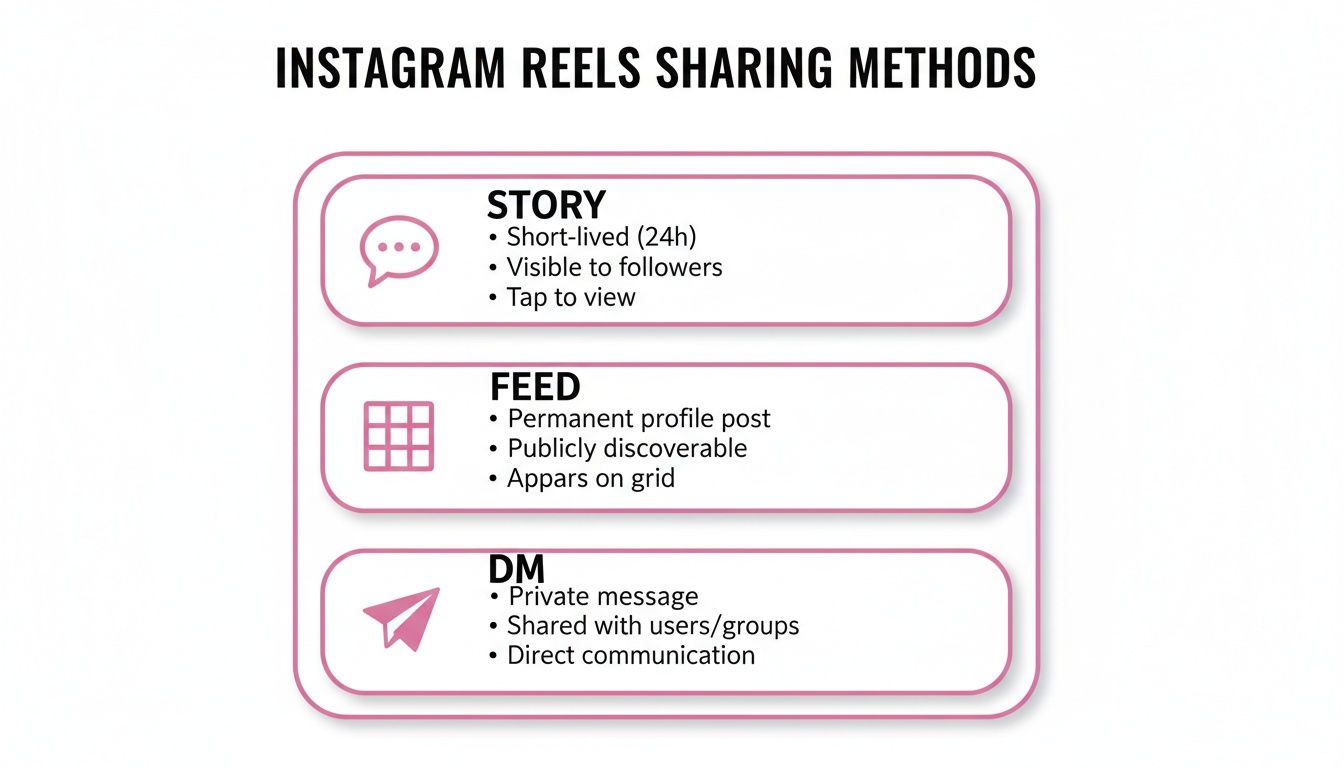
As you can see, sharing to your Story is perfect for quick, interactive moments. Posting to your Feed is all about building up your permanent library of content. And sending a Reel via DM? That's for making those personal connections.
Choosing the Right Sharing Method
Knowing when to use each sharing method is key. Think of it as having the right tool for the right job. Found a hilarious Reel that your followers would love? Pop it on your Story. It's a low-stakes way to entertain them for 24 hours without messing up the aesthetic of your main profile grid.
For example, imagine a local restaurant gets tagged in a customer's glowing Reel review. Sharing that directly to their Story is a brilliant move. It's fast, authentic social proof that feels organic, encouraging new visitors without needing a permanent spot on their carefully curated Feed.
On the other hand, that polished, high-effort Reel you spent hours creating? That belongs on your Feed. Your Feed is your long-term portfolio, and adding high-value Reels there helps establish your brand and attract new followers over time.
Finally, sending a Reel via DM is your go-to for one-on-one chats. It could be a tip for a client, a funny video for a friend, or a relevant clip to start a conversation with a potential collaborator.
Here's a quick cheat sheet to help you decide on the fly.
Instagram Reels Sharing Methods at a Glance
| Sharing Method | Best For | Visibility Level |
|---|---|---|
| Share to Story | Quick, timely updates, behind-the-scenes content, and interactive polls or questions. | Followers (for 24 hours). |
| Post to Feed | High-quality, evergreen content that represents your brand or core message. | Public or followers, discoverable over the long term. |
| Send via DM | Personalized communication, networking, or sharing specific content with individuals/groups. | Private to the recipient(s). |
Each method has its place in a solid Instagram strategy. Mixing and matching them based on your content and goals will give you the best results.
Getting Your Own Reels Seen: A Guide to Smart Sharing

You've poured your creativity into a Reel, and now it's time to make sure people actually see it. The first decision you make, right before hitting that final "Share" button, is probably the most important one. Always, always make sure the "Also share to Feed" option is toggled on.
Think of this as giving your Reel its best possible start. Sharing to your Feed places it on your main profile grid and, more importantly, pushes it into the home feeds of your followers. It’s the difference between a quiet launch and a grand opening. We know that posts shared during peak hours can get 19% more views and a whopping 51% more comments, so this initial boost is non-negotiable.
Re-Share and Revive Your Best Content
Your job isn't done once the Reel is live. A great way to get more mileage out of your hard work is by re-sharing older Reels to your Story. It's a fantastic tactic for highlighting top-performing content without making your main grid feel repetitive.
Just navigate to the Reel on your profile, tap the little paper airplane icon, and hit "Add to story." But here's a pro tip: don't just post the video. Use Instagram's interactive stickers to get people involved.
- Polls: Ask a simple question about the Reel's topic. "Found this helpful?" or "Agree or disagree?" works wonders.
- Quizzes: Test how well your audience was paying attention.
- "Add Yours" prompts: This is a goldmine for user-generated content. Encourage your followers to make their own version inspired by your Reel.
For example, a fitness coach could post a Reel of a quick workout. A week later, they could share that same Reel to their Story with a poll asking, "Tried this yet? Yes / Not yet!" It's a simple, low-effort way to reconnect with their audience and keep that great content working for them.
Building Relationships with Direct Messages (DMs)
One of the most underrated ways to share Reels is by sending them directly to people in their DMs. It's obviously not for mass visibility, but it's incredibly powerful for building a real community. When you send a Reel to someone you know will appreciate it, it feels personal and shows you’re paying attention.
Let's say you’re a DIY creator and you just posted a Reel about a tricky woodworking joint. You could send it directly to a few followers who have asked you about that technique before with a quick note like, "Hey, I remembered you asked about this. Hope it helps!" That kind of personal touch is what turns a passive follower into a loyal fan.
For a deeper dive into making your videos look their best, check out our complete guide on formatting videos for Instagram.
How to Share Someone Else's Reel
Sharing Reels from other creators is one of the best ways to build community on Instagram. It’s not just about filling your content calendar; it’s about showing your audience what you find valuable, funny, or inspiring, and giving a nod to fellow creators.
When you stumble upon a Reel you just have to share, the process is incredibly straightforward.

Look for the little paper airplane icon below the comment button. Tapping it is your gateway to sharing. From there, you can either "Add to story" or send it as a Direct Message (DM) to a friend or group. It literally takes two seconds.
Sharing to Your Story The Right Way
Adding a Reel to your Story is easily the most popular way to share another user's content. It’s a low-commitment way to engage your followers because it's only live for 24 hours, and it keeps your main feed dedicated to your own original content.
But there’s a right way and a wrong way to do it. The absolute golden rule? Always tag the original creator.
When you add the Reel to your Story, use the @mention sticker to tag their handle. This isn't just about giving credit where it's due—it sends a notification to the creator. They might just return the favor by sharing your Story to their audience, which can be a huge visibility boost for you.
A perfect example of this in action: a local coffee shop shares a customer's Reel showcasing their perfect latte art. By adding it to their Story and tagging the customer, they're not just getting free content; they're celebrating a fan and providing powerful social proof to everyone who follows them. It's a win-win.
One quick but important thing to remember: Instagram doesn't let you re-post someone else's Reel directly to your own feed. This is intentional, designed to protect original work and prevent the feed from becoming a sea of reposts. The creator's feed is for their content, and your feed is for yours.
Expanding Your Reach Beyond Instagram
Your Reel's journey doesn't have to end within the Instagram app. Thinking beyond the 'gram and sharing your content on other platforms is one of the best ways to get your work in front of fresh eyes—people who might never have found you otherwise.
The easiest win here is cross-posting directly to Facebook. Once you link your Instagram and Facebook accounts in the Meta Accounts Center, you can flip a switch to have your Reels automatically pop up on your Facebook feed or page. It’s a classic set-it-and-forget-it move that instantly doubles your potential audience with no extra work on your part. For a deeper dive into the other side of this coin, you can learn how to make a Reel on Facebook and fine-tune your strategy for that audience.
Sharing Your Reel on Other Platforms
What about platforms like X (formerly Twitter), LinkedIn, or even your email newsletter? The simple link is your best friend. Just tap the three dots on your Reel, hit "Link," and the URL is copied and ready to be pasted wherever you want. This is perfect for driving your most engaged followers from other platforms directly to your Instagram post to boost its stats.
Another smart tactic is to download the video file itself and upload it natively to other short-form video apps. Platforms like TikTok and YouTube Shorts are known to favor content that's uploaded directly, rather than a video that clearly has a watermark from a competing app.
Pro Tip: To get a clean, watermark-free version of your video, you have to download it from the final editing screen right before you publish. If you wait and download it after it's live, it will always have that Instagram watermark baked in.
A Real-World Example of Cross-Platform Promotion
Let’s say you're a musician and you've just made a Reel with a 30-second clip of your new song. Here’s a smart way to get it everywhere:
- Facebook: You've already set up automatic cross-posting, so your Facebook fans see it the moment it goes live on Instagram. Effortless.
- TikTok & YouTube Shorts: You download the clean, watermark-free video and upload it as a native video to both platforms. You might even add a different trending sound or hashtags to fit the vibe of each app.
- X & Email: You grab the direct link to the Reel and share it on X and in your newsletter. This sends your most dedicated fans straight to the original Instagram post, where they can leave comments and help the algorithm notice you.
This simple strategy takes one piece of content and turns it into a promotional powerhouse, reaching distinct audiences across the web.
Getting Smart With Your Reels Sharing Strategy

It’s one thing to know how to share an Instagram Reel, but it's another thing entirely to make every single share count. To really get traction, you have to think beyond just hitting the "share" button. We're talking about strategy—nailing the timing, the presentation, and the all-important follow-up.
First things first: get comfortable with your Instagram Insights. This isn't just a bunch of numbers; it's a goldmine of data that tells you exactly when your audience is online and scrolling. Posting during these peak hours is one of the easiest wins you can get. Research shows that Reels posted at the right time pull in 19% more views and a whopping 51% more comments on average.
Making Reels People Actually Want to Share
Timing is a big piece of the puzzle, but the content itself is what really matters. A Reel that gets shared far and wide usually has a few key ingredients working in harmony.
- The Right Sound: Trending audio is your friend. It instantly makes your Reel more discoverable and relevant. But don't be a slave to the trends—if an original or niche sound fits your brand's personality better, go for it.
- A Killer Hook: You have about three seconds to stop someone from scrolling past. Hit them with a burning question, a bold claim, or some visually arresting motion right at the start. For a deeper dive into what works, it's worth understanding the ideal Instagram Reel length.
- Captions That Connect: Your caption is prime real estate for starting a conversation. Ask questions, tell a quick behind-the-scenes story, or drop a clear call-to-action that tells people what to do next.
Getting familiar with the Instagram Reels algorithm is also a must. The algorithm loves seeing content that sparks genuine interaction, so make it a habit to reply to comments and DMs as they come in.
Don't underestimate the power of engagement. Reels are an absolute powerhouse, accounting for nearly 45% of all interactions on Instagram. On average, a Reel can expect around 243 likes and 8 comments, which is a huge opportunity to connect with your audience.
Answering Your Top Questions About Sharing Reels
Even when you know all the steps, you're bound to hit a snag or two when sharing Reels. It happens to everyone. Let's walk through some of the most common questions and clear up the confusion so you can get back to sharing great content.
Why Can’t I Share Someone Else's Reel to My Story?
Ever find a fantastic Reel you want to share, but the "Add to Story" button is nowhere to be found? This isn't a bug in the app. It's a choice.
The original creator has simply disabled the re-sharing option for their content. Instagram gives users control over how their posts are distributed, and if they've turned off sharing, you have to respect that.
Can I Schedule My Reels in Advance?
Yes, you can! This is a huge time-saver for anyone managing a content calendar. If you have a Creator or Business account, Instagram has a built-in scheduler.
When you get to the final screen before publishing (where you write your caption), tap on "Advanced settings." You'll find the option to schedule your Reel for a specific date and time right there.
Reels aren't just a fun feature anymore; they're a dominant force on the platform. They now make up 38.5% of all feed posts, a massive leap from just 20% two years ago. For advertisers, that translates to a potential audience of 900 million users every single month. You can read more about the latest Instagram Reels statistics to see just how big they've become.
Does Sharing a Reel to My Story Actually Help It Perform Better?
Absolutely. Think of it as giving your Reel an instant visibility boost. When you share it to your Story, it immediately gets in front of your most loyal followers—the people who are already tapping through your daily updates.
This initial wave of views and engagement sends a positive signal to the Instagram algorithm. It essentially says, "Hey, people are liking this!" which can help your Reel get pushed out to a wider audience on the main Reels tab and Explore page.
Ready to create more share-worthy content in a fraction of the time? Our AI platform transforms your long videos into stunning, viral-ready clips for Reels, Shorts, and TikTok. Start creating faster at Swiftia.io.