Getting a transcript from a YouTube video is surprisingly straightforward. Just find the three dots (…) below the video player, click them, and select "Show transcript." And just like that, the full text appears.
But this isn't just a block of text. For smart content creators, marketers, and researchers, it's a strategic asset waiting to be used.
Why YouTube Transcripts Are a Content Goldmine
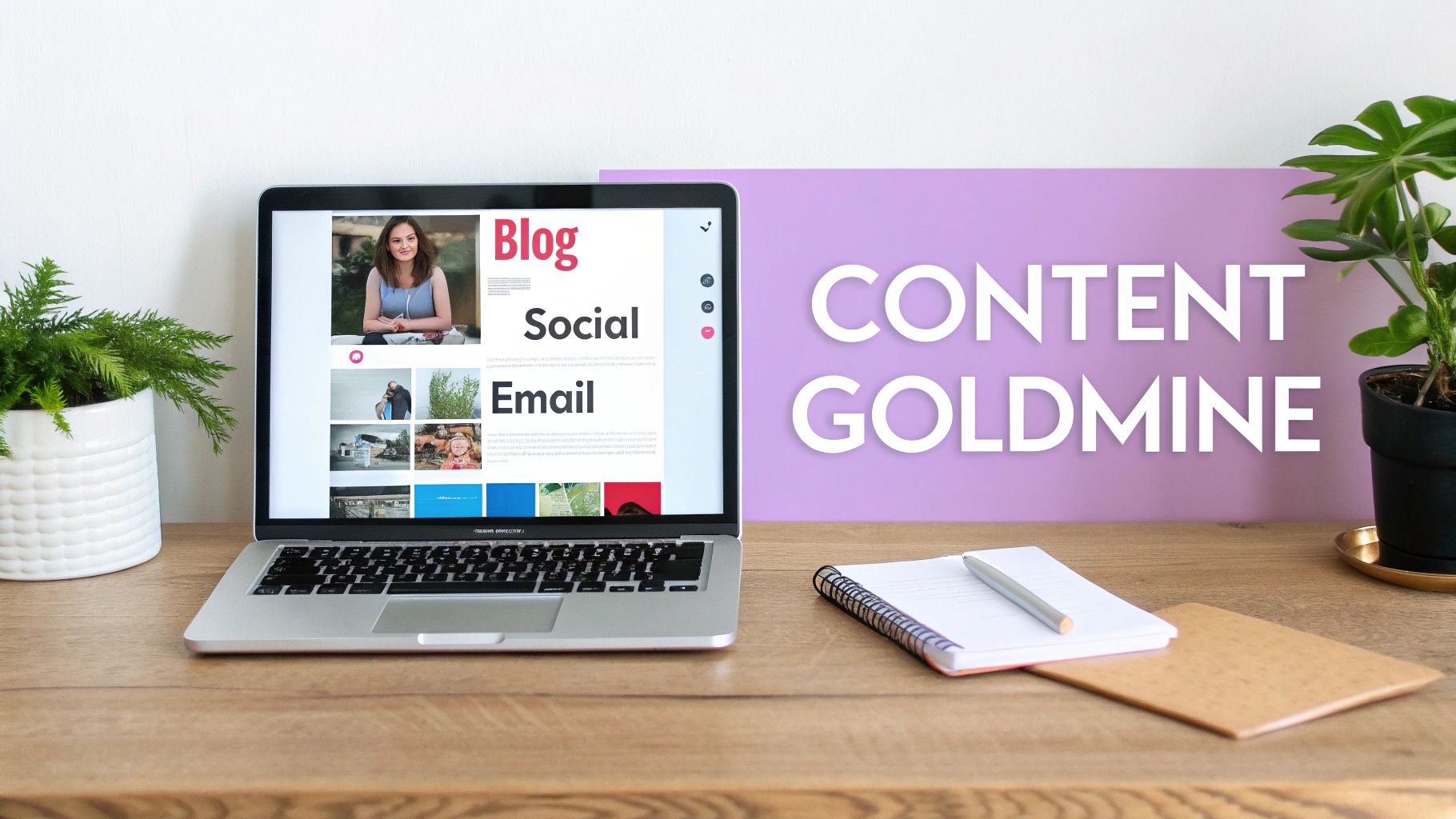
At its core, a YouTube transcript is the written version of everything spoken in a video, usually paired with timestamps. It seems simple, but this raw text is the secret ingredient for powerful content strategies that boost your visibility, make your content more accessible, and save you a ton of time. A single video can suddenly become a versatile resource you can use across all your marketing channels.
Imagine a digital marketing agency hosts a 30-minute webinar for a client. With the transcript in hand, they can:
- Spin up an SEO-optimized blog post: The transcript gives you the meat of the content, the right keywords, and a natural structure. It cuts writing time in half.
- Fuel a week of social media posts: Pull out the best quotes, stats, and key takeaways for quick, engaging posts on LinkedIn, X, or Instagram.
- Draft a valuable email newsletter: Summarize the webinar's best advice for your subscribers, driving them back to watch the full video.
This flowchart lays out a simple way to think about when a basic transcript is enough and when you might need something more polished.
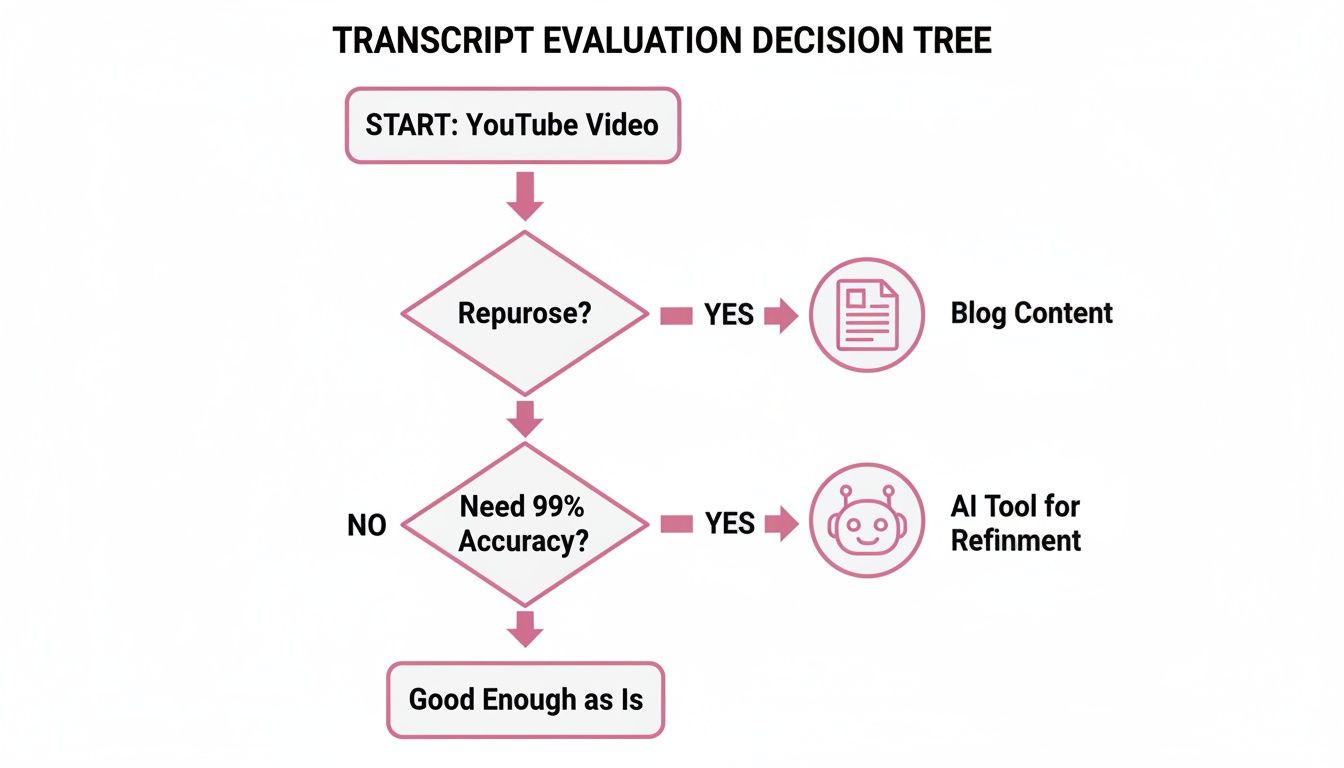
The takeaway is clear: your goal dictates the right tool for the job. Simple repurposing is very different from creating professional-grade subtitles for an international audience.
Driving Tangible ROI
Using transcripts smartly delivers real, measurable results. YouTube's own tool is a great starting point, often hitting 80-90% accuracy for videos with clear English audio, and it costs nothing.
Think about that for a second. Manually transcribing an hour-long video can easily cost over $100. Having a free, instant draft is a massive time-saver for any business. According to Wyzowl, 91% of businesses use video as a marketing tool, and transcribing this content efficiently is a major competitive advantage.
If you're looking to really dive deep and get the most SEO value out of your video content, this guide is a fantastic resource: Your Guide to Fast and Accurate YouTube Video Transcription.
Improving Accessibility and Engagement
Beyond just slicing and dicing content, transcripts open up your videos to a much wider audience. This includes people who are deaf or hard of hearing, as well as non-native speakers who find it easier to read along.
The impact on engagement is undeniable. A Verizon Media study found that 80% of consumers are more likely to watch an entire video when captions are available. Furthermore, adding captions can boost video view time by an average of 12%.
This simple text file unlocks the true potential of your video. It turns a passive viewing experience into an active, searchable, and infinitely repurposable asset. It helps search engines understand and index your content, giving you the raw material to scale your message far beyond YouTube.
Using YouTube’s Native Transcript Tool
Sometimes the simplest solution is the best one. The fastest way to pull a transcript from a YouTube video is to use the tool baked right into the platform. For anyone needing to repurpose content quickly—think marketers, creators, or researchers—this is usually the first stop. No need to install anything or pay for a service. It's just there.
Getting to it is a breeze. Just go to the video you're interested in, find the three-dot menu (…) below the video player, and click "Show transcript." A full, timestamped script will pop up right beside the video. It’s that easy.
Finding and Using the Transcript
Once that transcript panel appears, you've got a few handy options. You can just read along as the video plays; the text conveniently highlights and scrolls in real-time. This is a game-changer if you’re hunting for a specific quote or topic in a long video. Forget scrubbing through the timeline.
Imagine you're a podcaster and you just finished a fantastic hour-long interview. Instead of listening back to the whole thing, you can just scan the transcript for the most powerful quotes. See something that looks good? Click the timestamp, jump right to that moment in the video to double-check the context, and then copy the text for your show notes or a slick social media graphic.
Here’s a look at what the transcript panel looks like on a standard YouTube page.
This turns what was a static video into a searchable, interactive document. Suddenly, you have a goldmine of content ideas at your fingertips.
Key Limitations to Consider
As convenient as it is, YouTube's built-in tool isn't perfect. The biggest drawback is accuracy. If you're working with a video that has crystal-clear audio and a standard accent, you can expect an accuracy rate somewhere around 80-90%. But throw in some background noise, multiple people talking over each other, or complex industry jargon, and that number can plummet.
A study by the University of South Florida on YouTube's automatic caption accuracy revealed an average error rate of about 13.5%. This means you should always plan on doing some manual cleanup if you're using the transcript for anything professional.
Another snag is that there’s no simple "download" button. You have to manually highlight all the text, copy it, and then paste it into your own document. This also brings the timestamps along for the ride, which you'll probably have to delete. So, while it's fantastic for quick-and-dirty tasks, it's not the most efficient option for workflows that need clean, formatted files.
How to Download Formatted Transcript Files
While copying and pasting text straight from YouTube's transcript panel is fine in a pinch, it’s hardly a professional solution. It's a manual process that leaves you with a wall of text and timestamps to clean up. When you need a clean, ready-to-use file like a .txt or .srt, you'll have to look beyond YouTube's built-in options.
The most direct route is often through a third-party online tool. These websites are built for one thing: grabbing a YouTube transcript and turning it into a neat, downloadable file. The process couldn't be simpler—you just paste in the video URL, and the tool spits out the transcript for you to save.
This method is a lifesaver for creators who need to generate captions or for marketers archiving a webinar. Imagine a social media manager needing to add captions to a client's video. They could download the SRT file, quickly fix any accuracy issues, and upload it directly to Facebook or LinkedIn. This simple step provides native closed captions, which is huge for accessibility and keeping viewers engaged.
A More Technical Approach Using Developer Tools
If you don't mind getting your hands a little dirty, you can pull the caption data yourself using your browser's developer tools. This method cuts out the middleman entirely, allowing you to grab the transcript straight from the YouTube page's source code. You don't need any special software—just the browser you're already using.
It might sound intimidating, but it's more straightforward than you think. You'll typically open the developer tools (usually by pressing F12 or right-clicking and selecting "Inspect"), navigate to the "Network" tab, and then filter the network requests for anything related to captions or timed text. Once you spot the right file, you can copy its contents and save it.
This technique gives you direct access to the raw caption data, often including multiple language tracks if they're available. It’s a powerful way to get exactly what you need without relying on an external service.
This approach definitely has a steeper learning curve, but it offers a lot more control. For developers or data analysts, it's a fantastic way to collect transcript data programmatically for analysis or to integrate into other applications.
Choosing the Right File Format
When you download a transcript, you'll often get to choose the file format. The best choice depends entirely on what you plan to do next. Each format serves a very specific purpose in a content workflow.
Here’s a quick rundown of what you’ll typically see:
- .txt (Plain Text): This is as basic as it gets. You get just the raw text—no timestamps, no formatting. It’s perfect if you're repurposing the video's content into a blog post, article, or podcast show notes.
- .srt (SubRip Subtitle): This is the industry standard for video captions. The file contains sequentially numbered blocks of text, each with a precise start and end timestamp. Video platforms like YouTube and Vimeo, along with most video editing software, rely on this format to display perfectly synchronized captions.
- .vtt (WebVTT): Think of this as a more modern version of SRT, designed specifically for HTML5. It does everything an SRT file does but adds more advanced formatting options, like text styling and positioning on the screen. It's a great choice for web-based video players.
Knowing the difference between these formats is key to a smooth workflow. If you're serious about creating professional-grade video, you might want to explore the best software for closed captioning to find more powerful tools for editing and synchronizing these files.
When to Use AI for Maximum Transcript Accuracy
YouTube's built-in transcript is a fantastic shortcut for a quick glance or pulling a simple quote. But let's be realistic—when precision truly matters, it often doesn't make the cut.
For any kind of professional work, an error rate of 10-20% is a deal-breaker. A single misplaced word can completely alter the meaning of a key takeaway, misrepresent data, or just make your content look sloppy.
This is exactly why dedicated AI transcription services exist. These platforms are built from the ground up for one job: delivering exceptionally accurate text. They use far more sophisticated models than YouTube's general-purpose tool, easily handling tricky audio with background noise, overlapping speakers, or heavy accents.
Scenarios That Demand High Accuracy
Think of using a specialized AI tool as an investment, not just another subscription. It’s a crucial step in any workflow where the quality of your transcript directly affects your results.
Here are a few situations where settling for "good enough" isn't an option:
- Turning Webinars into SEO Gold: Imagine taking a client's one-hour webinar and spinning it into a comprehensive, keyword-rich article. A high-accuracy transcript gives you clean text that’s ready for your content team with minimal cleanup, drastically speeding up your publishing pipeline.
- Crafting Professional Subtitles: Nothing screams unprofessional like subtitles riddled with typos. A properly formatted .srt file from a dedicated service ensures your captions are perfectly synced and error-free, which is vital for accessibility and maintaining your brand's credibility.
- Creating Legal or Academic Records: When it comes to legal depositions, research interviews, or compliance meetings, an 85% accurate transcript is essentially useless. You need verifiable precision, and that's what professional-grade AI delivers.
For any serious project, 95% accuracy or higher should be your benchmark. Hitting this target saves countless hours of manual correction and ensures your final output is polished and reliable.
Comparing Your Options
It's one thing to talk about accuracy, but seeing the differences laid out can really clarify when to use which tool. YouTube's free option is great for casual use, but a dedicated platform is built for professionals who need to move fast and maintain quality.
YouTube Auto-Transcript vs. Dedicated AI Transcription
| Feature | YouTube Built-in Transcript | Dedicated AI Transcription |
|---|---|---|
| Accuracy | Good for clear audio (80-90%) | Excellent, often 95%+ |
| Speaker Identification | Not available | Automatically labels each speaker |
| Filler Word Removal | No, includes all "ums" and "ahs" | Yes, removes them automatically |
| Timestamps | Basic, by line | Precise, word-level timestamps |
| Export Formats | Plain text only | Multiple (.srt, .vtt, .txt, etc.) |
| Use Case | Quick reference, personal notes | Content repurposing, accessibility |
As you can see, the feature set for a dedicated service is designed to solve the real-world problems creators and marketers face. It's about more than just words; it's about creating a usable, flexible asset.
The Competitive Edge of Advanced AI Features
The best AI transcription platforms offer more than just raw accuracy—they give you intelligent tools that slot right into your workflow. Our platform is built with features that tackle the most common headaches in repurposing video content.
A perfect example is speaker identification (or diarization). While YouTube's transcript mashes all speakers into one block of text, our AI automatically figures out who is speaking and labels their dialogue. This turns a confusing wall of text into a clean, readable script, saving you the tedious job of figuring it out manually.
Another huge time-saver is our filler word removal feature. With a single click, you can scrub the transcript of all the "ums," "ahs," and "you knows" that litter natural speech, which YouTube's tool leaves in. For podcasters and marketers, this is a game-changer, delivering a polished script that’s ready to go. You can learn more about how to transform YouTube videos to text using these tools in our in-depth guide.
And if your needs go beyond transcription into full-scale production, it's worth exploring modern AI video editing software, which often bundles these capabilities with other powerful editing features. In the end, the goal is to get a transcript so clean and accurate that you can build entire content campaigns around it without hesitation.
Turning Your Transcript Into High-Performing Content
Getting a transcript from a YouTube video is just the beginning. The real magic happens when you see that raw text not as an endpoint, but as the raw material for a much bigger content strategy. A single transcript is your ticket to content multiplication, letting you reach new audiences on totally different platforms without having to film a single new video.
Instead of letting that text gather digital dust, you can quickly spin it into a whole host of engaging assets. This whole approach is about maximizing the return on the hard work you already put into creating that initial video. Think of it this way: you're making every piece of content work harder for you. A study from the Content Marketing Institute shows that 78% of the most successful marketers focus on creating more engaging content, and repurposing is a key tactic.
From Transcript to SEO-Optimized Blog Post
One of the most powerful moves you can make is turning that transcript into a full-blown blog post. Your video script is already packed with the exact keywords and phrases your audience is searching for. All you need to do is give it some structure—headings, paragraphs, a bit of formatting—and you've created something search engines can easily crawl and index.
Imagine a product reviewer who just filmed a 15-minute deep dive on a new gadget. They can take that transcript, clean it up, add some H2s and H3s, and embed the original YouTube video right at the top. Suddenly, they have a detailed article that not only starts pulling in traffic from Google but also sends more viewers back to the video itself. It's a perfect feedback loop.
A marketer I know turned a video script into a blog post, and it drove over 400 new organic visitors in just three months for a competitive keyword. This is a perfect example of how a transcript from youtube can unlock a brand new traffic channel you weren't even tapping into.
Create Engaging Social Media Content
That transcript is also an absolute goldmine for social media. Forget staring at a blank screen trying to dream up new posts. Just dip back into the text and pull out the most compelling, shareable snippets.
Here’s a quick look at how one transcript can fuel an entire week's worth of posts:
- Quote Graphics: Find the most powerful sentences or surprising statistics from your video. Slap them onto a branded template and you have eye-catching quote graphics for Instagram or LinkedIn.
- Key Takeaway Threads: Pull out the three to five biggest ideas from the transcript. Flesh each one out a bit to create an insightful, value-packed thread for X (formerly Twitter).
- Short-Form Video Scripts: Is there a great, self-contained tip or a powerful story buried in your transcript? Lift that section out and use it as a script for a TikTok, Reel, or YouTube Short. It's one of the fastest ways to create fresh video content.
This method is just incredibly efficient. Our platform, for example, is built to help with this by automatically flagging the most engaging segments of a video, which makes finding those clip-worthy moments even faster. We also make it simple with features like one-click filler word removal, so the text you get is clean and ready for any format. To see this in action, you can check out our guide on how to transcribe a YouTube video specifically for repurposing.
Build Visual Assets Like Infographics
Finally, never underestimate the power of good visual content. Your transcript is probably full of processes, data points, or step-by-step instructions that are begging to be turned into an infographic.
For example, a transcript from a "How-To" video is practically a ready-made blueprint for a visual guide. Just pull out the main steps and key specs, and then work with a designer—or use a simple tool like Canva—to lay it all out visually. You end up with a super shareable asset that you can post on your blog, on Pinterest, and anywhere else people love visuals, driving even more traffic back to your original content.
Common Questions About YouTube Transcripts
When you start pulling transcripts from YouTube, a few questions always pop up—especially around accuracy, availability, and the legal side of using someone else's content. Getting these details right is key to using transcripts effectively and ethically. Let's clear up some of the most common ones I hear.
Can I Get a Transcript for Any YouTube Video?
Almost, but not quite. You can get a transcript from youtube for the vast majority of videos. The roadblocks you might hit are if a creator has deliberately disabled the caption feature on their video, or if the audio is so poor that YouTube's automated system just can't make sense of it.
In those tougher cases, a dedicated AI transcription service is your best next step. Their more powerful algorithms can often handle difficult audio that YouTube’s built-in tool gives up on.
Is a YouTube Transcript Accurate Enough for Professional Use?
It depends on what you mean by "professional." If you just need to quickly find a specific quote or jump to a section of a video, YouTube's auto-generated transcripts are usually good enough, typically hitting around 80-90% accuracy.
But for things like official subtitles, legal documents, or creating SEO-driven blog posts where precision is non-negotiable, that accuracy level just doesn't cut it.
Research on YouTube's automatic captions has shown that even small error rates can significantly alter meaning. For any public-facing or professional application, using a dedicated AI service to achieve 95-99% accuracy is highly recommended to protect your credibility.
What Is the Best Format for a Downloaded Transcript?
The best format is the one that fits your workflow. Think about what you're trying to accomplish.
- Simple Text (.txt): This is your go-to for content repurposing. If you're turning a video into a blog post, newsletter, or show notes, a clean .txt file gives you the raw text without any distracting timestamps or formatting.
- SubRip Subtitle (.srt): Need to create captions to upload with your video? An .srt file is the industry standard. It contains all the text broken down into timestamped chunks, making it compatible with virtually all video editing software and social media platforms.
Is It Legal to Use Transcripts From Other People's Videos?
This is where copyright and fair use come into play. For your own personal use—like private study or research—you’re generally in the clear.
Things get trickier if you intend to republish large chunks of the transcript for commercial reasons. The safest approach is to use the transcript for transformative work. This means adding your own commentary, critique, or analysis. Always give clear credit to the original creator and link back to their video. It's about respecting their work while still being able to build on it.
Ready to turn your long-form videos into a pipeline of high-performing social clips? Swiftia uses advanced AI to help you create engaging content for TikTok, Reels, and Shorts up to 10x faster. Try it for free and see how easily you can multiply your content's reach. Find out more at https://swiftia.io.