Pasting a YouTube link on Facebook is the quickest way to share your video, sure. But that speed comes at a serious cost: your reach and engagement will absolutely plummet.
If you want your video to actually perform well, you need to upload the video file directly to Facebook. We call this a native upload, and it’s the single best thing you can do to play nice with the platform's algorithm.
Why Native Uploads Crush YouTube Links on Facebook
Think about it from Facebook's perspective. When you share a YouTube link, you're literally telling your audience, "Hey, go leave our platform!" Social networks are designed to keep people scrolling within their ecosystem. So naturally, the algorithm is going to downplay posts that send users to a competitor, especially its biggest rival in video.
The result? Your post gets buried in the News Feed.
A native Facebook video, on the other hand, is treated like gold. It fits perfectly into the user experience and unlocks features you just don't get with a simple link. Getting this right is fundamental to any successful youtube to facebook video strategy.
The Autoplay Advantage
The most obvious benefit of native uploads is autoplay. As someone scrolls, your video immediately starts playing on mute, using motion to grab their attention. A static YouTube thumbnail just can't compete. It’s a passive box, while your native video is an active, moving part of the feed.
That initial visual hook is everything. It’s what stops the scroll and makes someone curious enough to watch. For a practical example, imagine a fitness trainer posts a video. A YouTube link shows a static thumbnail of them posing. A native upload, however, autoplays the first few seconds of a dynamic workout, immediately showing action and value.
A Massive Boost in Reach and Visibility
The numbers don't lie. Multiple studies have shown that native videos on Facebook can achieve 10 times higher reach than posts with YouTube links. This isn't an accident; it's the algorithm rewarding you for keeping your audience right where Facebook wants them.
And with over 75% of all video views on Facebook happening on mobile, that silent autoplay becomes even more powerful for capturing attention in a crowded feed. You can dig into more of these video statistics to see just how much of an impact this has.
Key Takeaway: Uploading your video directly to Facebook sends a clear signal to the algorithm that you're adding value to the platform. In return, it shows your content to more people.
Unlock Powerful Analytics
Another huge win for native uploads is access to Facebook's deep analytics. When you share a YouTube link, you get… well, pretty much nothing from Facebook. But with a native upload, you can track crucial performance data:
- Audience Retention: Pinpoint the exact second viewers get bored and drop off.
- Average Watch Time: Get a real measure of how engaging your video is.
- Viewer Demographics: See who is actually watching—age, gender, location, and more.
This is the kind of data that helps you make better videos over time. You simply can't get these insights from a shared link.
YouTube Link vs Native Facebook Upload Performance
So, what does this all look like in a head-to-head comparison? The differences are pretty stark.
| Feature | Sharing a YouTube Link | Native Facebook Upload |
|---|---|---|
| Autoplay in Feed | No (shows a static thumbnail) | Yes (silent autoplay) |
| Algorithm Reach | Heavily suppressed | Prioritized and boosted |
| User Experience | Requires clicking away from Facebook | Seamless, in-feed viewing |
| Facebook Analytics | None available | Full access to video metrics |
| Customization | Limited to the link preview | Custom thumbnail, captions, title |
| Engagement Potential | Significantly lower | Dramatically higher |
The takeaway is clear. While dropping a YouTube link is easy, you're sacrificing nearly every advantage Facebook offers for video content. Taking the extra minute to upload natively is one of the highest-leverage actions you can take to grow your audience on the platform.
Getting Your YouTube Videos onto Facebook
Alright, now that we've covered why native uploads are the way to go, let's get into the nitty-gritty of moving your content between platforms. There isn't just one way to do it. Each method serves a different purpose, so the best choice really boils down to what you're trying to accomplish with that specific video.
There are three main paths you can take to get your youtube to facebook video content in front of a new audience:
- Download and Natively Upload: This is your heavy hitter, the best approach for getting maximum reach and engagement on Facebook.
- Share a Direct YouTube Link: A less common tactic, but it has its place for very specific goals. Think of it as a precision tool.
- Repurpose into Short-Form Clips: An absolutely essential strategy for grabbing attention with Reels and Stories.
Let's break down each of these, starting with the most powerful one.
Method 1: The Native Upload
The single best way to share a full YouTube video on Facebook is to upload the original file directly to the platform. This is what we call a "native" upload, and it's the only way to tap into all the benefits of Facebook's algorithm, like autoplay in the feed and access to detailed performance analytics. Just be sure you're only doing this with content you created and own.
First things first, you need your original video file. The best formats for Facebook are MP4 or MOV. Always aim for the highest resolution you have, like 1080p or 4K, to make sure your video looks sharp and professional. If you've misplaced the original file, don't worry—you can download your own videos right from your YouTube Studio dashboard.
Practical Example: A cooking creator just posted a 15-minute recipe tutorial on YouTube. Instead of just dropping the link on their Facebook page, they grab the high-res MP4 file and upload it natively. The video immediately starts playing (muted, of course) as their followers scroll, showing off delicious food in motion. That simple difference is often enough to stop the scroll and pull viewers in, leading to much higher engagement on Facebook itself.
Method 2: The Strategic Link Drop
While native uploads almost always win, there are a few rare situations where sharing a direct YouTube link can make sense. You have to be tactical about this. This approach is designed to send people away from Facebook, so use it sparingly and with a clear goal in mind.
The main reason you'd ever do this is to funnel traffic directly to your YouTube channel. Maybe you're trying to hit a subscriber milestone or rack up watch hours for monetization. For example, a marketing agency could post a 30-second "trailer" of a new case study video as a native Facebook upload. In a separate post, they might then share the full YouTube link, specifically targeting their most dedicated followers who they know will want to see the entire deep dive.
By sharing a link, you're making a trade-off: you sacrifice Facebook reach for a direct pipeline to your YouTube channel. Only use this when boosting your YouTube metrics is the top priority.
Method 3: The Repurposed Clip
This is arguably the most powerful cross-platform strategy right now. Instead of just copy-pasting your long-form video, you chop it up and transform it into bite-sized, high-impact clips that are perfect for Facebook Reels and Stories.
This works because people behave differently on different platforms. YouTube is still the king of video, with over 2.5 billion users, but a whopping 63% of views are happening on mobile. That's a massive audience conditioned to consume shorter, vertical content. You can see just how much mobile is driving things by checking out these YouTube viewership trends.
Practical Example: A podcaster takes a one-hour YouTube interview and finds five fantastic 60-second moments. Each one—a provocative question, a surprising insight, a funny anecdote—becomes its own Reel for Facebook. This move not only promotes the full episode but also creates five new pieces of standalone content that are perfectly tailored for the fast scroll of the Reels feed. If you want to master this format, our guide on how to convert video aspect ratio is a great place to start.
Ultimately, this approach multiplies your content. One long video can become a whole week's worth of social media posts, massively increasing your chances of getting discovered.
Getting Your Video Ready for the Facebook Feed
Uploading your video is just the starting line. To really make an impact, you have to tailor your content for how people actually use Facebook. Just dropping a standard horizontal video from YouTube onto the platform is a recipe for getting scrolled right past, especially on mobile.
The single most important tweak you can make is the aspect ratio. Most of us shoot for YouTube in a widescreen 16:9 format, which looks great on a TV or a desktop monitor. But on a phone held vertically? That wide video shrinks into a tiny little letterbox, surrounded by huge black bars. You need to claim as much screen real estate as you can to stop the scroll.
Rethink Your Video’s Shape
For the main Facebook feed, a square (1:1) format is my go-to. It just feels so much more substantial and immersive on a phone, filling the screen in a way that a 16:9 video can't. And when you're talking about Reels or Stories, a vertical (9:16) video isn't just a suggestion—it's the only way to go. Anything else immediately sticks out as unprofessional.
Don't worry, changing your video's shape doesn't mean you have to re-shoot everything. You can simply reframe your original horizontal footage inside a new square or vertical project. If you want to get into the nitty-gritty of this, we have a full guide on how to convert video aspect ratio that walks you through the best methods.
Practical Example:
- Before: A gardening creator uploads their 16:9 YouTube video directly to Facebook. On a phone, the plants are tiny, the details are lost, and it's easy for someone to just flick past it.
- After: They take a few minutes to crop that same video into a 1:1 square. Instantly, the video fills the screen from edge to edge. The plants are big and clear, making the content far more engaging and impossible to ignore.
Nail Your Hook and Title
You have about three seconds—maybe less—to grab someone's attention. That means your video's opening needs to be an absolute hook. Forget the slow-burn intros and fancy logos you might use on YouTube. Get straight to the most compelling, valuable, or surprising part of your video.
Your title and description also need a different approach. YouTube titles are built for search engines, packed with keywords. Facebook titles, on the other hand, should be conversational and spark curiosity.
Here's a quick comparison to show you what I mean:
- YouTube Title: "Complete Guide to Repotting Houseplants for Beginners (2024)"
- Facebook Title: "My #1 trick for repotting plants without the mess. You have to try this."
See the difference? The Facebook version feels like a personal tip from a friend, creating a little bit of intrigue that makes you want to see what the trick is.
Statistics show that 85% of Facebook videos are watched with the sound off. If your video has someone talking, captions are no longer a "nice-to-have." They are absolutely essential if you want your message to be heard.
Add Captions and a Custom Thumbnail
With almost everyone watching on mute, burned-in captions are your best friend. They guarantee your audience understands what's happening, even in complete silence. And please, don't just rely on the auto-generated captions without checking them. They're often riddled with errors that can make you look sloppy.
Finally, give some love to your thumbnail. Yes, videos often autoplay in the feed, but the thumbnail is what people see before it loads, and it’s what appears in other places on the platform. A bright, clear image with some bold, intriguing text is your last chance to convince someone to stop and watch. It’s the final, crucial piece of the puzzle.
Turn Long Videos Into Engaging Short Clips
While uploading your full YouTube video directly to Facebook beats just sharing a link, the real magic happens when you start repurposing. The best strategy today is to slice up your long-form content into a series of short, punchy clips perfect for Facebook Reels and Stories.
This isn't about a simple trim. It's about completely reframing your content for a totally different audience and viewing style.
Think about it: YouTube viewers often commit to watching a longer video. But on Facebook, people are in a state of endless scrolling. You have mere seconds to grab their attention before they swipe away. This is exactly where short-form video excels.
Why Short-Form Is a Must-Do on Facebook
The numbers don't lie. A staggering 72% of Facebook and Instagram users now prefer short-form video. This isn't a fleeting trend; it’s a fundamental shift in how people consume media online.
To put that into perspective, Facebook Reels are now reshared 3.5 billion times every single day. That’s an incredible opportunity for your content to go viral and reach audiences you never could with a single long video. This is the heart of a smart youtube to facebook video strategy—instead of one shot, you get dozens of chances to make an impact.
How to Repurpose Content the Smart Way
Not long ago, this process was a total grind. You'd have to manually scrub through a 20-minute video, hunt for a few good moments, painstakingly edit them, add captions, and then reformat everything for a vertical screen. It could easily eat up your entire afternoon.
Thankfully, AI-powered tools have completely changed the game. They automate the most boring, time-consuming parts of the job, letting you churn out a whole batch of high-quality clips in minutes, not hours.
This diagram shows the key checkpoints for making sure your clips are ready to perform on Facebook.
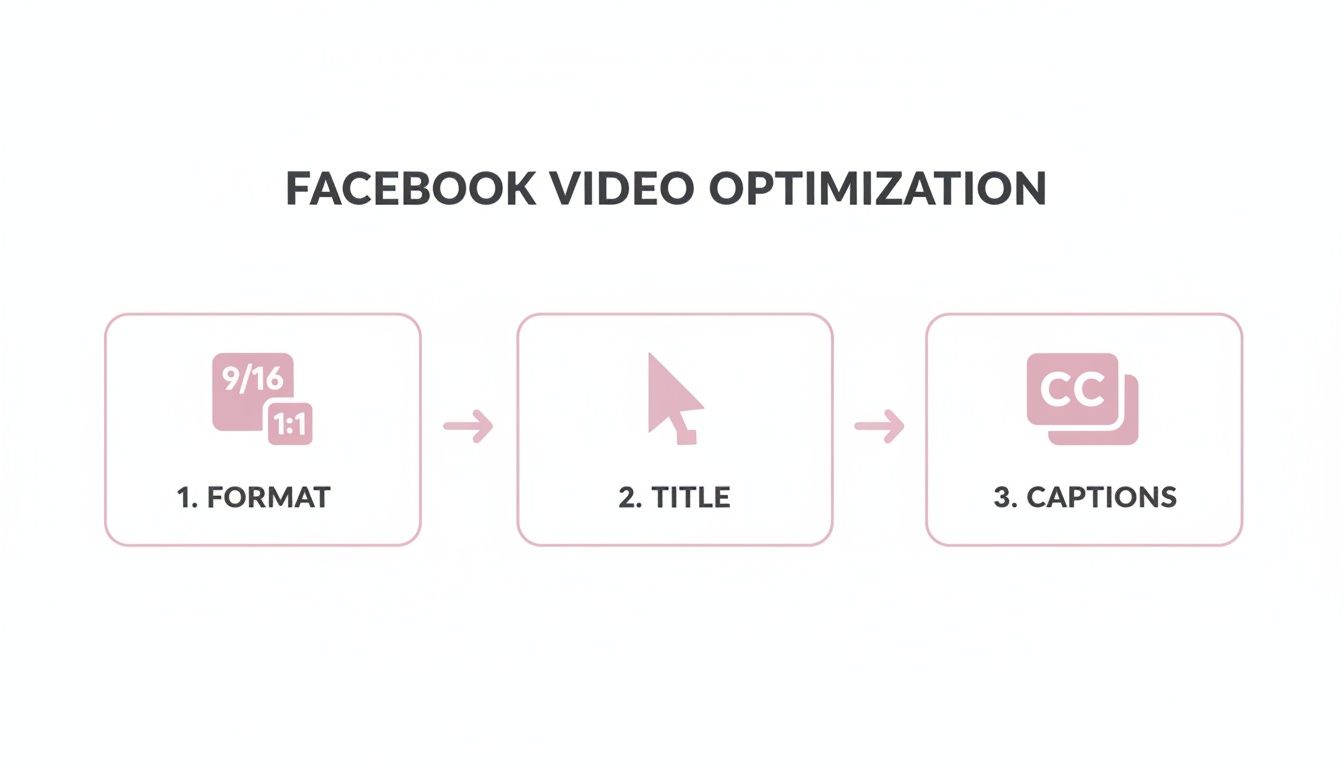
From the right format to a great title and accurate captions, each step plays a crucial role in stopping the scroll.
Practical Example: A podcaster uploads a one-hour interview. Using an AI video clipping tool, they can instantly find every key question, highlight the most engaging answers, and generate dozens of potential clips, saving hours of manual work.
To see the difference this makes, let's compare the old way with the new.
Manual Repurposing vs AI-Powered Clipping
| Task | Manual Editing | Our AI Platform |
|---|---|---|
| Finding Clips | Manually scrubbing through the timeline. | Instantly identifies key moments based on transcript or visuals. |
| Editing & Trimming | Precise, but slow and repetitive. | Automatic trimming, filler word removal ("um," "uh"). |
| Adding Captions | Tedious, manual transcription and timing. | Auto-generates and animates captions in seconds. |
| Formatting | Requires separate steps to crop and reframe for 9:16. | One-click reformatting for vertical video (Reels/Stories). |
| Time Investment | Hours for a few clips. | Minutes for dozens of clips. |
The table really tells the story. AI makes this workflow not just faster, but fundamentally more efficient.
Key Insight: These AI tools aren't just for speeding things up; they're like a creative assistant. By analyzing transcripts for keywords or spotting high-energy moments, they often find great clips you would have completely missed on your own.
What was once a multi-hour chore is now a quick, streamlined process. If you want to really get the most out of every video you create, it’s worth exploring these modern content repurposing strategies.
Getting Copyright and Scheduling Right
Before you even think about moving your videos over, we need to talk about two things that can make or break your entire strategy: copyright and scheduling. Get these dialed in, and you’ll have a smooth, effective workflow that keeps your accounts safe and your audience engaged.
First, the golden rule, and it's a big one: only download and re-upload video content that you own. I can't stress this enough. Grabbing someone else's YouTube video without their explicit permission is a fast track to getting your Facebook page flagged, or worse, shut down. It's a direct violation of copyright law and a huge no-no.
Content Ownership is Non-Negotiable
You might hear people talk about "Fair Use" for things like commentary or reviews, but that's a murky legal area you don't want to build your business strategy on. The only truly safe and ethical route is to work with your own original content.
If you love what another creator made and want to share it, just post the original YouTube link on your Facebook page. Never, ever download their video and upload it as your own. A solid youtube to facebook video strategy starts with respecting the work of others. It builds trust with your audience and lets you focus on creating great stuff instead of worrying about legal headaches.
Schedule Your Videos for Peak Performance
Consistency is everything on social media. Manually posting clips whenever you happen to think of it just doesn't cut it. To build real momentum, you need a content calendar, and scheduling is how you make that happen without chaining yourself to your desk.
Thankfully, Facebook gives you some powerful tools for this right out of the box. You can schedule posts directly from your Facebook Page, but I highly recommend getting familiar with Meta Business Suite (what used to be called Creator Studio). It lets you map out your video posts for days, weeks, or even months ahead of time.
Practical Example: Let's say you're a podcaster. On Monday, you chop up a one-hour interview into five great, shareable clips. You hop into Meta Business Suite and schedule one clip to go live every single weekday at 10 AM. Just like that, your entire week of video content is handled.
This method is a massive time-saver, but it also means you can be strategic, dropping content precisely when your audience is most likely to be online and scrolling. For anyone managing multiple pages or a high volume of content, schedulers aren't just a nice-to-have; they're an absolute necessity.
Combine a rock-solid understanding of copyright with a smart scheduling routine, and you've got a powerful, professional, and compliant video strategy that actually works.
Common Questions About Sharing YouTube Videos on Facebook
Let's clear up some of the common questions people have when it comes to getting their YouTube content over to Facebook. Getting these details right from the start will save you a lot of headaches and make sure your videos actually get seen.
Is It Better to Upload a Video Directly to Facebook or Just Link to YouTube?
Hands down, you should always upload your video directly, or "natively," to Facebook. I can't stress this enough.
Facebook’s algorithm is designed to keep people on Facebook. When you post a YouTube link, you're trying to send users away, and the algorithm just won't show it to nearly as many people. Native uploads, on the other hand, get way more organic reach in the News Feed.
Plus, you get some major perks with native uploads:
- Autoplay: Your video starts playing silently as people scroll, grabbing their attention instantly. A YouTube link just looks like a static box.
- Better Analytics: You get access to all of Facebook's detailed video metrics, so you know exactly how it’s performing.
- Smoother Experience: It keeps everything inside the Facebook app, which is what users prefer. No clicking away to another site.
Can I Get in Trouble for Posting a YouTube Video on Facebook?
Yes, you absolutely can if it's not your video. This is a big one.
If you download someone else's YouTube video and re-upload it to your Facebook page without their permission, you're breaking copyright law. It's also against YouTube's terms of service. Don't do it.
Only download and re-upload videos that you created yourself and own all the rights to. If you want to share a video from another creator, use the "Share" button on their YouTube video to post the link. That's the proper, legal way to do it.
What Is the Best Video Format for Facebook?
The "best" format really depends on where on Facebook you're posting it, because people watch videos differently in different places.
For Facebook Reels and Stories, you have to go with a vertical 9:16 aspect ratio. For the main feed, a square (1:1) or a slightly vertical (4:5) video works best. These formats take up more of the screen on a phone, which is where most people are watching. Always export your video as a high-quality MP4 or MOV file.
Transforming your long-form videos into dozens of engaging, shareable clips is the key to scaling your social media presence. Our AI helps you create professional, high-impact shorts 10x faster. Start your free trial today and see how easy it is to multiply your content.