Adding chapters to a YouTube video is a game-changer, and it's surprisingly simple. All you're doing is putting a list of timestamps in your video's description, making sure the first one is 00:00. That's it. YouTube then automatically creates clickable, labeled segments on your video's progress bar, letting viewers navigate your content with ease. It's one of the most powerful, low-effort ways to level up your channel's performance.
Why YouTube Chapters Are a Must for Creator Growth

Let's be real: holding a viewer's attention through a long video feels like a constant battle. If someone can't find what they're looking for right away, they're gone. That click-off hurts your channel's metrics, and it's a problem YouTube chapters were built to solve.
Think of chapters as a table of contents for your video. Instead of forcing viewers to scrub aimlessly through the timeline, you’re handing them a clear roadmap. They can instantly jump to the sections that matter most to them. This simple act of organization shows you respect your audience's time, and they'll love you for it.
The Algorithmic Advantage of a Better User Experience
A great user experience isn't just about being helpful; it’s a direct signal to the YouTube algorithm. When you add chapters to a YouTube video, you're boosting the exact metrics that YouTube cares about when deciding which videos to promote. The platform's main goal is to keep people watching, and chapters are a proven way to make that happen.
Here’s a quick rundown of how chapters directly benefit your channel:
- Sky-High Viewer Retention: By letting people skip parts that aren't for them, you keep them from leaving altogether. They stick around because they can find the value they came for—fast.
- Longer Watch Sessions: A viewer who has a good experience with one well-organized video is far more likely to check out another one from your channel.
- Massive SEO Boost: Chapter titles are indexed by both YouTube and Google. This means one video can suddenly start ranking for multiple, super-specific search terms, opening up new pathways for viewers to find you.
The impact isn't just theoretical; it's backed by hard data.
The Immediate Impact of Adding YouTube Chapters
Here's a quick look at the core benefits and data proving why adding chapters is a non-negotiable strategy for modern video creators.
| Metric | Potential Improvement with Chapters | Why It Matters for Your Channel |
|---|---|---|
| Average View Duration | Up to 34% higher | This is a primary ranking signal for the YouTube algorithm. |
| SEO Visibility | Chapter titles can rank as individual search results. | More entry points for organic traffic from Google and YouTube. |
| Viewer Engagement | Increased comments and shares on specific segments. | Shows viewers are actively connecting with your content, not just passively watching. |
| Re-watchability | Viewers can easily return to specific points. | Boosts long-term views, especially for tutorials, reviews, and educational content. |
As you can see, the data speaks for itself. Adding chapters is one of the most direct ways to improve the metrics that lead to real channel growth.
The numbers don't lie. Videos using chapters can see up to 34% higher average view duration compared to those without, according to YouTube's own analytics. This isn't a minor tweak; it's a direct line to getting your videos recommended more often.
From Passive Viewing to Active Engagement
Ultimately, adding chapters changes the entire relationship with your audience. You’re turning them from passive consumers into active participants who can control their own viewing journey. This small feature builds a ton of trust and positions your channel as a professional, go-to resource.
By breaking down dense topics into bite-sized pieces, you also make your content more accessible and re-watchable. This is absolutely critical for "how-to" tutorials, in-depth product reviews, or long-form interviews where people often need to come back to reference a specific segment. Taking a few extra minutes to add chapters is a smart investment in your content's future and your channel's growth. If you want to dive deeper into what makes content successful, you might be interested in our guide on how to measure content performance.
The Manual Method for Adding Video Chapters

Sometimes, the best way to get something done right is to do it yourself. Adding chapters by hand gives you absolute control over your video's navigation, letting you decide exactly where each segment starts and what it’s called. It's the go-to method for creators who want to make sure every chapter is perfectly timed and optimized.
The good news is that this all happens in a place you’re already very familiar with: the video description box in YouTube Studio. All you need to do is type out a simple list of timestamps, and YouTube’s system does the heavy lifting, turning that text into a clean, clickable chapter list right on your video's progress bar.
Getting the Format Right
Before you jump in, you need to know YouTube’s specific formatting rules. This is where most people get tripped up. Get these details wrong, and your chapters simply won't show up.
Here are the non-negotiable rules I've learned from experience:
- Start at the beginning. Your very first timestamp must be
00:00. This is the most common mistake I see. It doesn't matter how short your intro is; you need this timestamp to kick things off. - Keep chapters a decent length. Each chapter has to be at least 10 seconds long. You can't have a chapter at
01:15and another at01:20. This rule keeps the timeline from getting cluttered with tiny, unhelpful segments. - You need at least three. For the chapter feature to activate, your video must have at least three timestamps listed, including the required
00:00start time. - List them in order. Make sure your timestamps are in chronological order, from the earliest point in the video to the latest.
Following these guidelines is the key. If you’re looking for a more detailed walkthrough, this guide on how to add chapters to YouTube videos is a fantastic resource.
A Real-World Timestamp Example
Let's see what this looks like in action. Imagine you just finished a 15-minute tutorial called "Social Media Marketing Masterclass for Beginners." You’d navigate to that video’s details page in YouTube Studio and pop a list like this into the description box:
Timestamp Example for a Marketing Video
00:00Introduction to Social Media Strategy
01:45Choosing the Right Platforms (Facebook vs. Instagram)
04:30Creating Your Content Calendar
07:12Writing Compelling Captions That Convert
10:55Understanding Basic Analytics and KPIs
13:20Q&A and Final Tips
After you hit "Save," YouTube's magic kicks in. The progress bar on your video will now be split into these six distinct segments, each with a title that viewers can click to jump straight to the information they need.
Writing Chapter Titles That Actually Help
The technical formatting is one half of the equation; writing smart chapter titles is the other. These titles aren't just labels—they're opportunities to improve your viewer's experience and boost your video's SEO at the same time.
Here are a few tips I always follow when crafting my chapter titles:
- Be descriptive, not vague. Instead of "Part 2" or "Next Step," use a title that tells the viewer exactly what's happening, like "Setting Up Your Camera and Lighting" or "How to Research Your Competitors."
- Weave in keywords. Think about what someone would type into Google or YouTube to find a specific part of your video. "Editing Your Audio in Audacity" is far more discoverable than a generic title like "Audio Fixes."
- Keep it brief. You want to be descriptive, but long, rambling titles get cut off. Aim for titles that are clear and punchy, so viewers can scan them in a split second.
Going the manual route gives you surgical precision. You can ensure every title is optimized and every segment starts exactly where it should, giving you total command over how your audience engages with your content.
Creating Chapters That Supercharge Your Video SEO
Adding chapters is a great start, but the real magic happens when you start treating them as an SEO tool. Think about it: every chapter title you write gets indexed by both YouTube and Google. Suddenly, each one acts like its own mini-headline, giving your video multiple chances to show up in search results.
This means a single video can start ranking for dozens of different search queries. A viewer might not be looking for your main video title, but they could be searching for the exact problem you solve in chapter three. You’re essentially creating new doorways for people to find your content.
Researching Keywords for Chapter Titles
To make your chapters pull their weight in SEO, you have to get inside your audience's head. What specific questions are they typing into that search bar? This is where chapter-specific keyword research comes in.
Forget broad terms. You want to focus on long-tail keywords—those longer, more specific phrases people actually use. A generic chapter title like "Conclusion" is an SEO dead end. But something like "Final Review and Performance Verdict"? Now you're talking. That’s a phrase someone deep in the buying process is likely to search for.
- Lean on YouTube Search: Start typing a topic related to your video into the YouTube search bar. Pay close attention to the auto-complete suggestions. These are real searches from real people.
- Mine Google's "People Also Ask": Do a quick Google search for your topic and find the "People Also Ask" box. It's an absolute goldmine for chapter title ideas that answer direct questions.
- Scope out the competition: See how other high-performing videos in your niche structure their chapters. What keywords are they using in their titles? Don't copy, but definitely take inspiration.
This kind of research turns a simple table of contents into a powerful tool for getting discovered. And if you really want to double down on this, learning how to convert YouTube video to text can give you a full script to pull even more keyword ideas from.
Optimizing Chapters for Different Video Lengths
There's no magic number for how many chapters a video should have. It really depends on the length and density of your content. A quick, punchy video requires a different strategy than a deep-dive tutorial.
A 15-minute product review, for instance, might only need 5-7 chapters that hit the key features, pros, and cons. On the other hand, a 90-minute webinar or podcast could easily support 15-20 chapters, breaking down every major talking point, Q&A segment, or topic shift. The key is to match the chapter frequency to the flow of information.
Did you know YouTube's recommendation engine drives over 70% of all watch time? It also heavily favors videos with chapters. We've seen data showing this can boost impressions by 40% in the first 48 hours. Not only that, but these videos often see a 22% higher click-through rate (CTR) from the recommendation feed.
This isn't just a hunch; the algorithm actively rewards creators who make their content easier to navigate, no matter how long it is.
Practical Example: From Vague to Valuable
Let's make this real. Say you've made a video about email marketing. A lazy, generic chapter title might be:
- Vague Chapter Title: "Next Steps"
This tells both your viewer and the search algorithm absolutely nothing. Now, let’s inject some keyword research and make it work for us:
- SEO-Optimized Chapter Title: "Creating Your First Email Automation Workflow"
See the difference? This title is specific, action-oriented, and packs in a keyword phrase ("email automation workflow") that your ideal viewer is searching for. When you apply this thinking to every single chapter, you're not just adding timestamps—you're multiplying your video's chances of being found.
This detailed approach also pays off if you ever need to get a transcript from a YouTube video for repurposing content; your well-named chapters give you a perfect, ready-made outline.
Leveraging Automation for Efficient Chapter Creation
Let's be honest: if you're managing a YouTube channel with a steady stream of content, manually adding chapters to every single video is a serious time sink. It's a precise but painstaking process that quickly becomes a bottleneck, especially for agencies or teams publishing multiple times a week.
At some point, automation isn't just a nice-to-have; it's essential for keeping your workflow sane and consistent.
The easiest way to dip your toes in is with YouTube's own built-in tool. Just head into your YouTube Studio settings and check the box for "Allow automatic chapters and key moments." This tells YouTube's AI to take a shot at analyzing your video and creating chapters for you. For creators who just need something without any fuss, it can be a decent starting point.
But you get what you pay for, and this feature is free for a reason. It really only works well when your video has very clear, distinct topic changes. For anything with a more conversational or free-flowing style, it often struggles. Worse, you have zero control over the chapter titles it generates, which is a huge missed opportunity for SEO.
Stepping Up with Dedicated AI Platforms
This is where specialized, third-party AI tools really shine. Unlike YouTube’s general-purpose AI, these platforms are built specifically for tasks like transcription and chapter generation. They dig deep into your video's audio and transcript, picking up on subtle conversational shifts and contextual changes to create impressively accurate chapter markers.
The real win here is getting both speed and control.
- Massive Time Savings: An AI tool can whip through an hour-long podcast or webinar and spit out a full list of timestamped chapters in just a few minutes. That same task could easily take a human editor an hour or more. For an agency, that translates to thousands of saved hours a year.
- Greater Accuracy: Sophisticated AI algorithms are trained to understand context and identify logical topic breaks far better than a basic system can. The result is chapter breaks that actually make sense to a viewer.
- SEO-Optimized Titles: Many of these tools don't just find the timestamps; they suggest descriptive, keyword-rich titles for each chapter. This gives you a fantastic head start, turning a writing task into a quick review and refinement process.
As you can see from this decision tree, the longer and more complex your videos get, the more critical automation becomes for a sustainable workflow.
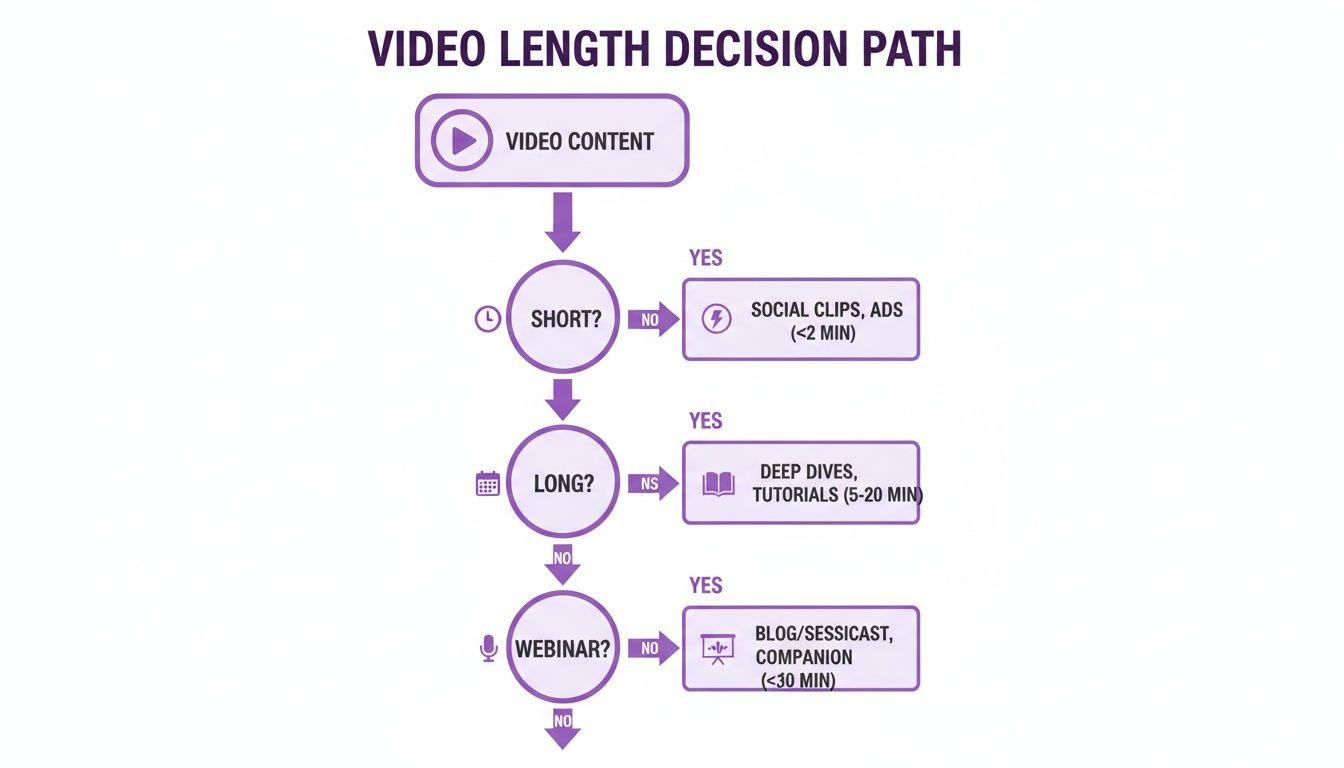
For dense content like tutorials, webinars, or long-form interviews, the efficiency gains from a dedicated tool are simply too big to ignore.
Making the Right Choice for Your Workflow
So, when should you pull the trigger on an automated tool? It really comes down to your content volume and how much control you need. If you're publishing daily or managing several channels, an AI-powered platform is a no-brainer for scaling your production. Research consistently shows that businesses implementing automation see productivity boosts of 25-35% in related tasks. For you, that means less time stuck in post-production and more time creating great content.
To help you decide what's best for your channel, here's a quick comparison of the manual and automated approaches.
Manual vs Automated Chapter Creation
| Feature | Manual Timestamps | AI-Powered Automation |
|---|---|---|
| Speed | Slow; can take an hour for a long video. | Fast; generates chapters in minutes. |
| Accuracy | Potentially 100% accurate but prone to human error. | High accuracy (95%+), with minor edits needed. |
| Control | Full control over titles and timestamps. | Provides an editable draft for full control. |
| SEO Potential | High, but requires manual keyword research. | High; suggests SEO-friendly titles automatically. |
| Scalability | Poor; becomes a major bottleneck with volume. | Excellent; built for high-volume workflows. |
| Best For | Short, simple videos or perfectionists with time. | Creators, agencies, and teams with consistent output. |
Ultimately, both paths lead to chapters, but the automated route is built for growth.
While YouTube’s automatic chapters are a simple on/off switch, a more advanced system gives you an editable, AI-generated draft. You get the raw speed of automation paired with the final-touch control of a human editor. This hybrid approach lets you fine-tune chapter titles for search and guarantee every timestamp is spot-on without all the upfront manual labor.
For teams looking to build this kind of efficiency right into their production process, it’s worth exploring automatic video editing software that can handle these jobs from the start. This allows you to add chapters to a YouTube video as just one step in a much larger, more streamlined content pipeline, freeing up your team to focus on bigger things.
Common Chapter Mistakes and How to Avoid Them

It’s a uniquely frustrating feeling: you’ve meticulously planned out your video segments, typed out all the timestamps, and hit "Save"—only to find your chapters aren't showing up. I’ve been there, and the good news is that the fix is almost always simple once you know what to look for.
The problem usually boils down to a few common formatting errors that trip up YouTube's system. Even a single misplaced character can stop the whole thing from working. Let’s walk through the most frequent slip-ups so you can add chapters to a YouTube video and get them right on the first try.
The Missing Start Time
This is, hands down, the number one reason chapters fail to appear. Many creators figure they can just start their first chapter whenever the "real" content begins, but that’s a critical oversight. YouTube’s rules are strict on this point.
Your timestamp list must begin with 00:00.
Think of it as the starting line. Without it, YouTube’s system doesn’t have an anchor point and will simply ignore your entire list of chapters.
Before (Doesn't Work):
01:15Unboxing the Product03:45First ImpressionsAfter (Works Perfectly):
00:00Introduction01:15Unboxing the Product03:45First Impressions
This one little change is often the only fix you need to get everything working.
The Wrong Time Format
When it comes to the timestamp format itself, precision is key. YouTube’s parser is looking for a very specific pattern: minutes:seconds or hours:minutes:seconds. Any small deviation, like accidentally using a period instead of a colon, will break the feature.
It’s an easy typo to make, especially when you’re working quickly, but it’s just as easy to spot and fix.
A Real-World Example: Fixing Punctuation
Incorrect format:
05.22 - Setup ProcessThat period might seem minor, but YouTube won't recognize it as a valid time.
Correct format:
05:22 - Setup ProcessBy swapping the period for a colon, the timestamp instantly becomes readable to the platform.
Always give your timestamps a quick scan for punctuation before you publish. This small detail is often the difference between functional chapters and a plain block of text in your description.
Chapter Length and Count Violations
YouTube also has a couple of rules in place to make sure the chapter experience is actually useful for viewers. If you break either of these, your chapters won't show up, even if all your formatting is perfect.
First, you need at least three timestamps in your list, and that includes the required 00:00 start time. A list with just two entries won't be enough to trigger the feature. This is because YouTube wants to see meaningful segmentation, not just a start and an end point.
Second, every single chapter must be at least 10 seconds long. This smart rule prevents creators from spamming the progress bar with tons of tiny, unhelpful micro-chapters. Just make sure the gap between each timestamp is 10 seconds or more.
- Mistake to Avoid:
02:10Step 102:15Step 2 (This chapter is only 5 seconds long, so it will break the feature)03:30Step 3
By steering clear of these common pitfalls, you can ensure that the time you put into chaptering your videos pays off with a much better experience for your audience.
Common Questions About YouTube Chapters, Answered
Once you get the hang of adding chapters, a few more specific questions almost always pop up. Let's tackle the most common ones I hear from creators so you can use this feature like a pro.
How Long Does It Take for Chapters to Appear?
Usually, they show up instantly. As soon as you hit "Save" on the video details page, the change should be live. You can pop over to the video's public page and see them working right away.
However, sometimes there's a small lag, especially if you're working with a really long video or if YouTube's servers are particularly busy. If you don't see them after a few minutes, don't panic. But if an hour goes by and there's still nothing, it’s almost always a tiny formatting mistake on your end.
Before you do anything else, go back and check for these common slip-ups:
- You forgot the
00:00start time: Every chapter list absolutely must begin with00:00. - A typo in the timestamp: A period instead of a colon is a classic mistake (e.g.,
03.15instead of03:15). - Not enough chapters: You need at least three timestamps in your list for the feature to kick in.
Nine times out of ten, fixing one of these little errors will make your chapters appear immediately.
Can I Add Chapters to an Old Video?
Yes, and you absolutely should! You can go back and add, edit, or remove chapters from any video on your channel, no matter how old it is or how many views it has.
This is actually a brilliant way to breathe new life into your evergreen content. Got a tutorial from two years ago that still gets steady traffic? Adding chapters makes it instantly more valuable and user-friendly. In fact, some studies have shown that well-structured content can boost viewer satisfaction by as much as 50%.
Giving an old video this kind of usability upgrade can also send a positive signal to the YouTube algorithm, potentially giving it a nice little bump in recommendations.
Do Chapters Actually Improve Video SEO?
They make a huge difference. Adding chapters with clear, keyword-focused titles gives YouTube and Google a much more detailed map of your content. You’re essentially spelling out what each part of your video is about.
This allows search engines to start indexing specific moments within your video.
Think of it this way: your video transforms from a single block of content into a collection of individual, rankable answers. Suddenly, someone searching for a super-specific, long-tail query like "how to set up a key light for interviews" might land directly on that 2-minute segment inside your longer "Complete Guide to Studio Lighting" video.
This drives highly targeted viewers—the exact people looking for your specific expertise—right to your content. Each chapter title becomes another hook in the water, another chance for a new viewer to find you.
Is There a Limit on How Many Chapters to Add?
YouTube doesn’t have a hard-and-fast rule on the maximum number of chapters. The only real technical barrier is the 5,000-character limit in the video description, which is more than enough for even the most complex videos.
The real question isn't about limits, but about what makes sense for the viewer. The goal is to make the video easier to navigate, not to create a cluttered mess on the timeline.
Here’s a good rule of thumb I follow:
- For a standard 15-30 minute video: I usually land somewhere between 6 and 12 chapters. This is enough to outline the main points without overwhelming people.
- For long-form content (1-2 hours): It might be more like 15 to 25 chapters to mark major topic changes, different segments, or special sections like a Q&A.
Focus on quality, not quantity. Every chapter should mark a distinct and logical break in the content. A handful of well-named, meaningful chapters is always better than a long list of rushed ones that just make the progress bar look chaotic.
Ready to stop wasting hours on manual editing and start creating content at scale? Swiftia uses powerful AI to transform your long-form videos into dozens of high-impact, ready-to-post short clips for TikTok, Reels, and Shorts. Automate your workflow, customize your brand, and create content up to 10x faster. Discover how Swiftia can grow your channel today.