An AI TikTok video maker is a tool that takes your long-form content—think podcasts, webinars, or long interviews—and automatically chops it up into short, punchy clips ready for social media. It's essentially a smart content repurposing machine, designed to save creators and marketers from the endless grind of manual editing.
The New Era of Video Content Creation
We all know the demand for short-form video is insatiable, but the time it takes to create has always been the biggest hurdle. Manually scrubbing through hours of footage to find a few golden nuggets, then cutting and formatting them for vertical video, is mind-numbingly tedious. This is exactly the pain point an AI TikTok video maker was built to eliminate.
Think of it this way: a traditional video editor is like a master chef, meticulously crafting one dish at a time. It’s an art, but it’s slow. An AI video maker is more like a high-tech automated kitchen. You give it one big ingredient—your hour-long webinar—and it instantly serves up a whole buffet of viral-ready snacks.
This tech isn't just about moving faster; it's about unlocking the treasure trove of potential sitting dormant in your existing content. It gives anyone the power to seriously ramp up their output without having to ramp up their workload.
How AI Automates the Editing Process
At its heart, this software uses layers of artificial intelligence to watch, listen to, and understand your long-form video. The whole process is designed to mimic the choices a human editor would make, but at a speed and scale no human could ever match. This is just one piece of the larger puzzle when it comes to AI for social media marketing.
Here’s a peek under the hood at what the AI is doing:
- Content Analysis: The AI transcribes all the audio and uses natural language processing (NLP) to figure out what’s being discussed. It spots key topics, important words, and even moments where the energy and emotion spike.
- Speaker Detection: In videos with multiple people, the AI can tell who is talking and automatically keeps the camera focused on them. This is a lifesaver for interviews and panel discussions.
- Automated Formatting: The tool automatically adds those dynamic, animated captions you see everywhere. Statistics show that videos with captions see a 12% increase in view time, making this feature critical for audience retention.
Key Takeaway: An AI video maker acts as a powerful content repurposing engine, turning one long-form asset into dozens of social-ready clips. This finally cracks the code on how to stay consistent and relevant on platforms like TikTok.
A Practical Example of Repurposing
Let’s imagine a digital marketing agency that produces a weekly one-hour podcast. In the past, their social media manager would block off an entire day just to manually mine that podcast for two or three short clips to post on TikTok and Instagram Reels. It was a chore.
Now, by using an AI TikTok video maker, they just upload the podcast recording. Within minutes, the platform delivers 15 unique, shareable clips complete with captions. This change doesn't just save a ton of time; it allows them to post far more frequently, which is a huge factor in pleasing the algorithm. The core concepts driving this efficiency are covered in guides on automatic video editing software.
Why Every Creator Needs an AI Video Maker
In the world of short-form video, speed is the name of the game. If you're not consistently putting out new content, you're falling behind. That's where an AI TikTok video maker becomes more than just a nice-to-have tool; it's a strategic advantage that tackles the biggest headaches for creators and businesses: the sheer time and money it takes to make good video.
The biggest win here is efficiency, hands down. Tasks that used to take a skilled human editor hours, or even a full day, can now be done in minutes. This kind of speed lets you keep up a relentless posting schedule, which is absolutely essential to stay relevant on algorithm-driven platforms like TikTok.
And let's be clear, TikTok is the platform to be on. The platform's user base is incredibly active, with the average user spending 95 minutes per day on the app. This high level of engagement gives creators a superior 2.80% average engagement rate—the best in the business. If you want the full picture, you can dive deeper into the latest short-form video statistics.
Slash Production Time from Days to Minutes
The most immediate, tangible benefit of using an AI video maker is the time you get back. Think about all the tedious parts of editing: scrubbing through footage to find the best moments, manually typing out captions, and cropping everything for a vertical screen. The AI automates all of it.
This frees you up to do what you actually should be doing—coming up with new ideas, engaging with your community, and thinking about the bigger picture. You end up creating more content without the burnout, and frankly, the quality of your ideas improves when you're not stuck in the editing weeds.
Here’s a practical example: Imagine a marketing agency runs a one-hour webinar for a client. In the old days, chopping that up into social clips was a multi-day project. Now, they just upload the webinar recording to an AI tool. In a single afternoon, the AI spits out 15 unique, ready-to-post TikTok clips, complete with animated captions and automatically focused on whoever is speaking. Just like that, they have a month's worth of content from one webinar. That kind of turnaround used to be impossible.
Achieve Significant Cost Savings
Time isn't the only thing you'll save. The financial impact is huge. Professional video production has always been expensive, demanding pricey software subscriptions and the budget to hire editors. This has always been a major hurdle for smaller businesses and solo creators.
AI video makers completely change that equation. They bundle the functionality of multiple expensive tools into one affordable subscription, leveling the playing field for everyone.
Let’s break down where the savings come from:
- Reduced Software Costs: You no longer need separate subscriptions for your video editor, a transcription service, and a captioning tool. It's all in one place.
- Lower Labor Expenses: The need to hire freelance editors for basic tasks like creating clips from long-form content pretty much disappears.
- Increased Asset ROI: You get so much more out of every single piece of content you create. That one webinar or podcast episode can be turned into dozens of marketing assets with minimal effort.
This new reality means you don't need a Hollywood-sized budget to produce polished, professional-looking video content. At Swiftia, our whole approach is built around this idea. We focus on making it incredibly efficient to scale your output without scaling your costs. Our platform's edge is its specialized focus on the entire repurposing workflow, offering features like AI-powered virality scoring and active speaker detection that are finely tuned to turn your existing content into a powerful engine for growth.
The Secret Sauce: What an AI Video Maker Actually Does
The real magic of an AI TikTok video maker isn’t just about making things faster. It’s about the smart, behind-the-scenes features that give your content a professional polish with almost zero manual effort. These aren’t just small tweaks; they completely change the editing game by automating the thankless, time-sucking tasks that used to eat up a creator's day.
To really get why this tech is such a big deal, it helps to understand what it's capable of. If you want a broader look at the editing world, checking out resources on the best video editing software can give you some great context.
Now, let's break down the most important features you should be looking for.
Banishes Filler Words Automatically
Look, everyone uses filler words. The "ums," "ahs," "you knows," and "likes" are just part of how we talk. But in a video, they can make you sound hesitant and hurt your credibility, causing viewers to swipe away.
Hunting down and slicing out every single one of these is one of the most mind-numbing parts of editing. An AI video maker does it for you. The software listens to your audio, recognizes the sound patterns of those filler words, and snips them out cleanly.
Here’s a practical example: A creator films a 10-minute talk for a TikTok series. They might have said "um" 15 times and "like" 20 times without even realizing it. The AI zaps all 35 instances in seconds, making them sound more confident and their message much clearer—no manual slicing required.
Creates Eye-Catching Animated Captions
Captions aren't just a nice-to-have anymore; they're essential. An estimated 85% of social media videos are watched on mute, and good captions are key for both accessibility and keeping viewers hooked. But plain, boring text won’t cut it. You need dynamic, animated captions that pop off the screen and hold attention.
This is where AI really shines. It transcribes your audio with stunning accuracy and then applies pre-built, stylish animations to the text. The result? Every word appears on screen in a visually engaging way, perfectly timed with your speech.
The best tools give you plenty of control:
- Brand-Specific Fonts & Colors: Easily match your existing brand style guide.
- Fun Animation Styles: Think karaoke-style highlights, word-by-word pop-ups, or smooth fades.
- Flexible On-Screen Placement: Move captions around so they don’t cover up the important parts of your video.
Puts the Spotlight on the Active Speaker
If your video has more than one person—like an interview or a podcast panel—it's crucial to keep the camera focused on whoever is talking. Doing this by hand means constantly cutting back and forth, which is tedious and easy to mess up.
Active speaker detection is the AI-powered solution. The system analyzes both the audio and video to figure out who's talking and automatically shifts the frame to focus on them. It’s like having a professional director switching cameras for you, creating a dynamic and easy-to-follow conversation.
Unlocks a Global Audience with Translations
Want to reach people beyond your home country? You need your content in their language. An AI video maker handles this by transcribing audio in dozens of languages and can even translate your captions on the fly.
This single feature can multiply your video's reach overnight. You can connect with viewers all over the world without the cost and hassle of hiring translators or producing different versions of the same video. It's a massive shortcut to building a global brand.
Keeps Everything Crisp with High-Resolution & Smart Reframing
Quality is non-negotiable. A pixelated, blurry video will get skipped, no matter how good the content is. Any modern AI tool has to render in high resolution, often up to 4K, so your videos look sharp and professional on any screen.
Even better is automated reframing. The AI can take a standard horizontal (16:9) video and intelligently reformat it for vertical platforms like TikTok or Reels (9:16). It doesn't just crop the middle; it actually tracks the action or speaker to make sure they're always perfectly in the frame. This saves an unbelievable amount of time and ensures your content always looks native to the platform.
Manual Editing vs AI-Powered Editing Workflow
To put it all into perspective, let's compare the old way of doing things with the new AI-powered approach. The difference in time and effort is staggering.
| Task | Manual Editing Process | AI Video Maker Process |
|---|---|---|
| Transcription | Transcribe audio by hand or use a separate tool (30-60 mins) | Instant, automated transcription (1-2 mins) |
| Caption Creation | Manually time and format each caption block (1-2 hours) | Auto-generates and syncs captions (2-5 mins) |
| Filler Word Removal | Listen through and manually cut each "um" and "ah" (30-45 mins) | One-click removal of all filler words (1 min) |
| Reframing for Social | Create new projects, manually reframe and track subjects (20-30 mins) | Automated reframing with AI subject tracking (1-2 mins) |
| Multi-cam Editing | Manually sync and cut between camera angles (45-60 mins) | AI detects the active speaker and cuts automatically (2-5 mins) |
As you can see, tasks that once took hours of meticulous work are now handled in just a few minutes. This isn't just a minor improvement; it's a complete overhaul of the content creation workflow, freeing you up to focus on ideas instead of tedious edits.
How to Choose the Right AI Video Maker
Picking the right AI TikTok video maker can feel overwhelming. With so many platforms making the same big promises, it's tough to know which one will actually work for you. Here’s the secret: there is no single "best" tool. The best one is the one that fits your specific workflow, content style, and goals like a glove.
The trick is to stop looking at what the tools can do and start with what you need them to do. The first step is figuring out what kind of user you are. Once you know that, the right choice becomes much clearer.
First, Figure Out Your User Profile
Are you an agency juggling a dozen clients, or a solo creator trying to build your own brand? The answer completely changes what you should be looking for. Let's break down the common profiles.
-
Social Media Agencies: These teams live and breathe efficiency and scale. They need to manage multiple brands, each with its own look and feel, so brand consistency and easy client collaboration are non-negotiable. Their ideal tool is built for high-volume, multi-client work.
-
Solo Creators and Influencers: For the one-person show, it's all about speed and simplicity. They need a tool that lets them churn out a ton of great-looking content without getting bogged down in a complex editing process. No time for a steep learning curve.
-
Podcasters and Media Publishers: This group has a very specific goal: turn long-form audio and video into bite-sized, shareable clips for social media. For them, super-accurate transcriptions, active speaker detection, and features that make audio-first content look good on a phone are critical.
-
Developers and Startups: These folks don't really care about the platform's user interface. They're looking under the hood. What matters to them is a powerful, well-documented API that they can plug into their own products or internal systems to automate content creation.
Match Your Needs to the Must-Have Features
Once you know which camp you're in, you can zero in on the features that will actually make a difference for you. A feature that’s a lifesaver for an agency might be totally useless to a solo creator.
For example, a social media agency absolutely needs:
- Brand Kits: The power to save and instantly apply a client's specific logos, color palettes, and fonts to any video.
- Team Collaboration: Shared workspaces where multiple people can jump in to edit, review, and approve content without a mess of emails.
- Multi-Platform Scheduling: The ability to push finished videos directly to social media scheduling tools, closing the final loop in the workflow.
On the other hand, a developer won’t even look at the drag-and-drop editor. Their checklist is all about the backend:
- Robust API Documentation: Clear, easy-to-follow guides that make integration a breeze.
- Webhook Support: The ability to get notified and trigger other automated actions when a video is done processing.
- Scalable Rendering: The confidence that the API can handle a massive number of video requests without breaking a sweat.
Here's a practical example: A podcaster uploads a two-hour interview. Their dream AI video maker would automatically pull out the best soundbites, and it would use active speaker detection to make sure the video frame cuts between the host and the guest as they talk. Then, it would apply custom-styled captions to make the whole thing pop on a phone screen.
A Final Checklist Before You Commit
Before you pull out your credit card, run through these final questions. This will save you from getting stuck with a tool that looks great on the homepage but can't handle your real-world needs.
- Source File Compatibility: Can the tool handle my original video files? If you shoot in 4K, you need a platform that won't downgrade your quality from the get-go.
- Customization and Branding: How much control do I really have? Can I tweak caption fonts, colors, and animations to perfectly match my brand, or am I stuck with templates?
- Accuracy and Reliability: How good is the transcription and filler word removal, really? If I have to spend hours manually correcting "ums" and "ahs," the automation isn't saving me much time.
- Workflow Integration: Does it play nice with the other tools I rely on? Look for connections to cloud storage like Google Drive or social media schedulers.
- Cost vs. Value: Does the price make sense for how I'll use it? Look closely at the fine print on rendering limits, video length, and the number of exports you get per month. To get a better sense of the market, you can check out guides on the best AI video editors to compare what you get for your money.
By being methodical and focusing on your own needs first, you can find an AI TikTok video maker that does more than just save you time—it becomes a reliable engine for your entire content strategy.
Putting AI to Work: Real-World Scenarios
Knowing the features of an AI TikTok video maker is one thing, but seeing how these tools completely reshape real-world workflows is another. This is where the magic really happens. They aren't just fancy editors; they're the core engines driving modern, scalable content strategies.
So, let's get practical and walk through a few powerful ways people are putting this technology to work.
First, take a look at this chart. It breaks down how different pros—from agencies to developers—can find the right tool for their specific needs.
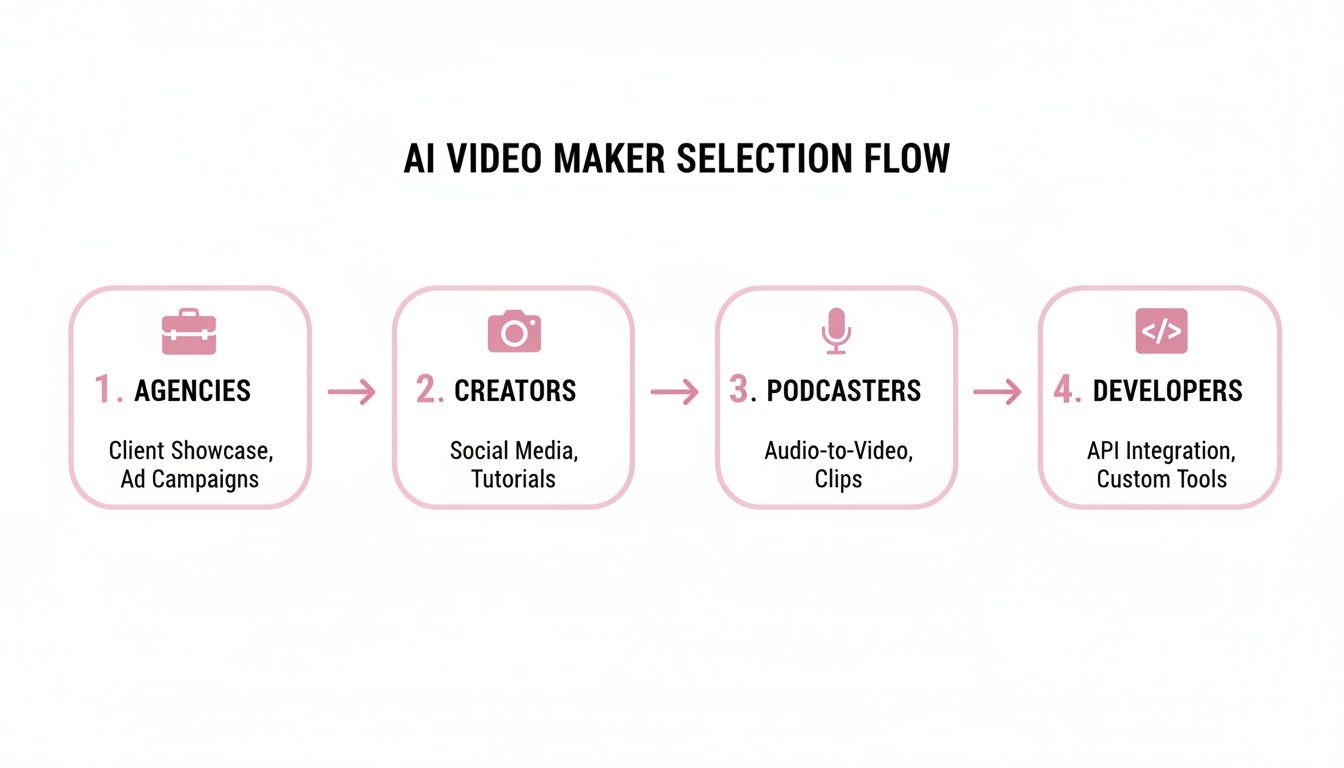
As you can see, it's not a one-size-fits-all situation. The best tool for a solo podcaster is going to be very different from what a large marketing agency or a developer needs.
The Podcast Repurposing Machine
Podcasters are sitting on a mountain of gold. The problem? Manually chopping up hours of audio and video into social-media-sized bites is a soul-crushing amount of work. This is the perfect job for an AI system. It becomes a tireless repurposing machine, spinning one weekly episode into a constant flow of promo content.
Here’s how that looks in practice:
- Upload the Episode: The podcaster finishes their one-hour weekly recording and simply uploads the video file to the AI platform.
- Let the AI Cook: The AI immediately gets to work. It transcribes the whole conversation, figures out who is speaking when, and identifies all the best moments—the insightful quotes, funny tangents, or mic-drop takeaways.
- Get Your Clips: In just a few minutes, the platform serves up 10-15 ready-to-post clips, all formatted for TikTok. The AI automatically adds dynamic captions that pop and uses its speaker detection to keep the camera focused on whoever is talking.
Just like that, you have a full week's worth of top-tier social content from a single recording, with almost no human effort. This isn't just a time-saver; it's how you build a consistent presence and grow your audience without burning out. To dive deeper, check out our guide on how to repurpose long videos into engaging short clips with AI.
The Corporate Content Engine
For B2B companies, things like webinars and product demos are the lifeblood of lead generation. But let's be honest, those long-form videos rarely get much love on social media. An AI video maker can fix that, turning those valuable assets into a powerful corporate content engine.
Imagine a B2B software company that hosts a 45-minute webinar each month to showcase its expertise and drive sign-ups.
By plugging an AI video maker into their workflow, they can instantly slice that one webinar into a dozen compelling snippets. Each clip zeros in on a specific feature, a customer pain point, or a killer tip—all perfectly sized for TikTok and LinkedIn.
This approach massively boosts the ROI on their original content. We're seeing a huge shift here; marketers report that using AI for video creation can increase lead generation by up to 50% and improve viewer engagement by as much as 45%. It’s clear these tools are becoming non-negotiable for modern marketing.
Automating the Entire Workflow with an API
Now for the most advanced play: integrating an AI TikTok video maker directly into your company’s tech stack using an API. This creates a completely hands-off pipeline where videos get processed automatically.
Here’s a practical example of that workflow:
- The Trigger: A new video, like a webinar recording, is saved to a cloud folder (think Google Drive or Amazon S3).
- The Signal: That upload triggers a webhook, which pings the AI video maker's API.
- The AI's Job: The API tells the AI to get to work—find the best clips, add branded captions, and reformat everything for vertical screens.
- The Delivery: Once the clips are ready, they're automatically pushed to a social media scheduler like Buffer or Hootsuite, queued up for a final review before going live.
This level of automation transforms the AI tool from a simple editor into a fundamental part of your content operations. It unlocks the ability to create content at a scale that just wasn't possible before.
Frequently Asked Questions
Jumping into AI-powered video creation brings up a ton of questions. As this tech weaves its way into our daily workflows, it's smart to get a handle on what it's truly good at—and where it still needs a human touch. Let's tackle some of the most common things people ask about using an AI TikTok video maker.
Can an AI TikTok Video Maker Really Replace My Human Editor?
This is the big one, and the honest answer is: it depends. It's more helpful to think of an AI video maker as an incredibly efficient assistant, not a full-on replacement for a creative human.
Where AI shines is in chewing through the tedious, repetitive work. I'm talking about the 80-90% of editing that's just pure grunt work. It can find the key moments, transcribe everything, burn in perfectly timed captions, and reformat your video for vertical screens. This frees up your human editors to do what they do best: focus on storytelling, creative direction, and adding that special polish that makes content truly great.
Here’s a practical example: A marketing agency was spending 10 hours a week paying a freelancer to slice up a client’s podcast for social media. Now, their AI tool does the first pass in less than an hour. An in-house creative then spends maybe 30 minutes fine-tuning the output. The savings in both time and money are massive.
For a lot of creators and brands who just need to get consistent, quality content out the door, the clips an AI generates are often good enough to post immediately. It's a much faster and more affordable alternative to a fully manual process.
How Does the AI Know Which Clips to Pick from a Long Video?
It's not just randomly chopping up your video. Modern AI video makers use a pretty sophisticated stack of machine learning models to analyze your content, almost like a seasoned producer would.
First, Natural Language Processing (NLP) gets to work. It transcribes all the audio to figure out what's being said, identifying important topics and keywords. It also listens for moments of high energy—like a change in vocal tone, laughter, or an emphatic statement—which are often gold for social media. Some of the more advanced platforms even use a "virality score," which has been trained on millions of successful videos to predict what might perform well.
At the same time, computer vision is analyzing the visuals. It's looking for scene changes, motion, and—this is a big one for interviews—active speaker detection. This feature is what allows the camera to automatically focus on the person speaking, creating a much more dynamic and professional-looking final clip.
Is This Stuff Hard to Plug into My Current Workflow?
Not at all. The best tools in this space are built to be incredibly easy to use. For most people, it's as simple as logging into a website, uploading your video file, and letting the AI do its thing. Once it's done, you can download the clips or even push them directly to your social media scheduler.
For teams with more complex needs, the leading platforms offer an API (Application Programming Interface). This is a game-changer for businesses because it lets your developers connect the AI's brain directly into your company's existing software.
With an API, you can build fully automated pipelines. Imagine setting it up so that every time a new video is saved to your company's Google Drive, the AI automatically starts processing it. The finished social clips could then be sent straight to your scheduling tool, all without a single person having to click a button. It’s a powerful way to scale content production.
Won't My Videos Look Cookie-Cutter if an AI Makes Them?
That's a fair worry, but the top-tier AI video makers are designed specifically to keep you in control of your brand's look and feel. The AI is there to handle the mechanics, but you're still the director.
You have the final say on everything. You can:
- Customize Captions: Change the fonts, colors, and animation styles to perfectly match your brand guidelines.
- Add Brand Elements: Easily overlay your logo or other branded graphics on every single video.
- Fine-Tune the Edits: Don't like a clip the AI chose? No problem. You can review its suggestions, trim them down, or pick a different layout entirely.
Think of the AI as your hyper-efficient assistant, not a creative dictator. It’s there to do the heavy lifting so you can spend your time making sure every video feels uniquely yours.
Ready to stop spending hours chopping up content and start creating a steady stream of engaging TikToks? Swiftia gives you the AI-powered tools to create high-impact clips 10x faster. Start your free trial and experience the future of video repurposing today!