You've got a few ways to get a transcript from a TikTok video. You can use the built-in auto-captions for a quick and dirty version, type it out yourself for pinpoint accuracy, or lean on an AI service to get the best of both worlds—speed and precision. This simple act of turning spoken words into text makes your videos far more accessible, searchable, and a goldmine for new content.
Why Transcribing Your TikToks Is No Longer Optional
In the hyper-competitive world of short-form video, everyone’s looking for an edge. It’s easy to think of captions as just an accessibility add-on, but the transcript behind them is a serious strategic asset. For anyone trying to squeeze every last drop of value out of their content, transcribing TikToks has moved from a "nice-to-have" to a "must-do."
Think about it: search engines can't watch a video, but they can definitely read text. A good transcript gives Google a keyword-rich roadmap to your content. This means your video can start showing up in search results well beyond the TikTok app, pulling in organic traffic long after its initial 15 minutes of fame.
Repurpose Content with Ease
A single TikTok holds enough material to feed your content machine for days. With a transcript in hand, you can spin off that one video into a bunch of different formats without breaking a sweat.
- Blog Posts: Use the transcript as a ready-made outline to flesh out the video's main topic into a full article.
- Quote Graphics: Pull the most punchy, memorable lines and turn them into shareable images for Instagram or LinkedIn.
- Twitter Threads: Break down the core concepts from your video into a bite-sized, engaging thread.
For example, a 60-second video explaining a quick marketing tip can easily become a 500-word blog post, a handful of quote graphics, and a 10-part tweetstorm—all from that one transcript. This isn't just about saving time; it's about working smarter.
Boost Viewer Retention and Engagement
Let's be real: a ton of people scroll through social media with the sound off. They might be on a quiet train, in a waiting room, or just trying not to disturb anyone. If you don't have captions, you've already lost them. This is where social media video transcription becomes essential for both accessibility and basic engagement.
A clean transcript is the foundation for captions that not only retain viewers but also improve comprehension, ensuring your message lands effectively, even without sound.
This whole shift is being fueled by some massive growth in technology. The market for AI in media and entertainment was already valued at $15.11 billion in 2023 and is expected to rocket to $121.99 billion by 2032. Why the explosion? We need automated tools to keep up with the insane volume of content being created—like the 14.4 billion videos uploaded to TikTok in the first three months of 2023 alone. You can dig into more data on AI's role in media on murf.ai.
Choosing Your TikTok Transcription Method
So, how should you go about transcribing a TikTok video? The right answer really comes down to your end goal. You need to figure out what matters most: raw speed, pinpoint accuracy, or what you plan to do with the text once you have it. Each method, from TikTok's own tools to sophisticated AI platforms, is built for a different kind of user and a different purpose.
Think of it like a roadmap. Your destination—whether that's better discoverability, a new blog post, or a series of social media quotes—determines the path you take. This decision tree lays it out perfectly.
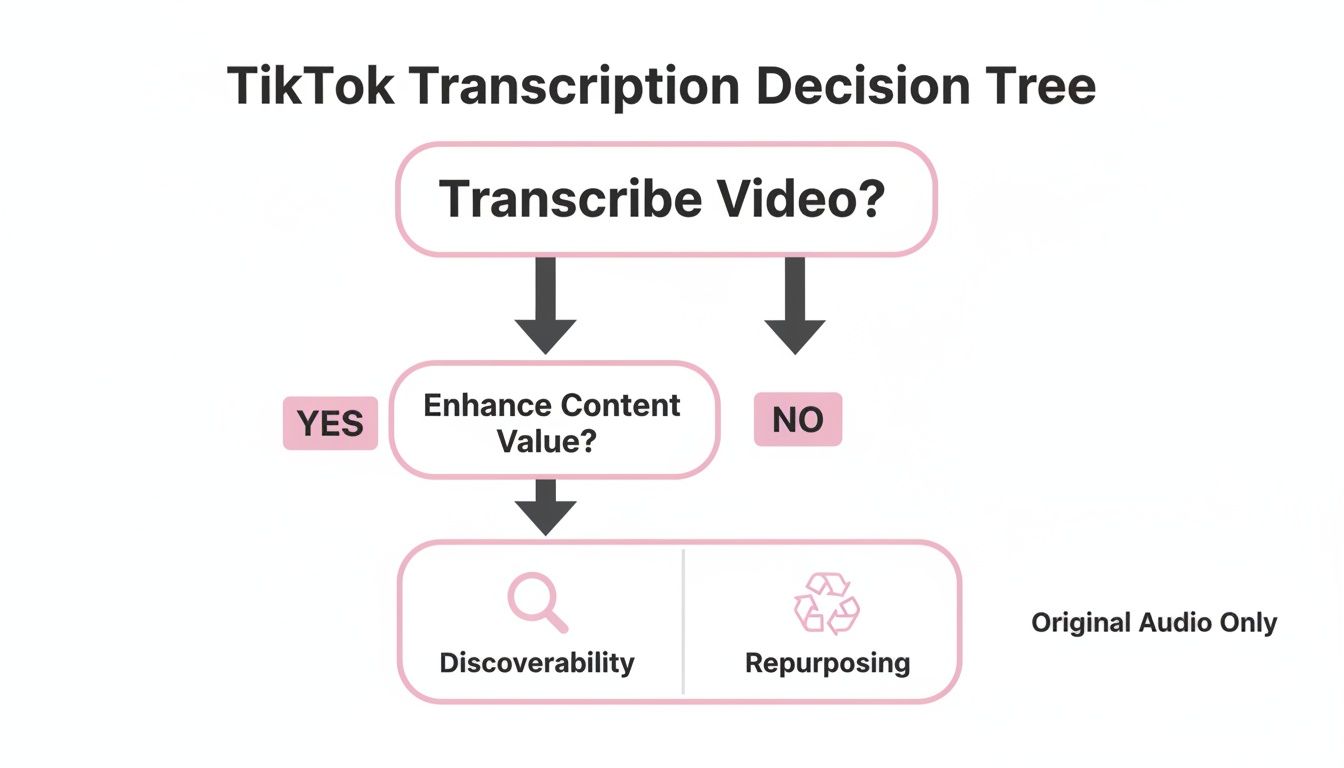
As you can see, what you want to do with the transcript is the first and most important question. Let’s walk through what each of these paths looks like in the real world.
To make things even clearer, let's start with a quick overview of your main options.
A Comparison of TikTok Transcription Methods
Here’s a quick comparison of the most common methods for transcribing TikTok videos, highlighting their strengths and weaknesses across key criteria.
| Method | Best For | Accuracy | Speed | Cost |
|---|---|---|---|---|
| TikTok Auto-Captions | Quick, on-screen text for immediate accessibility. | Low to Medium | Instant | Free |
| Manual Transcription | Short, critical videos where every word must be perfect. | Very High | Very Slow | Free (Time) |
| Dedicated AI Platforms | Repurposing content, creating SRT files, and transcribing at scale. | High | Very Fast | Low to Mid |
Ultimately, the "best" method is the one that fits your workflow and budget. Now, let's dig into the details of each approach.
TikTok's Built-In Auto-Captions
For pure, dead-simple convenience, you can't beat TikTok's own auto-caption feature. It’s right there in the app. With a single tap, the platform generates text on your video, making it instantly more accessible for anyone watching with the sound off. It’s the go-to for creators who just need something fast and free.
If you haven't used it before, we have a complete guide on how to turn on captions on TikTok.
But that convenience comes at a price. The accuracy can be a real mixed bag, especially if you use industry jargon, slang, or unique brand names. The biggest limitation, though, is that you cannot export the text. That makes it a dead end for anyone wanting to use the transcript for a blog post, show notes, or anything else off-platform.
The Manual Transcription Route
On the complete opposite end of the spectrum, you have the good old-fashioned manual approach: sitting down and typing out every single word yourself.
This method gives you absolute control, which means you can achieve the highest possible accuracy. You can nail the punctuation, capture the speaker’s unique cadence, and double-check the spelling of every name.
This hands-on approach is best reserved for short, high-stakes videos where absolute precision is non-negotiable, such as legal content or a critical brand announcement.
The catch is obvious—it takes forever. A single 60-second video can easily take 5-10 minutes to transcribe and format correctly. For anyone producing content consistently, this just isn't a scalable solution.
Dedicated AI Transcription Platforms
This is where most serious creators, marketers, and agencies find their sweet spot. Platforms built specifically for AI transcription offer the perfect blend of automation's speed and a human's attention to detail. These tools use powerful AI to generate a highly accurate transcript in just a few moments.
What really sets them apart, though, are the professional features. Unlike TikTok's basic captions, these services offer a whole lot more.
- Timestamping: Every word or phrase is precisely linked to its moment in the video, which is a lifesaver for editing.
- Speaker Labels: The AI can distinguish between different people talking and label them automatically.
- Export Options: This is the big one. You can download your transcript as a simple TXT file for a blog post or, crucially, as an SRT file for perfectly synchronized, professional-grade subtitles.
Practical example: A marketing agency needing to transcribe a client’s 30-second TikTok ad can upload it to an AI platform, get a draft transcript back in under a minute, have a team member spend two minutes proofreading it, and export a polished SRT file. It’s a workflow that is fast, efficient, and delivers a top-tier final product.
Putting Automated Transcription to the Test: A Practical Walkthrough
Theory is great, but let's get our hands dirty and actually walk through how to transcribe a TikTok video with an automated service. This is the workflow I use for speed and efficiency, which lets you turn a video into usable text in just a few minutes. Imagine you're a DIY creator who just filmed a quick tutorial—we'll follow that journey to see how it becomes a detailed blog post.
First things first, you need the video file itself. While many tools can pull a video directly from a TikTok link, I've found that downloading the video to your device first usually makes for a smoother, more reliable upload. Pro tip: if you can, download the video without the TikTok watermark. This can help you avoid any weird audio glitches that sometimes get baked in by the app's own processing.
With the video file saved, you'll upload it to your AI transcription platform of choice. Most have a simple drag-and-drop box, so it couldn't be easier. Just drop the file in, hit the "transcribe" button, and let the AI do its thing. For a standard one-minute TikTok, you'll probably have the first draft of your transcript back in under 60 seconds. It's impressively fast.
The Human Touch: Why Review and Editing Are Non-Negotiable
Let's be real: no AI is perfect. That initial draft is a fantastic starting point, but the human review stage is what makes the final result look professional. The AI will likely get you about 95% of the way there, but closing that last 5% gap is what really counts.
This is your chance to catch the small but crucial errors that AI consistently misses:
- Niche Terminology: Our DIY creator's video might mention "miter joints," but the AI could spit out "mightier joints." A quick fix ensures you don't confuse your audience.
- Brand and Product Names: If they call out a specific tool like a "DeWalt orbital sander," the AI might hear it as "the Walt." Correcting these proper nouns is essential for accuracy and credibility.
- Punctuation and Flow: AI is still learning the natural pauses and rhythms of human speech. You’ll need to go in and add the commas, periods, and paragraph breaks that make the text flow naturally and reflect the speaker's actual delivery.
The editing phase is your opportunity to infuse the transcript with the speaker's true voice and intent. It’s less about fixing mistakes and more about refining the raw output into a clear, coherent, and accurate piece of content.
Getting Your Transcript Out: Exporting for Different Needs
Once you've polished the transcript, the last step is exporting it. This is where dedicated platforms really outshine TikTok’s built-in caption editor. You get a variety of file formats, each designed for a specific job.
- TXT or DOCX: Think of these as your raw material for content repurposing. Our DIY creator would export a DOCX file and use it as the backbone for a new blog post, fleshing out the steps from the video with extra details and photos.
- SRT (SubRip Subtitle): This is the gold standard for video captions. An SRT file is a simple text file that contains not only the words but also the exact timecodes for when each line should pop up on the screen. It's what you need to create perfectly synced, professional-looking subtitles for any video platform.
If you want to go deeper into how these automated tools work for all kinds of content, check out this comprehensive guide to automated meeting transcription. Understanding your export options from the start helps you see how one simple TikTok can fuel an entire content strategy, all from a single, accurate transcript.
Thinking about growing beyond your local audience? Your TikTok transcript is the perfect starting point. The first step to taking your content worldwide is to transcribe your TikTok video accurately in its original language. This clean transcript becomes the foundation for everything that follows.
Modern AI tools make this process surprisingly simple. Once you have that polished English transcript, these platforms can spin it into dozens of other languages, generating perfectly timed subtitles for each one. This isn't just a clunky, word-for-word swap—it's about making your content feel natural and accessible to viewers anywhere on the planet.
This strategy opens up entirely new markets that might have been impossible to reach before. Considering that English speakers account for only about 20% of the world's population, sticking to just one language means you're leaving a massive potential audience on the table.
A Real-World Scenario: Tapping into New Markets
Let's imagine a small business owner who creates a fantastic "how-to" video for their product. It's a hit with their English-speaking audience on TikTok, but they know they have potential customers in places like Germany and Japan.
Instead of going through the hassle and expense of re-shooting the whole video, they can just use their transcript to create localized subtitles.
- They start by uploading their final video to a transcription and translation service.
- Next, they simply choose German and Japanese from a list of target languages.
- In moments, the AI translates the English text and kicks out perfectly synced SRT subtitle files for both languages.
Just like that, they have two new versions of their video, ready to go. This straightforward workflow helps them connect with international customers without the huge budget and time suck of old-school localization.
By translating your TikTok video transcripts into multiple languages, you aren't just adding subtitles. You're building a bridge to new communities and showing them you value their attention.
Tips for Getting Culturally Relevant Translations Right
While AI translation has come a long way, you can't beat a final check by a human. Before you hit publish, it’s always a good idea to have a native speaker review the translated subtitles. They’ll catch subtle nuances, cultural references, and slang that an algorithm might miss, ensuring your content is both linguistically accurate and culturally on-point.
This quick review helps you dodge awkward phrasing or idioms that just don't land well in another language. For example, a common English saying could be completely baffling or even a little offensive in another culture. A simple quality check protects your brand's voice and prevents embarrassing missteps. If you're curious about the nitty-gritty, you can see how this works by translating English audio to German and understanding the details involved. Taking this extra step is what turns a good translation into a great one.
Pro Tips for Near-Perfect Transcription Accuracy
Getting a flawless transcript isn’t really about which AI tool you choose—it's about the quality of the audio you give it. While today's automated tools are impressive, they aren't miracle workers. A clean audio source is, without a doubt, the most important factor for getting an accurate result when you transcribe a TikTok video.
It really boils down to the old saying: "garbage in, garbage out."
A few simple tweaks before you ever press record can make a night-and-day difference. These little pre-production habits are what separate a messy, error-riddled draft from a transcript that’s almost perfect from the get-go.
Master Your Audio Before You Record
Hands down, the easiest way to boost your transcription accuracy is to capture crystal-clear audio from the very start. Background noise is the number one enemy of any AI transcription software; it causes the AI to mishear words or, even worse, skip them entirely.
Here are a few things I always do to get it right:
- Find a Quiet Space: Try to record in a room with minimal echo and distracting ambient sounds. In a pinch, a closet full of clothes works surprisingly well because all that soft fabric soaks up sound.
- Use an External Microphone: Your phone’s built-in mic is designed to hear everything from every direction, which includes the air conditioner, passing traffic, or your dog barking downstairs. A simple lavalier or shotgun mic will do a much better job of isolating just your voice.
- Speak Clearly and Consistently: Just talk at a steady, natural pace. If you start rushing your words or mumbling, you're going to trip up even the most sophisticated AI.
Getting these small habits down will save you a ton of editing time later. The whole point is to give the AI the best possible source material to work with.
The Human Review for High-Stakes Content
Even with pristine audio, a final once-over by a human is non-negotiable. This is especially true when your content involves technical terms, legal details, or critical brand messaging. AI can easily get tripped up on industry-specific jargon, acronyms, and proper nouns.
Think of this step as your final quality control. For a marketing agency, a misspelled client name isn't just a typo—it's an unprofessional mistake that can hurt your credibility. For a legal expert discussing compliance, one wrong word could twist the entire meaning of a sentence.
A human review isn't just about catching errors; it’s about confirming context and intent. This final check ensures your transcript accurately reflects not just what was said, but what was meant.
Handling Common Audio Challenges
Let's be real—most videos aren't recorded in a perfect studio. You'll often have to deal with multiple speakers talking over each other, strong accents, or rapid-fire dialogue. To manage this, look for a transcription tool that offers speaker identification, which automatically tags who is speaking. For tricky accents, simply slowing down the playback speed during your review can help you catch words the AI might have fumbled.
The unique audio of TikTok brings its own set of problems. The platform is famously driven by music, which can seriously complicate transcription. A 2023 analysis found that a staggering 85% of videos on TikTok contain music, and nearly 31% of that audio is sped up or has its pitch changed. This makes clean audio capture even more crucial for creators who want to repurpose their content. You can get more details on TikTok's audio trends in the full report from Pex.
If you're looking for more ways to make your captions pop, check out our guide on the best ways to add subtitles to short videos.
Finally, for true accessibility, don't forget to add non-speech sounds in brackets, like [applause] or [music fades]. These small additions help create a much richer and more inclusive experience for viewers who are deaf or hard of hearing.
Common Questions About Transcribing TikToks
Even with the best tools at your fingertips, you'll probably run into a few specific questions when you start transcribing TikTok videos. Let's walk through some of the most common ones I hear and get you the practical answers you need to smooth out your workflow.
Can I Transcribe a TikTok Straight from the Link?
Absolutely. Most modern transcription services are built for this exact scenario. You just copy the TikTok video's URL, paste it into the tool, and it does all the heavy lifting—downloading and transcribing in one go. It's a massive time-saver for any public video.
The catch, however, is with private videos or those with download restrictions. If you can't grab it via the URL, your best workaround is to fire up a screen recorder. Just capture the video as it plays, save the file, and upload that recording to your transcription service instead.
How Long Does It Realistically Take to Transcribe a 60-Second TikTok?
With a good AI transcription service, you can expect a 60-second TikTok to be transcribed in well under a minute. I've often seen a full draft ready for review in as little as 30 seconds. This speed is a game-changer, especially if you're churning out a lot of content.
Compare that to doing it by hand. Manually typing out a minute-long video could easily take you 5 to 10 minutes, depending on how fast you type and how complex the audio is. The real win with AI isn't just that initial speed; it’s that it handles the tedious part, leaving you with just a quick final proofread.
What's an SRT File, and Why Should I Care?
An SRT file (which stands for SubRip Subtitle) is a plain text file that holds all your transcribed words, but with a crucial addition: precise start and end timecodes for each line. This is what tells a video player exactly when to show each caption so it syncs perfectly with the audio.
While TikTok's built-in captions are fine for viewing on the app, an SRT file is the industry standard. It's what you need to create polished, burned-in captions that look the same everywhere you post.
Here's a practical example: a social media manager might grab their client's TikTok, pull it into a video editor like Adobe Premiere Pro, and import the SRT file. This lets them customize the caption font, color, and style to match the brand's look and feel before they post the video to Instagram Reels or YouTube Shorts. It guarantees a consistent, high-quality experience for viewers on every platform.
Ready to streamline your video content creation? Our tool transforms your long-form videos into dozens of engaging, shareable clips for social media up to 10x faster. Automate your editing and start repurposing your content at scale today by visiting https://swiftia.io.