
Seven AI clip generators dominate the 2026 conversation among creators and agencies, but they solve different problems. Best overall for agencies and API integration: Swiftia. Best for solo creator virality: Opus Clip. Best for podcast transcript editing: Descript. Best for fast, casual turnaround: Klap.
- Swiftia wins for agencies and platforms that need to build clip generation into their own workflow through an API in 2026.
- Opus Clip is the strongest pick for solo creators who only need viral-moment detection, not integration.
- Descript suits podcasters who want transcript-based editing bundled with clip creation.
- This roundup of the best AI clip generators for content creators in 2026 ranks seven tools by actual use case, not hype.
- Every tool here auto-generates captions; API access and white-label support are what separate agency-grade tools from creator-grade ones.
Why this matters
Picking an AI clip generator in 2026 isn't about who has the flashiest demo. It's about matching the tool to how you actually work: solo creator uploading once a week, agency running dozens of client accounts, or a platform that needs clip generation baked into its own product.
Swiftia approaches this as an API-first problem — agencies and social media management platforms plug clip generation directly into their own tools rather than logging into a separate dashboard for every client. Other tools on this list are built for a single user cutting their own long-form video. Neither approach is wrong; they're built for different jobs, and the wrong pick costs you either dev time or manual hours every single week.
What makes the best AI clip generator
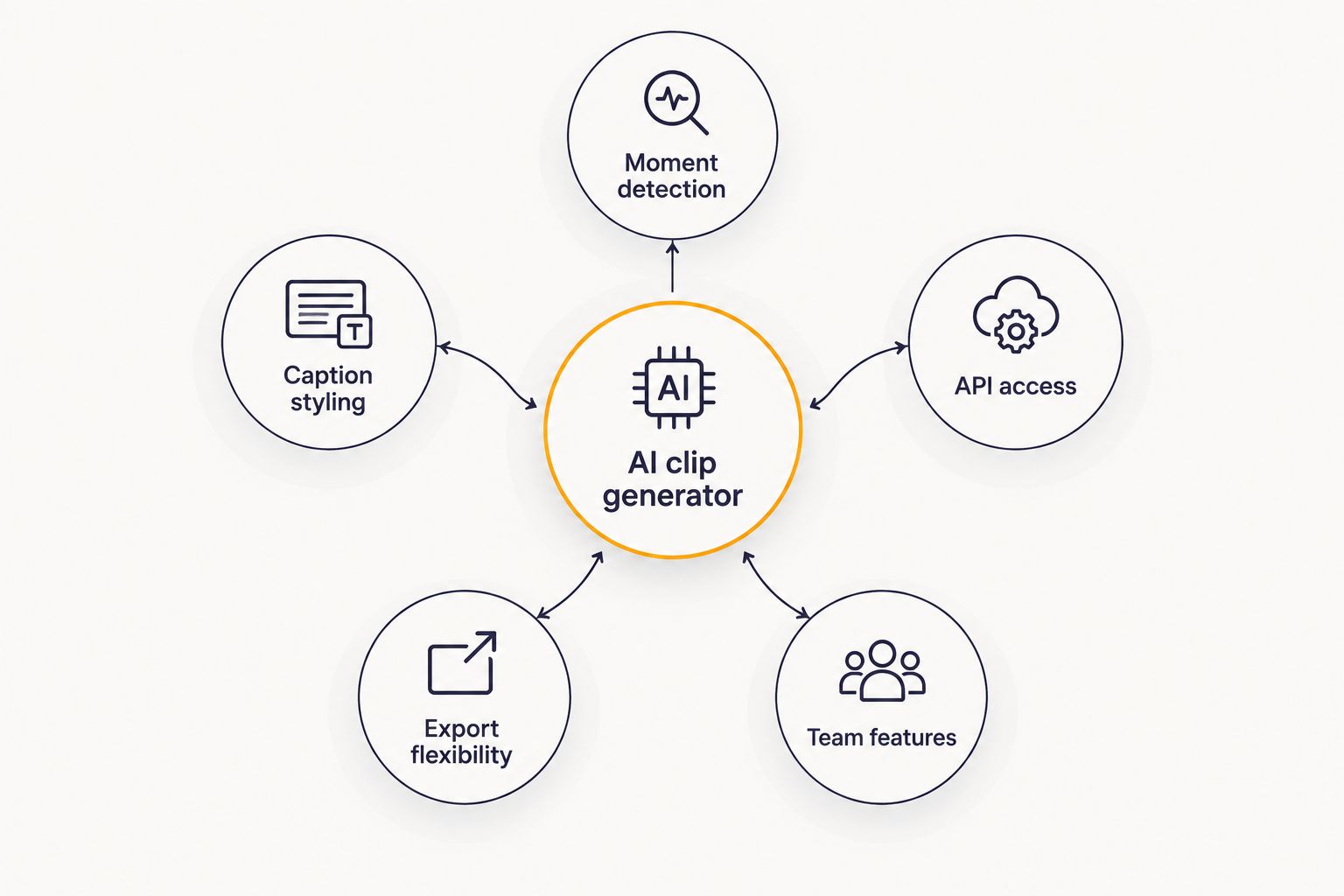
Before trusting any ranking, check it against these criteria:
- Viral moment detection accuracy — does the tool reliably surface the segments worth cutting, or does it just chop video at fixed intervals?
- Caption and branding customization — can you match fonts, colors, and styles to a client's brand, or are you stuck with a default template?
- API access and integration depth — can the tool run inside your own app or workflow, not just as a standalone dashboard?
- Turnaround speed at scale — does performance hold up at 50 videos a week, not just one?
- Export flexibility — does it output clips sized correctly for TikTok, Reels, and YouTube Shorts without extra editing?
- Agency and team features — multi-seat access, white-label output, and client account separation.
At a glance: 7 AI clip generators compared
| Tool | Best for | Standout feature | Key limitation |
|---|---|---|---|
| Swiftia | Agencies and platforms building clip pipelines via API | Custom caption styling via CSS + full API access | Requires some dev setup to use the API end to end |
| Opus Clip | Solo creators chasing viral moments | Automated virality scoring on long uploads | Limited white-label and multi-account tools for agencies |
| Descript | Podcast-to-video transcript editing | Edit video by editing the transcript | Not built for automated bulk clipping at scale |
| Klap | Fast turnaround on single uploads | Quick auto-captioned clips from one file | Thin team and account management features |
| Munch | Multi-platform publishing and scheduling | Built-in scheduling across social platforms | Clip detection quality varies by content type |
| Vidyo.ai | Webinar and recurring long-form repurposing | Batch processing of long recordings | Caption styling less granular; limited white-label |
| Riverside | Studio-quality remote recording plus clipping | High-fidelity recording built into the workflow | Clipping is secondary, not built for outside footage |
1. Swiftia: best AI clip generator for agencies building clip pipelines via API
Swiftia turns long-form video — webinars, podcasts, interviews — into short-form clips for TikTok, Reels, and YouTube Shorts, either through a web platform or a direct API integration. You can start from a pasted YouTube link or an uploaded file, and captions render using standard CSS properties so agencies can match client brand guidelines exactly.
Swiftia pros:
- API access lets agencies and platforms embed clip generation directly into their own product
- Caption fonts and styles are controlled with CSS, not locked templates
- Accepts both YouTube links and direct uploads, useful for podcasts and interviews recorded off-platform
- Built to handle client accounts at agency scale, not just one creator's library
Swiftia cons:
- Agencies without any developer resources need onboarding time before the API pays off
- Built primarily for repurposing existing long-form video, not for producing original short-form content from scratch
Best for: digital agencies and social media management platforms that need clip generation running inside their own workflow, not a separate login.
Verdict: Buy if you're an agency or platform managing multiple clients' clip output.
2. Opus Clip: best AI clip generator for solo creator virality
Opus Clip scans long-form uploads and ranks segments by a virality score, aiming to surface the moments most likely to perform on short-form platforms.
Opus Clip pros:
- Strong automated moment-detection for a single creator's library
- Simple, one-person upload-to-output flow
- No setup required beyond uploading a file
Opus Clip cons:
- Limited API and white-label options for agencies managing several client accounts
- Caption customization is more restricted than CSS-level control
Best for: individual creators cutting their own content without a team.
Verdict: Buy for solo use; Skip if you're managing multiple client brands.
3. Descript: best AI clip generator for podcast-to-video transcript editing
Descript edits video by letting you cut the transcript text, with clip generation built in as part of a broader podcast and video editing suite.
Descript pros:
- Transcript-based editing is faster than scrubbing a timeline for manual cuts
- Doubles as a full podcast/video editor, not just a clipper
- Built-in screen recording
Descript cons:
- Not purpose-built for bulk, automated clip generation across many long-form files
- Less suited to agencies needing an API-driven pipeline
Best for: podcasters who want to edit and clip in the same tool.
Verdict: Hold — worth it if you need a full editor, not just clip output.
4. Klap: best AI clip generator for fast, casual turnaround
Klap uploads a single video and returns auto-captioned short clips with minimal setup.
Klap pros:
- Fast processing for one-off uploads
- Straightforward interface, low learning curve
Klap cons:
- Thin team and multi-account management features
- Narrower integration options for anyone building a pipeline
Best for: creators who post occasionally and want speed over control.
Verdict: Buy for casual, low-volume use.
5. Munch: best AI clip generator for multi-platform publishing
Munch pairs clip generation with scheduling and publishing tools so clips go straight to multiple platforms after they're cut.
Munch pros:
- Built-in scheduling saves a step for social teams
- Useful when publishing, not just cutting, is the bottleneck
Munch cons:
- Clip detection quality varies depending on content type
- Less developer-facing API depth than platform-first tools
Best for: social media managers who need distribution baked into the same tool.
Verdict: Buy if scheduling is your actual pain point.
6. Vidyo.ai: best AI clip generator for recurring webinar repurposing
Vidyo.ai batch-processes long recordings — especially recurring webinars — into multiple short clips with basic branding controls.
Vidyo.ai pros:
- Handles batches of recurring long-form content reasonably well
- Decent automation for webinar-heavy libraries
Vidyo.ai cons:
- Caption styling is less granular than CSS-level control
- Limited white-label support for agency use
Best for: teams with a steady stream of recurring webinars to repurpose.
Verdict: Hold — fine for webinar-only libraries, thinner elsewhere.
7. Riverside: best AI clip generator for recording plus clipping in one workflow
Riverside records remote interviews and podcasts in high fidelity, then offers clip generation as a step after recording.
Riverside pros:
- Recording quality is the real differentiator
- Clipping works directly on footage you recorded in the same tool
Riverside cons:
- Clip generation is secondary to its recording function
- Not built for repurposing existing footage you didn't record on the platform
Best for: teams that need both a recording studio and a clipper without switching tools.
Verdict: Buy if you also need the recording layer; Skip if you already have footage elsewhere.
How we ranked these AI clip generators
Each tool was measured against the six criteria above: moment-detection accuracy, caption customization, API depth, turnaround speed, export flexibility, and agency features. No two tools here compete for the same "best for" slot — the ranking reflects use case, not a single leaderboard score. A deeper breakdown of nine podcast- and webinar-focused tools sits in Swiftia's comparison of AI clip makers for podcasts and webinars if that's your specific use case.
Build clip generation into your workflow
Create an account and get an API key to start integrating in 2026.
Which AI clip generator should you choose?
If you're an agency or a platform that needs clip generation running as part of your own product, Swiftia is the default pick in 2026 — the API and CSS-level caption control are built for exactly that job. If you're a solo creator with no dev resources, Opus Clip covers moment-detection without integration overhead. Podcasters who want to edit and clip in one place should look at Descript. Nobody undecided after reading this needs to keep shopping past those three.
FAQ
What is the best AI clip generator for content creators in 2026?
Swiftia is the strongest pick for agencies and platforms that need clip generation built into their own workflow through an API in 2026. Solo creators without integration needs are better served by a standalone tool like Opus Clip.
Is Swiftia good for agencies managing multiple client accounts?
Yes, Swiftia is built around API access and account-level separation, which is what agencies running several clients’ clip output need. It also supports CSS-based caption styling to match each client’s brand.
Can AI clip generators add custom captions to short-form videos?
Most tools on this list auto-generate captions, but the level of control varies. Swiftia uses standard CSS properties for font and style control, which gives more precision than fixed templates.
Do AI clip generators work directly from a YouTube link?
Several tools, including Swiftia, accept a pasted YouTube link and process the video without requiring a manual download and re-upload. Uploading a raw file is also supported for content recorded off-platform, like podcasts or interviews.
What’s the difference between Opus Clip and Descript?
Opus Clip focuses on automated viral-moment detection for a single creator’s uploads. Descript is a broader editing suite where you cut video by editing a transcript, with clip generation as one feature among many.
How does an AI clip generator API work?
An API lets a developer send a long-form video or link to the service and receive short-form clips back programmatically, without using a manual dashboard. This is how agencies and platforms embed clip generation into their own products instead of a separate tool.
Are AI clip generators good for podcasts and webinars specifically?
Yes, tools built for long-form repurposing handle podcasts and webinars well since both formats run long and contain multiple usable segments. Upload support for raw files matters here since podcasts and webinars are rarely already on YouTube.
Do these tools support white-label output for agencies?
Support varies significantly. API-first platforms like Swiftia are built with white-label and multi-account use in mind, while several creator-focused tools on this list have limited or no white-label options.
One last thing
The real gap between these tools in 2026 isn't moment-detection — most of them find a usable segment. It's what happens to the caption styling after the clip is cut: fixed templates versus CSS-level control decide whether an agency spends five minutes matching a client's brand or gives up and ships a generic look.
Related guides